Transcripts tell you what was said. This tells you what was shown.
Two videos can share a script and perform nothing alike, because short-form lives and dies on the visual layer: framing, cuts, on-screen text, pacing. Visual Analysis watches the video scene by scene and writes down what your eye registers but doesn't consciously catch.
What you get back
Four sections, in this order.
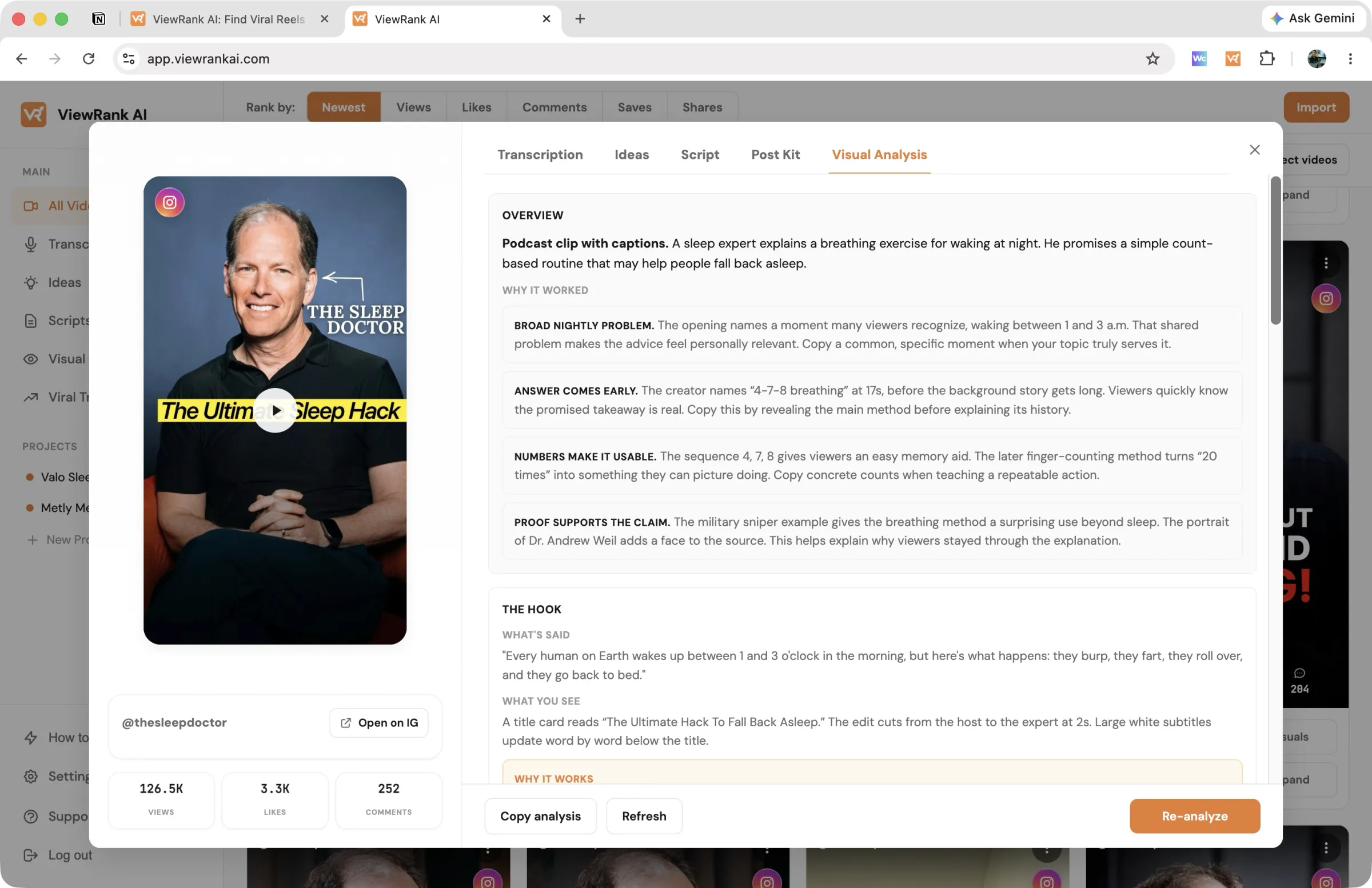
A quick overview of this video. The video's format named in a few words ("Two-person skit listicle", "Talking head with graphics"), a plain sentence or two on what the video promises the viewer, and then Why it worked: three or four separate reasons, each with a short headline so you can scan them.
Let's analyze the hook first. The opening broken apart on its own, because that's the part that decides everything else. The transcription, word for word. The visuals you see while it's said. And our comment on why that exact combination stops a thumb.
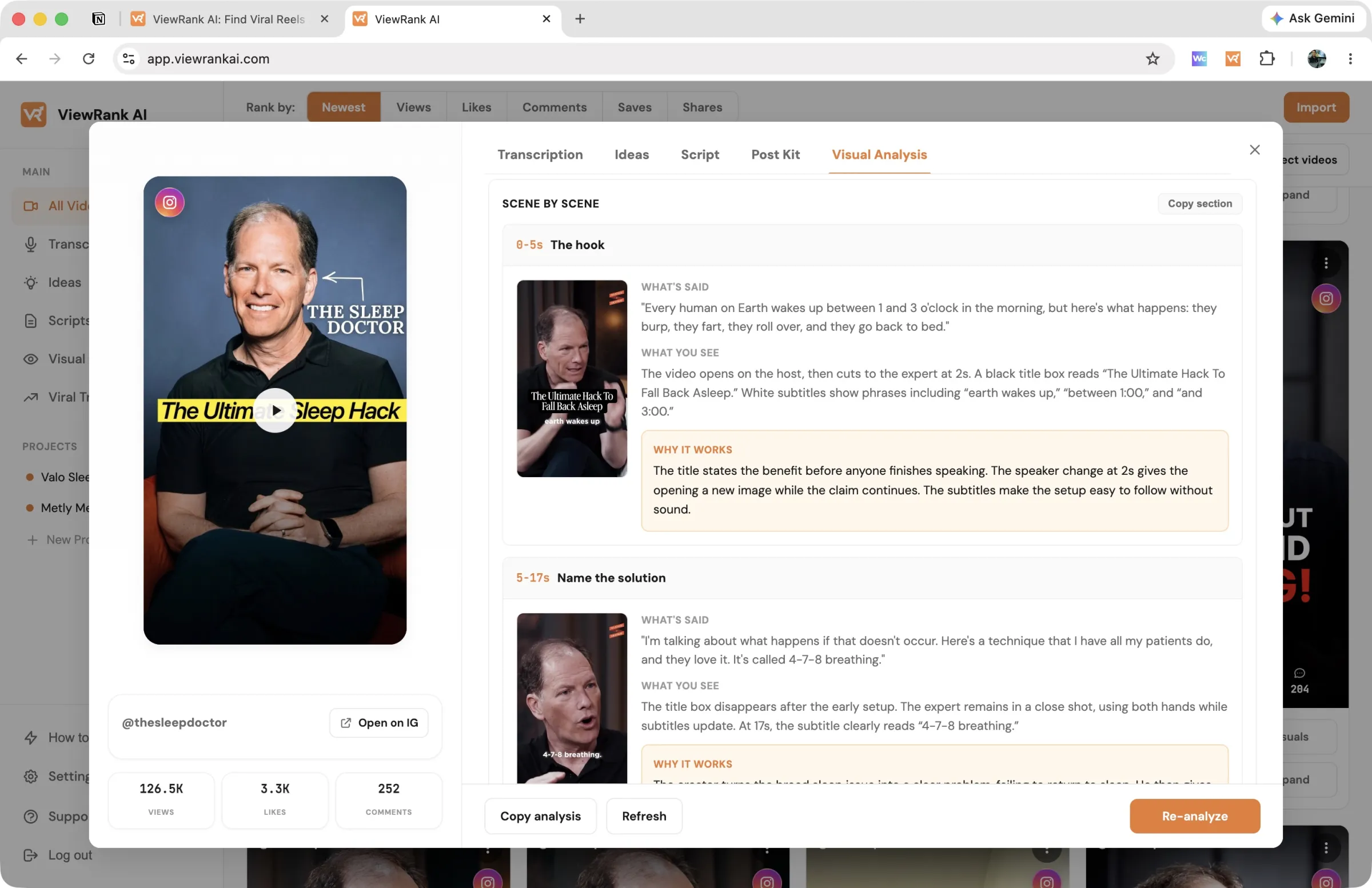
Now let's analyze it scene by scene. The whole video walked through in order, usually three to six scenes for a typical short. Every scene gets:
- A still frame pulled from the video, so you're looking at the shot, not just reading about it. Click any frame to see it full size.
- Its timestamp range and a short name for what the scene does ("The hook", "Proof moment", "Follow ask").
- Transcription, in the creator's own words.
- Visuals: the on-screen text, the graphics, the cut, whatever actually changes.
- Our comment: what stands out in that scene, the job it does for the video, and how it pays off the one before it.
Our overall remark. The closing note on the whole video: the shape it is built on and the handful of choices that carry it, written so you could build a different video on the same shape.
Copy section at the top of the scene walkthrough copies the whole thing, frames included, into a doc.
Run one
Click Visuals on any video in All Videos and the analysis starts immediately, with nothing to open and no second click. You can also open the video and start it from the Visual Analysis tab.
No video in your library yet? Open Visual Analysis in the sidebar and use the panel at the bottom of the page. There is one thing to give it, a public Instagram, TikTok, or YouTube Shorts link, and one button, Analyze. It imports the video and analyses it in one go.
This tab keeps the panel deliberately bare. There is no project picker and no options to set, because the analysis describes a video that already exists rather than writing something new for you. What your niche is does not change what the creator filmed. Click How it works in the top right corner of the panel if you want the short version of that on screen.
One thing the panel does behind the scenes: the analysis reads the transcript for the "Transcription" line on every scene, so a video without a transcript is transcribed first. The section below explains what that costs.
Then go do something else. It runs in the background, typically one to two minutes, longer for longer videos. The card shows that it is working and updates when the breakdown is ready. You can browse your library or even close the tab; the results are waiting when you come back.
What it costs
One visual analysis credit per video: Starter includes 30 a month, Pro includes 100. These are the scarcest credits on both plans, so spend them on outliers, the videos where knowing why is worth the most.
On a video that hasn't been transcribed yet, it also uses one transcription credit. Visual Analysis reads the transcript for the "Transcription" line on every scene, so it transcribes the video as part of the job and keeps that transcript in your library. You get a transcription, so it's charged as one.
Nothing is charged twice. If the video is already transcribed, the analysis uses the transcript you have and only the visual analysis credit is spent. Either order costs you the same.
Re-opening a finished analysis is free, however many times you come back to it. The Re-analyze button inside the Visual Analysis tab runs a genuinely new one and spends another credit, so use it when the first pass came back thin, not to re-read what you already have.
FAQ
It's been ten minutes and nothing appeared.
Refresh the page and open the video again. Longer videos take a few minutes and a refresh usually reveals a finished result. Still stuck? Email support with the video link.
Should I transcribe before analyzing?
It makes no difference to your credits, so do whichever suits you. Visual Analysis needs a transcript either way: if one exists it uses it, and if not it makes one, charges a transcription credit for it, and leaves it in Transcriptions for you.
The one thing to know is that a video you want both things for costs two credits in total, one of each, however you get there.
Some scenes have no image. Why?
The analysis picks the clearest frame for each scene, and occasionally a frame can't be attached. The scene still gets its full written breakdown; only the picture is missing.