3 Best Sort Feed Alternatives for Sorting Instagram and TikTok Videos
Sort Feed limits free sorting to 25 posts and charges $14 a month to remove the cap. Here are three Sort Feed alternatives compared on price, limits, and features.
Sort Feed does one thing well: it reorders a social profile by performance so you can see which videos actually worked. The friction is the meter. Free covers the latest 25 posts or one week of content, and removing that cap costs $14 a month, or $9 a month if you pay for a year, per Sort Feed's pricing page (checked September 2026).
Twenty-five posts is not enough to research an account. Outlier detection compares a video against what is normal for that creator, and a sample that small cannot establish normal. The accounts worth studying have hundreds of videos, and their best work is rarely in the most recent 25.
Three Sort Feed alternatives below. One disclosure: ViewRank is ours, and it is first because its free version has no cap at all.
Sort Feed alternatives compared
| ViewRank | ViralSort | OVSZON Sorter | |
|---|---|---|---|
| Chrome Web Store rating | 5.0 stars | 4.2 stars | 3.9 stars |
| Platforms | Instagram, TikTok (YouTube and Facebook coming) | Instagram only | Instagram, TikTok |
| Cost for full sorting | Free | $5 to $20 / month | $5 / month, $43 / year |
| Sorting limit | None | 10 profile sorts per month | Paid plan required |
| Outlier scores | Yes, free | No | No |
| Ranked dashboard over the profile | Yes | No | No |
| Sort by newest, shares, and saves | Yes | No | Newest only |
| Notes, tags, and favorites | Yes | No | No |
| Built-in video player | Yes | No | No |
| Spreadsheet export and video download | Both, free | No | Download only |
| Remembers your settings | Yes | No | No |
1. ViewRank: the free Sort Feed alternative for Instagram and TikTok
The ViewRank Chrome extension is free. Not a free tier with a meter behind it, and not a trial. Sorting, outlier scores, exports, downloads, notes, favorites, and the account stats all work with no account, no API key, and no subscription.
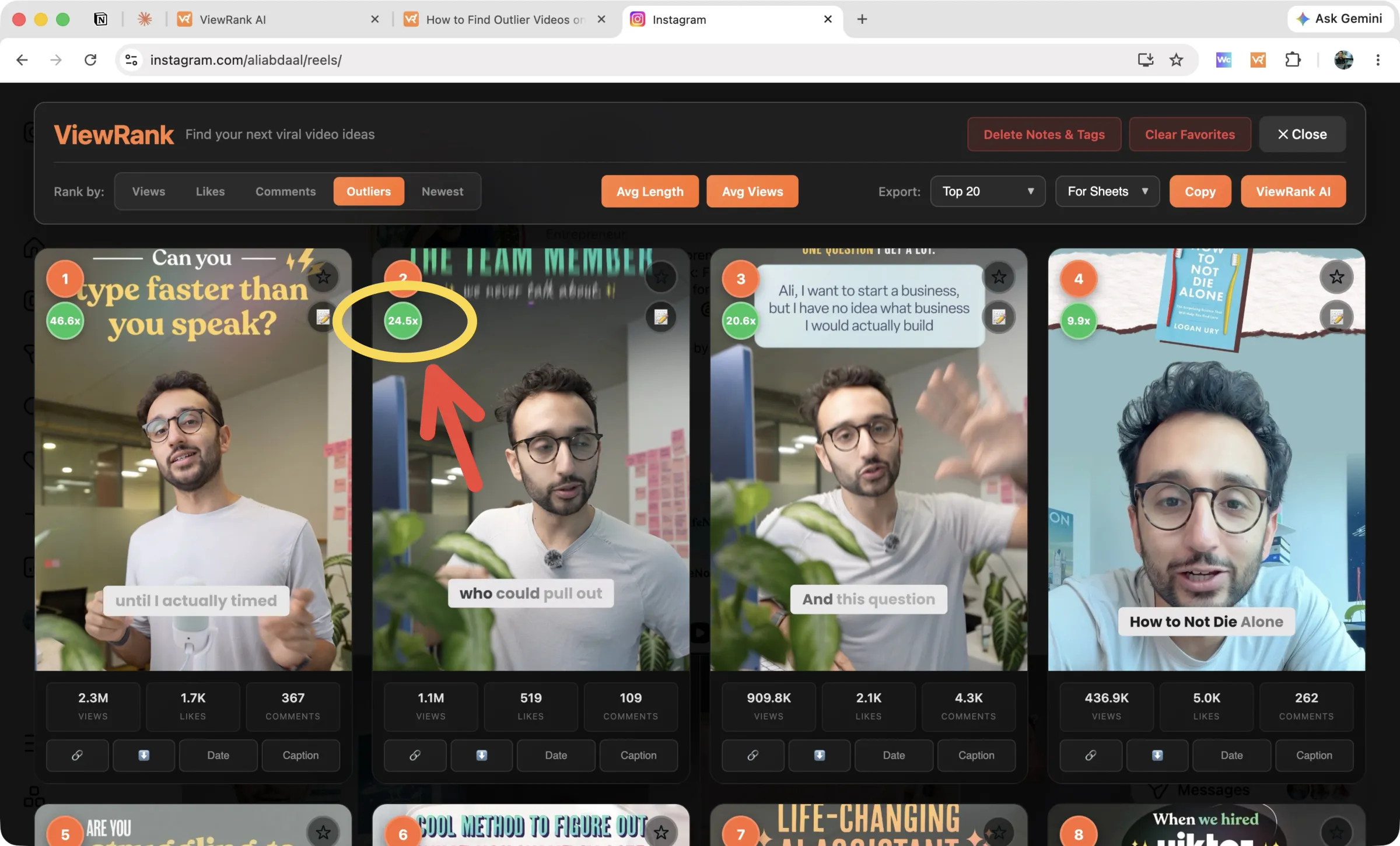
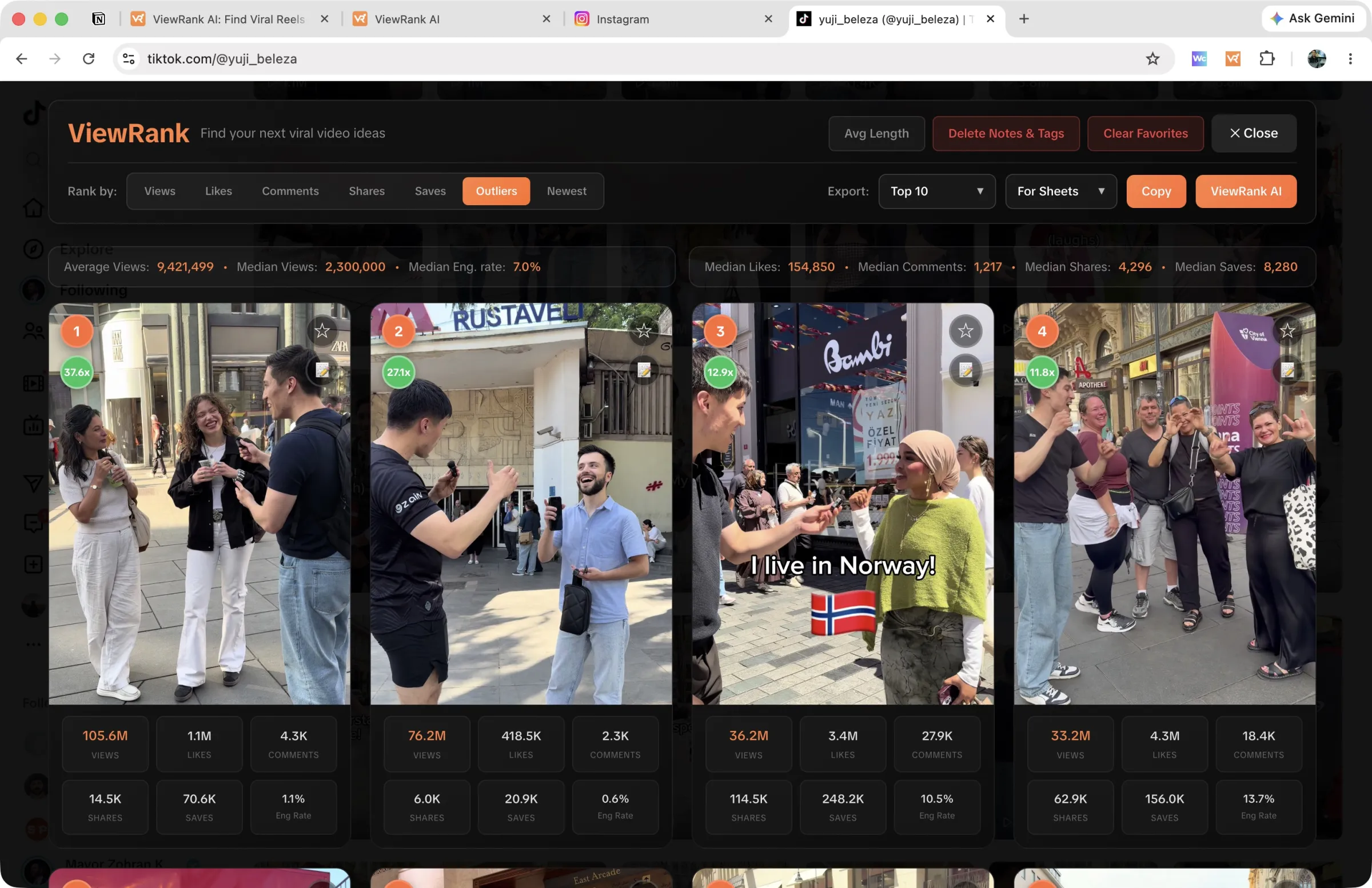
Open any public Instagram or TikTok profile, pick how many recent videos to include (50 up to the entire profile), and the overlay opens a ranked dashboard on top of the page.
What makes ViewRank different
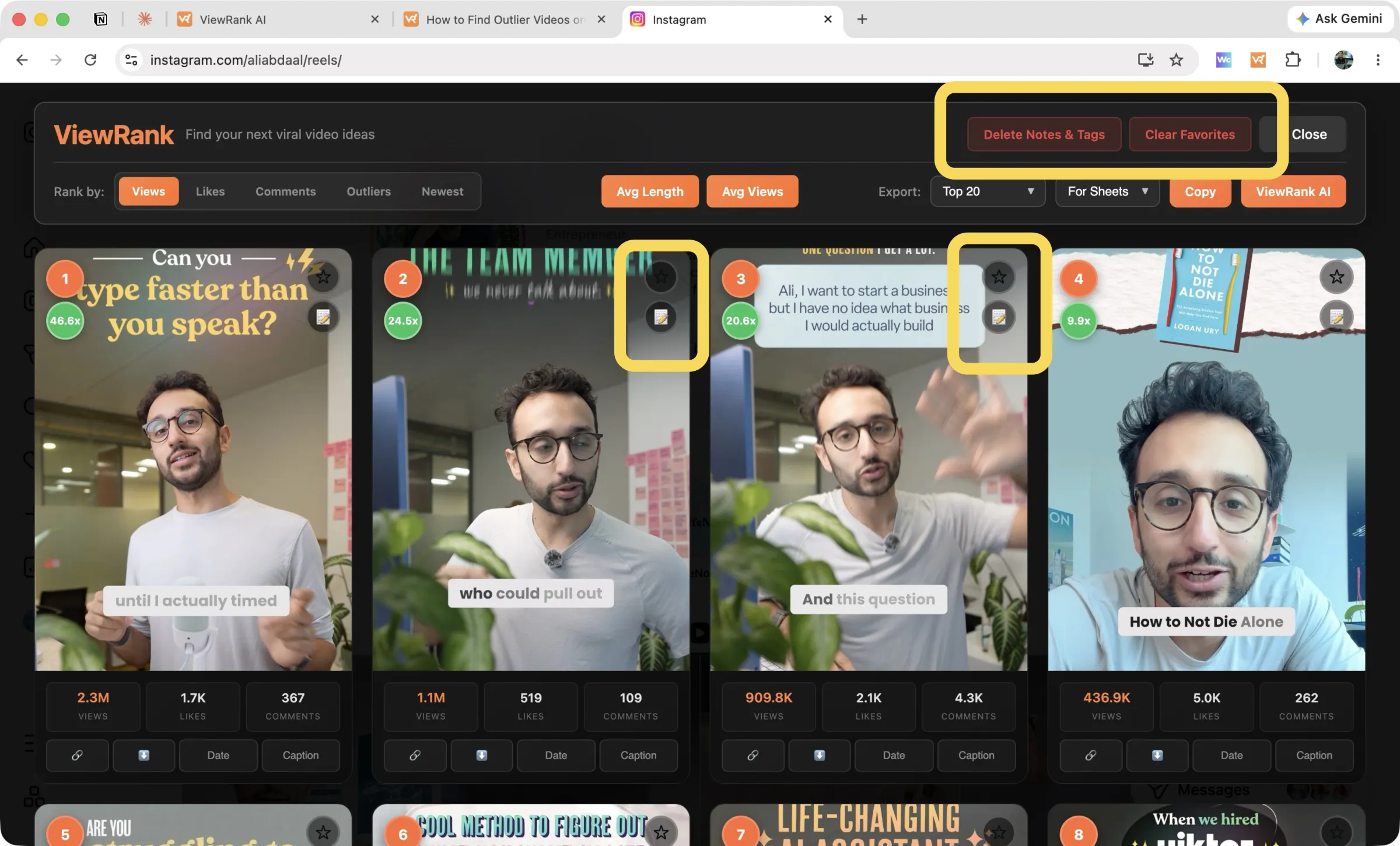
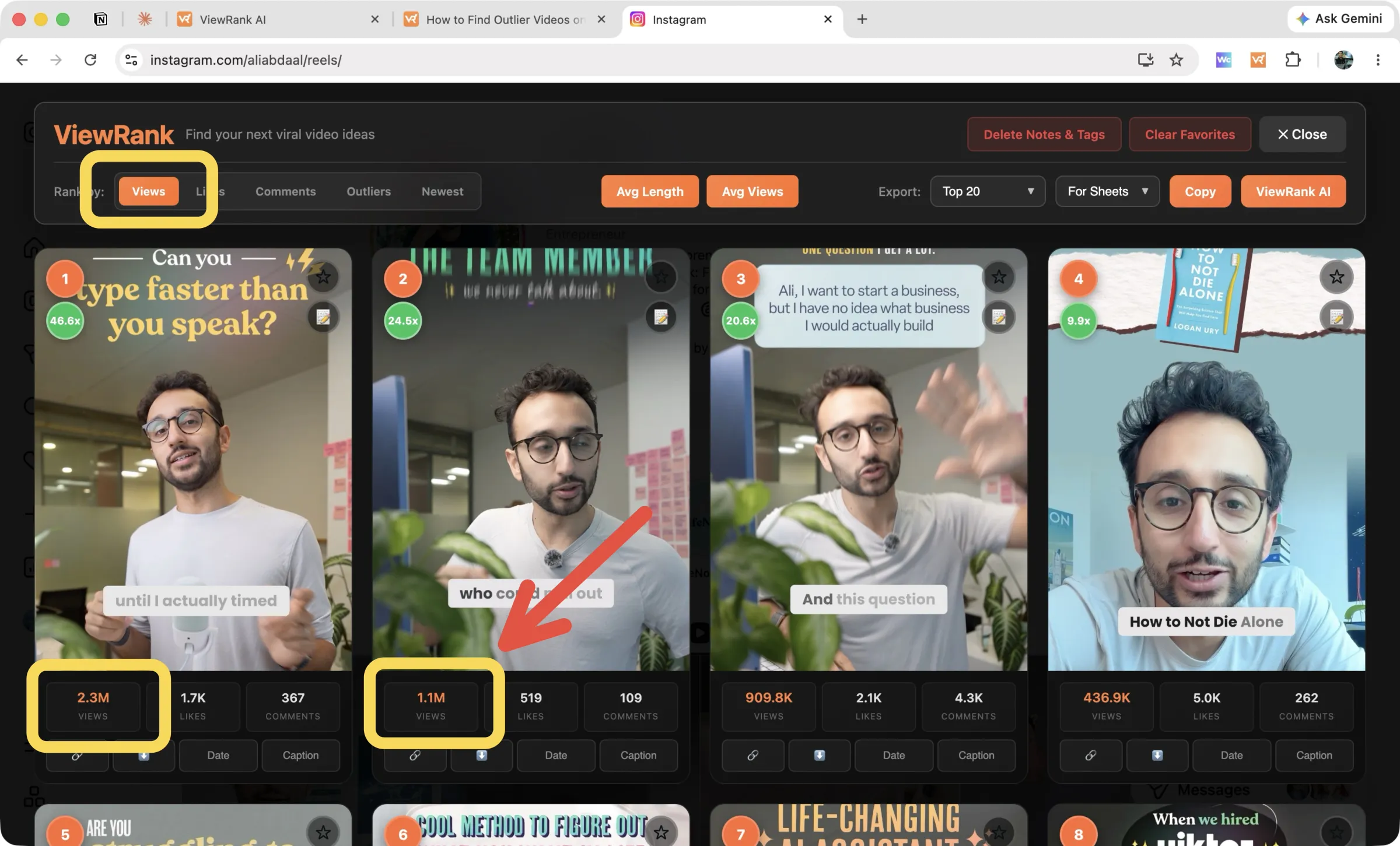
A ranked dashboard, not a toolbar. The other two reorder the existing grid or add a small control bar. ViewRank replaces the view with a research surface: numbered cards, an outlier multiplier on each video, and views, likes, and comments under every thumbnail.
Outlier scores on every video. Each card shows its views measured against the account's own average, such as 2.7x or 24.5x, with a green badge from 2x upward. Old pinned videos are excluded so a years-old viral hit cannot distort the numbers. The full workflow is in our guides to finding outlier videos on Instagram and on TikTok.
Notes, tags, and favorites that persist. Star a video, write a note on it, tag it by format, and all of it is still there next week. Export "Favorites" and you get only that creator's starred videos, with your notes and tags as their own spreadsheet columns.
Sort by newest, for the current picture. The Newest tab surfaces recent uploads with pinned videos pushed to the end, which is the quickest way to judge how an account's last two weeks performed.
Settings that survive between sessions. Your scan depth and your Videos or Posts mode are remembered, so a profile you researched in March takes one click in April.
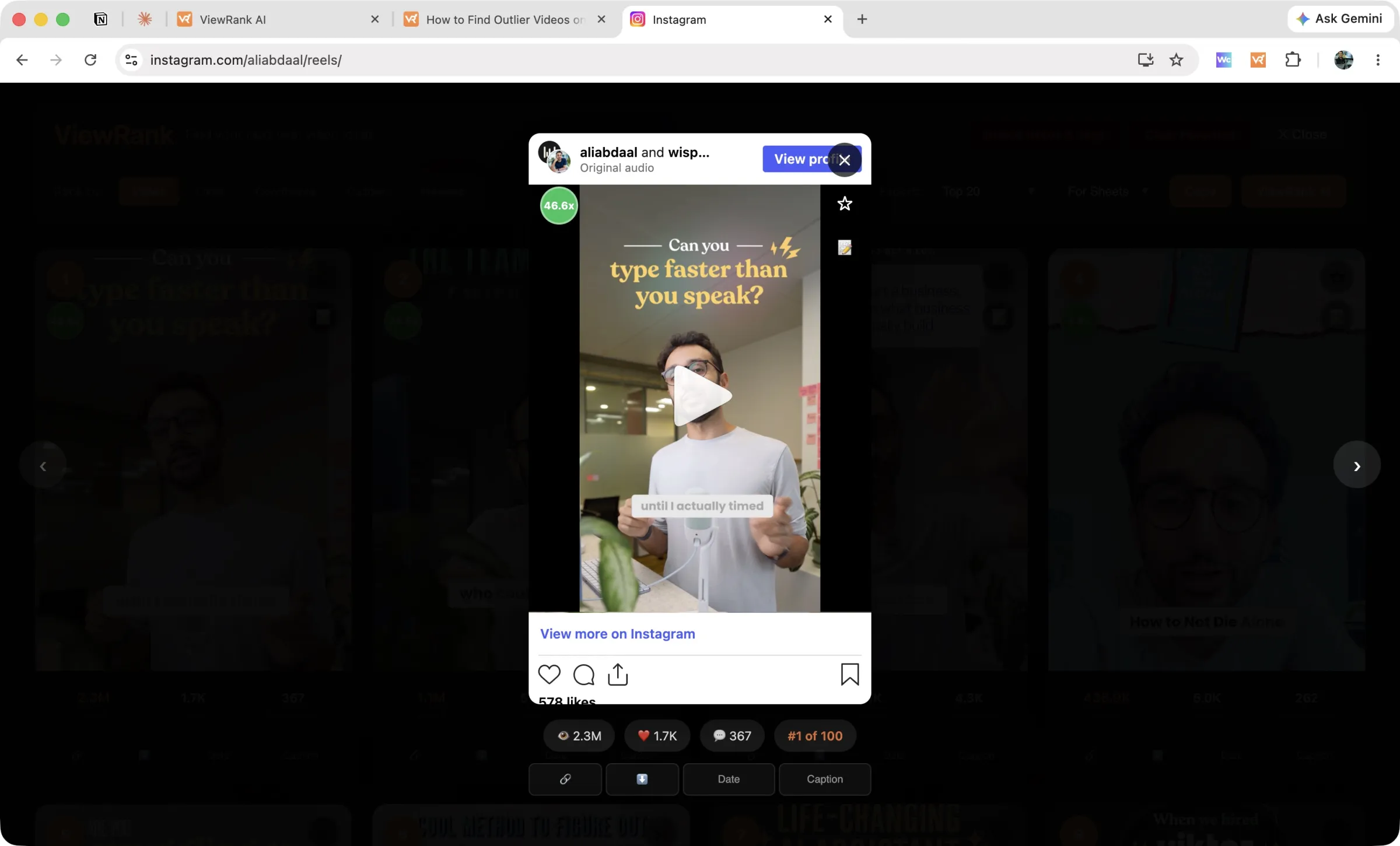
A built-in video player. Click any card and the video plays inside the overlay, with its stats and rank position on screen. Arrow keys move through the ranked list on Instagram, so you never lose the sorted view.
Account averages that give the ranking meaning. Avg Views shows an account's average, median, minimum, and maximum. Avg Length does the same for the duration of its most viewed videos. On TikTok a permanent stats strip carries average views, median views, median engagement rate, and medians for likes, comments, shares, and saves.
ViewRank pros and cons
Pros
- Genuinely free: no post cap, no account, no trial countdown
- Outlier scores on every card, so you see which videos beat the account's own average
- A ranked dashboard with a built-in player, notes, and favorites
- The widest range of sort options here, shares and saves included
- Spreadsheet export with an outliers-only scope
Cons
- No YouTube or Facebook support yet, though both are coming
- Chrome only
Sort any Instagram or TikTok profile in one click
The free ViewRank Chrome extension ranks any profile's videos by views, likes, comments, or outlier score, right on the page.
Add ViewRank to Chrome, it's free2. ViralSort: an Instagram-only Sort Feed alternative
ViralSort pairs an Instagram sorting extension with a web dashboard that carries saved ideas through scripting, shooting, editing, and publishing, with status stages and post-publish performance tracking. If your ideas keep dying in a notes app, that pipeline is the real product here.
Sorting covers views, likes, and comments on Instagram Reels. Per ViralSort's own pricing page (checked September 2026), plans run $5 a month for Basic (50 credits, 1 active project), $10 for Pro (100 credits, 3 projects), and $20 for Unlimited (unlimited credits, 5 projects), with roughly 28% off annually.
ViralSort pros and cons
Pros
- A production pipeline that carries each idea from script to published post
- Performance tracking on your own Reels after they go live
- The cheapest entry price of the three, at $5 a month
Cons
- Instagram only, so TikTok research needs a second tool
- Every plan caps profile sorts at 10 a month, including the $20 tier
- No outlier scoring, so you get the order without the meaning
- Three sort options, no export, and no way to save notes on a video
3. OVSZON Sorter: a cheap Sort Feed alternative for downloading
This extension comes from ovszon.com and now appears on the store as "Feed Sorter For TikTok™ & Instagram™". Until recently it was listed as "Sort Feed For TikTok™ & Instagram™", and that name-alike caused real confusion, so I will call it OVSZON here. It holds a 3.9 star rating across 167 reviews on the Chrome Web Store (checked September 2026).
It sorts TikTok and Instagram by views, likes, comments, newest, and oldest, and shows video stats over each post. Downloading is its strongest feature: video, music, cover images, and Instagram stories, each in one click. The controls sit in a small settings panel with toggles for video info, download buttons, and whether the toolbar appears on the page.
Pricing is worth reading twice: per OVSZON's own product page (checked September 2026), it is $5 for one month, $27 for six months, or $43 for a year, purchased upfront for that fixed period. The same page states plainly that there is no money back or refund policy.
OVSZON pros and cons
Pros
- One-click downloads for video, music, cover images, and Instagram stories
- Covers both Instagram and TikTok
- Sorting by newest and oldest alongside views, likes, and comments
Cons
- No outlier scoring, so a top video's ranking carries no context
- No ranked dashboard, notes, favorites, or spreadsheet export
- Paid upfront for a fixed term, with no refund policy stated
- Needs an account and a verified email before it activates
Which Sort Feed alternative should you choose?
If you want the sorting job Sort Feed does, on Instagram and TikTok, with no cap and no card, use ViewRank. If you are Instagram-only and your real problem is production rather than discovery, ViralSort's pipeline earns its subscription. If you mostly want to download media cheaply and rarely analyze anything, OVSZON is the cheapest route.
If your research covers YouTube or Facebook, Sort Feed still handles those today and none of these three do. Our Sort Feed vs ViewRank comparison goes through that trade-off in detail, and our guide to the 3 best Chrome extensions for Instagram and TikTok research covers the wider field.
Research deeper with ViewRank AI
Sorting tells you which videos won. It never tells you why, and that gap is where most content research stalls.
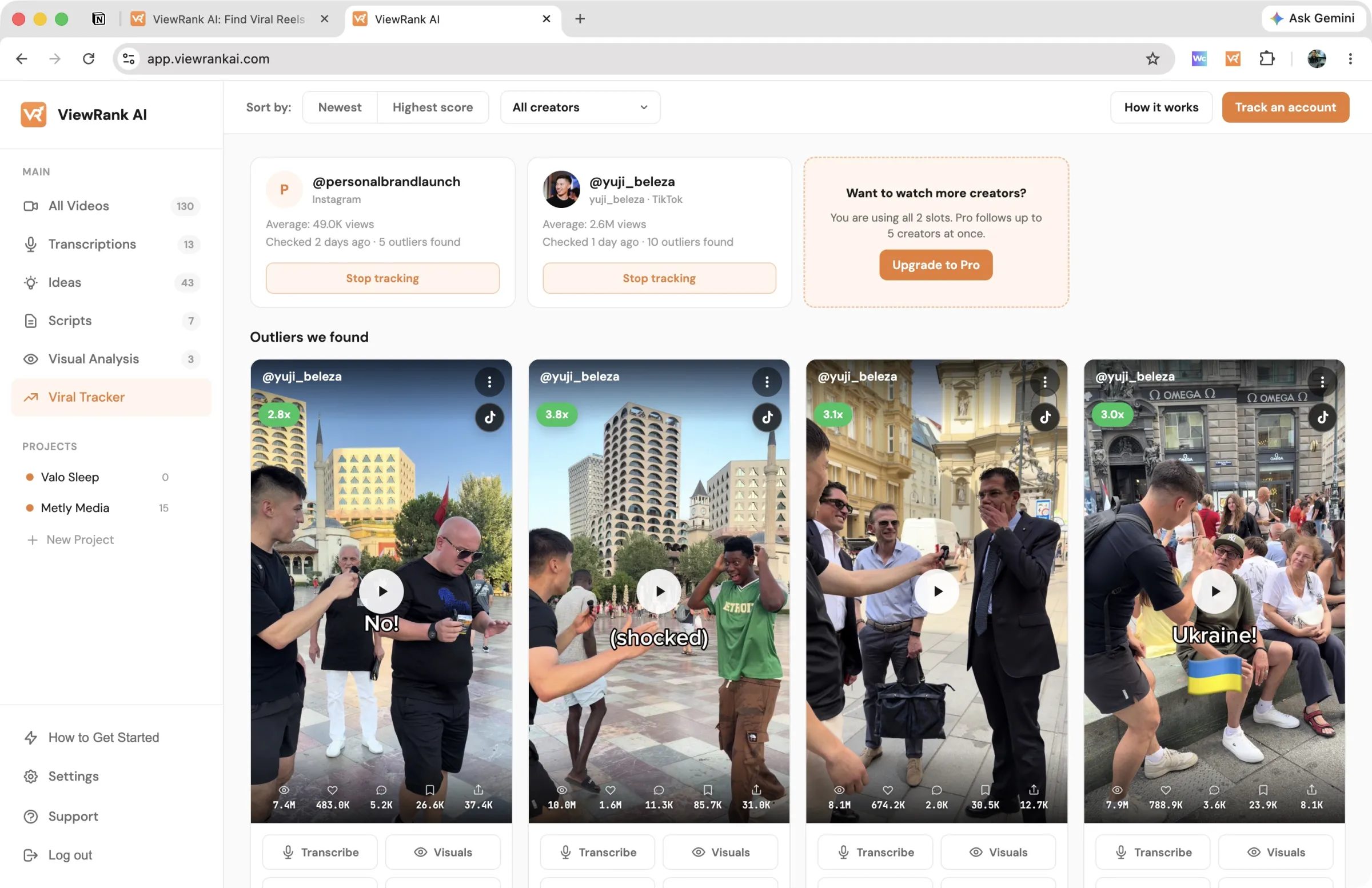
ViewRank AI is the paid upgrade to the free extension, and it exists to close that gap. Send a winning video across from the overlay and you get a word-for-word transcript, a scene-by-scene visual analysis matching what viewers saw to what they heard, and a read on why the video likely worked. From there it generates fresh video ideas and complete scripts shaped for your own niche.
It also removes the manual step from research entirely. The Viral Tracker watches the creators you choose, checks them every few days, and collects every video that reaches 2x their average into one feed with its score attached, so new outliers in your niche arrive without you opening a profile.
Plans start at $12.99 a month with a 7-day free trial you can cancel anytime. The extension keeps working for free whether or not you ever upgrade.
Want to know why those videos worked?
ViewRank AI transcribes winning videos, breaks down their visuals scene by scene, and turns the patterns into fresh ideas and scripts for your own niche. Free for 7 days. Cancel anytime.
Start your free trialFAQ
What is the best free Sort Feed alternative?
ViewRank. Its Chrome extension gives you unlimited sorting, outlier scores, account stats, notes, favorites, exports, and downloads on Instagram and TikTok without an account or a payment, where Sort Feed's free version stops at the latest 25 posts or one week of content.
Why do people look for Sort Feed alternatives?
Usually the free cap of 25 posts, which is too small to research an account properly, and the $14 a month price to remove it. Sort Feed's Chrome Web Store rating of 3.4 out of 5 (checked September 2026) also gives some buyers pause.
Is the ViewRank extension free forever, or is it a trial?
It is free, with no trial timer and no account. The separate paid product, ViewRank AI, adds transcripts, visual analysis, idea and script generation, and the Viral Tracker. Sorting and outlier detection are not part of that subscription and never expire.
Do any Sort Feed alternatives support YouTube or Facebook?
Not among these three today. ViewRank covers Instagram and TikTok with YouTube and Facebook support on the way, ViralSort is Instagram only, and OVSZON covers Instagram and TikTok.