3 Best Chrome Extensions for Instagram and TikTok Research in 2026
The right Chrome extension turns a profile into a research dashboard. These three sort Instagram and TikTok videos by performance, and only one does it without a paywall.
Three Chrome extensions are worth installing for Instagram and TikTok research in 2026. ViewRank sorts both platforms free, with an outlier score on every video, and it is ours, so weigh that. Sort Feed costs $14 a month for full sorting but reaches YouTube and Facebook Reels as well. ViralSort is Instagram only and adds a production pipeline that carries an idea from script to published post.
Why you need one at all: Instagram and TikTok publish every number a researcher needs and then refuse to organize any of it. View counts sit on the thumbnails, but the grid stays locked in date order, so finding an account's best videos means scrolling for twenty minutes while doing mental math on numbers like "1.2M" and "87.4K." These extensions read the numbers already on your screen and rebuild the profile as something you can study, and they are genuinely different products rather than three versions of the same idea.
What to look for in an Instagram and TikTok research extension
Sorting by views is the easy part, and on its own it mostly rewards whatever an account posted after it got popular. The features that change your content decisions sit underneath.
Outlier scoring comes first, because it measures a video against its own account's average rather than against the internet. Scan depth is second, since an extension that reads 25 videos cannot know what is normal for a creator with 400. Then come the things that turn a session into a habit: spreadsheet export, saved notes, favorites that survive the week, and account averages that give every number context.
1. ViewRank: the best free Chrome extension for Instagram and TikTok research
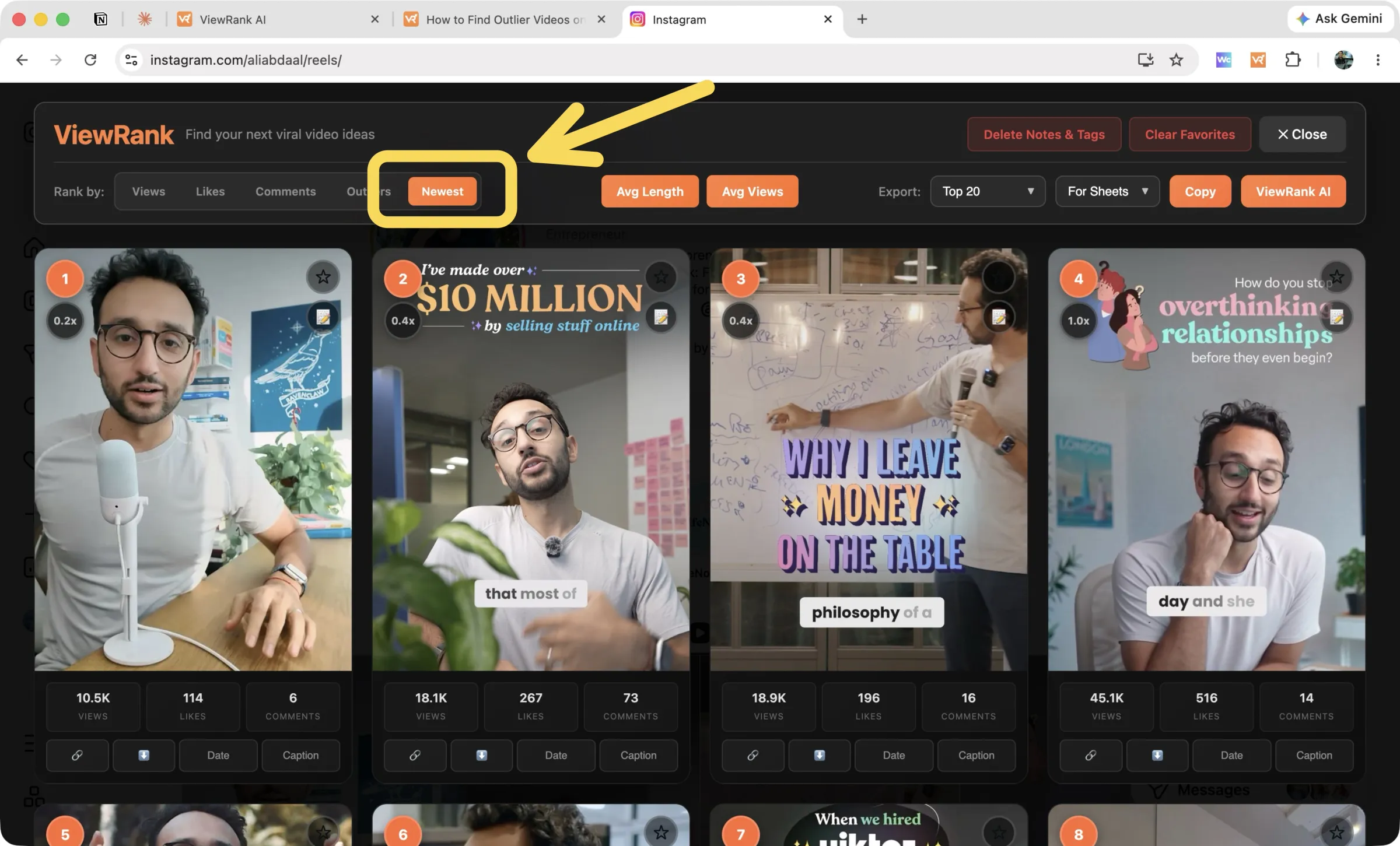
Ours, so weigh it accordingly. The ViewRank extension opens a ranked dashboard over any public Instagram or TikTok profile. Not a toolbar bolted onto the existing grid, but a full research surface: numbered cards, an outlier multiplier on each video, and views, likes, and comments under every thumbnail.
Rank by views, likes, comments, outlier score, or newest, and on TikTok also by shares and saves. Choose how deep to scan, from the latest 50 videos to the entire profile. There is no post cap, no account, no API key, and no subscription. The full workflow is in how to find outlier videos on Instagram.
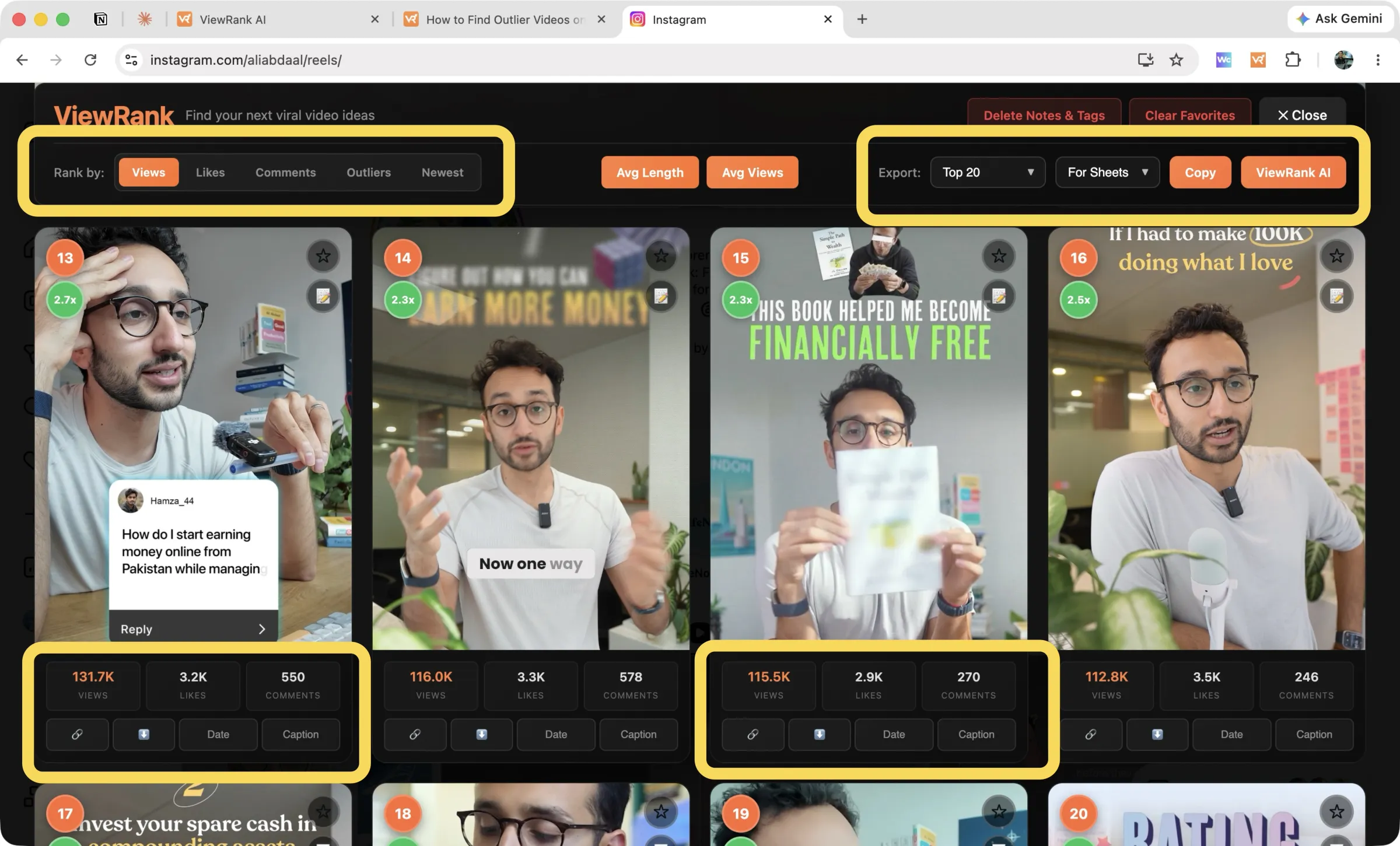
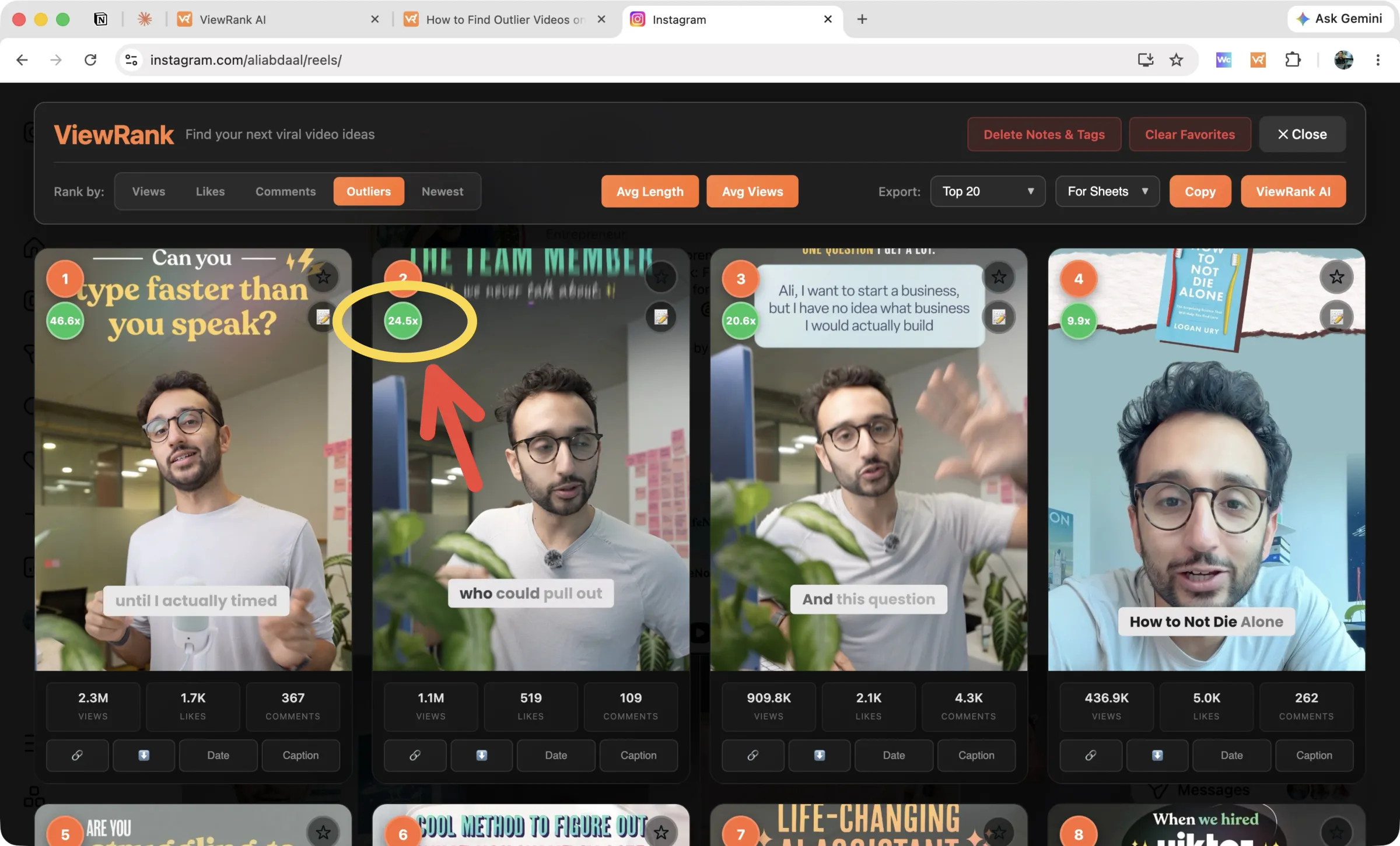
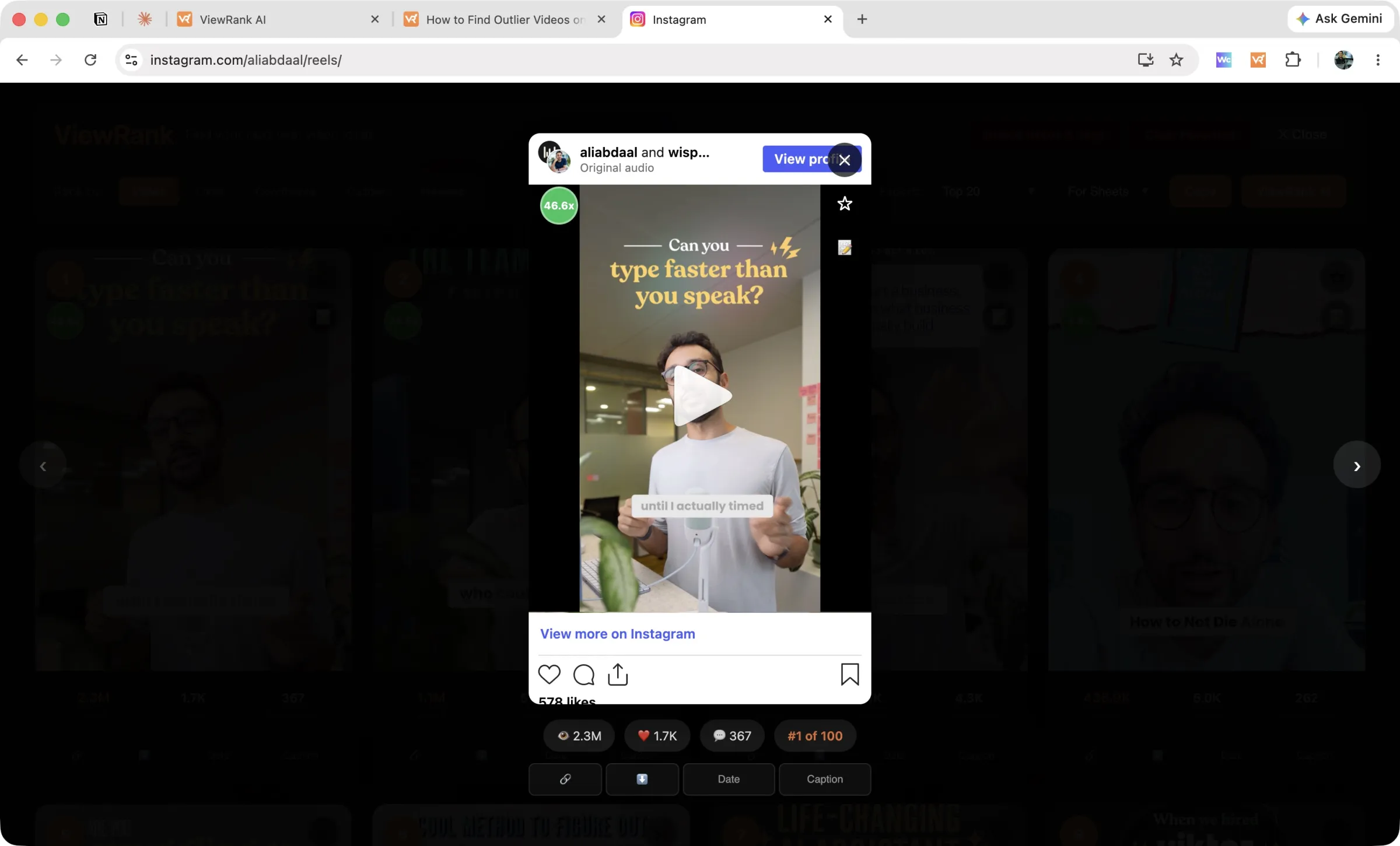
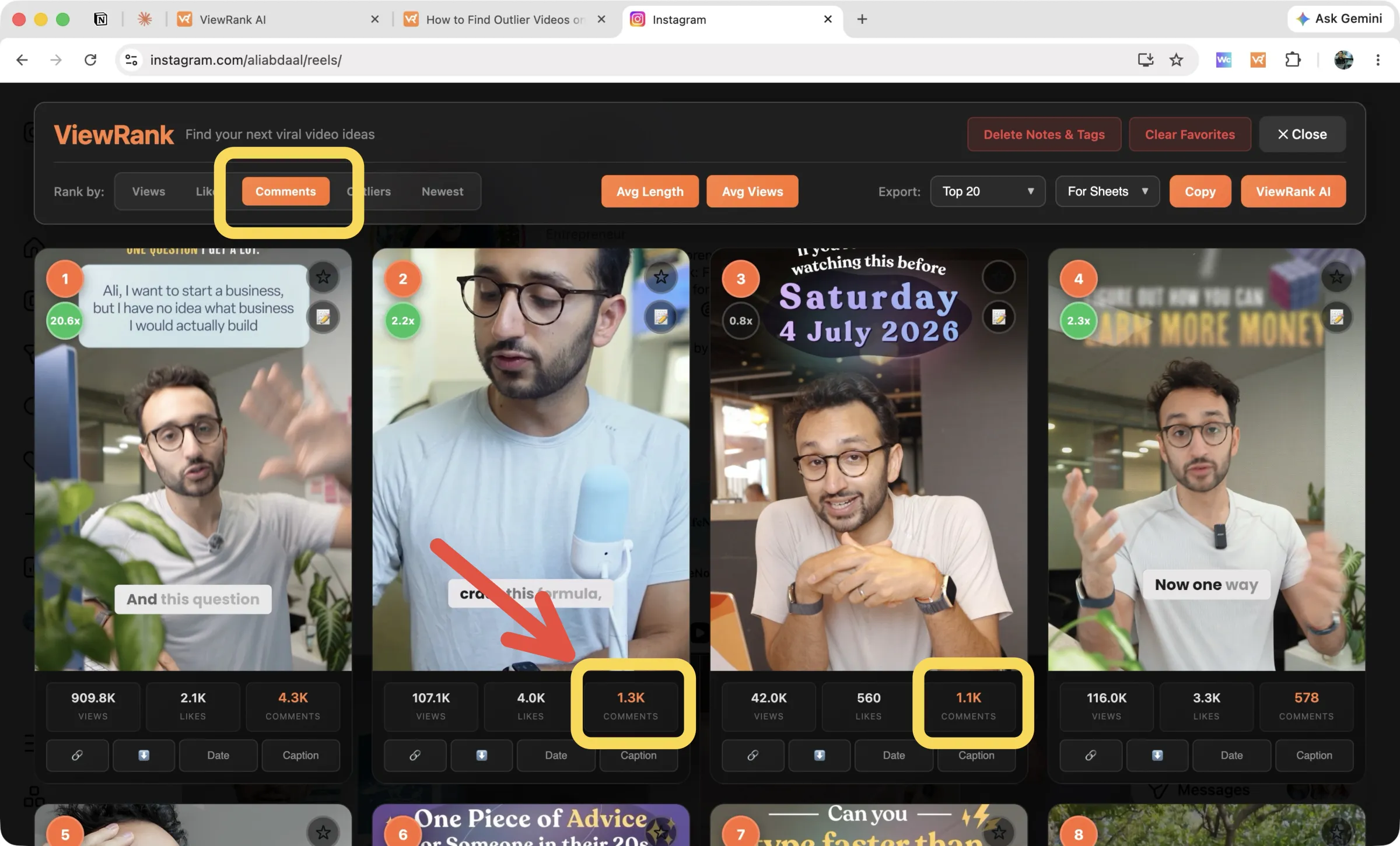
ViewRank research features
Outlier scores on every card. Each video carries its views against the account's own average, such as 2.7x or 24.5x, green from 2x upward. Old pinned videos stay out of the ranking so a years-old hit cannot skew the math.
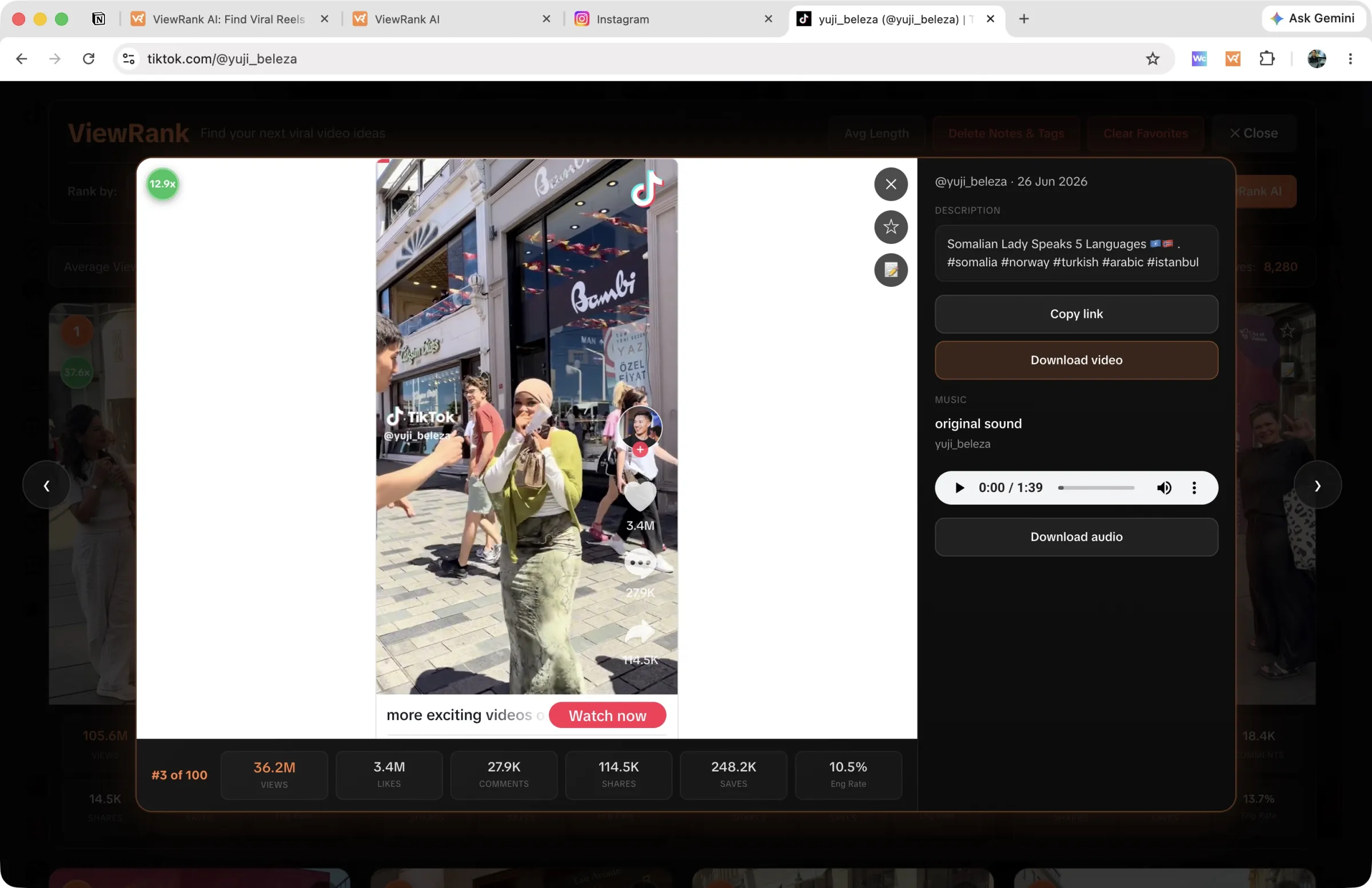
A built-in video player. Click a card and the video plays inside the overlay with its stats and rank position on screen. Arrow keys move through the ranked list on Instagram, so you can review a profile's top twenty without losing your place or opening a single tab.
Notes, tags, and favorites that persist. Star a video, write a note, add tags, and they are still there next month. Export "Favorites" and you get that creator's starred videos only, with your notes and tags as spreadsheet columns.
Sorting by newest. The Newest tab surfaces recent uploads with pinned videos pushed to the end, which is the fastest way to see how an account's last two weeks performed.
Account averages on demand. Avg Views shows the average, median, minimum, and maximum across an account's recent videos, and Avg Length does the same for the duration of its most viewed ones. TikTok profiles carry a permanent stats strip with average views, median views, median engagement rate, and medians for likes, comments, shares, and saves.
Settings that survive between sessions. Your scan depth and Videos or Posts mode are remembered, so a profile you researched in March takes one click in April.
Free export and downloads. Exports run to Google Sheets or a plain list, scoped to your top videos, your favorites, or only the outliers. Downloads work one video at a time, plus audio on TikTok.
ViewRank pros and cons
Pros
- An outlier score on every video, measured against that account's own average
- A ranked research dashboard rather than a reordered feed
- Seven ways to sort, including shares and saves on TikTok
- Notes, favorites, and scan settings that are still there next month
- Free with no post cap and no account
Cons
- No YouTube or Facebook support yet, though both are coming
- Chrome only
Sort any Instagram or TikTok profile in one click
The free ViewRank Chrome extension ranks any profile's videos by views, likes, comments, or outlier score, right on the page.
Add ViewRank to Chrome, it's free2. Sort Feed: the Chrome extension with the widest platform coverage
Sort Feed is the best-known name in this category, and it holds one advantage nothing else here matches: it sorts profiles on Instagram, TikTok, YouTube, and Facebook Reels. If your research crosses all four platforms, this is the only single extension that covers them.
It sorts by outliers, views, or likes, exports the results, and downloads videos. The paid plan adds transcription, 500 minutes a month, with transcripts included in exports, which is genuinely useful if you study hooks in writing.
The catch is the meter. Free sorts the latest 25 posts or one week of content, and lifting that cap costs $14 a month, or $9 a month billed yearly, per Sort Feed's pricing page (checked September 2026). Because outlier scoring needs a decent sample to mean anything, the free version works more as a preview than a research tool. We put the two side by side in Sort Feed vs ViewRank.
Sort Feed pros and cons
Pros
- The only extension here reaching Instagram, TikTok, YouTube, and Facebook Reels
- Outlier sorting included
- 500 transcription minutes a month on the paid plan
Cons
- Free version stops at the latest 25 posts or one week
- $14 a month to sort without limits
- No research dashboard, notes, or favorites
- A 3.4 out of 5 Chrome Web Store rating (checked September 2026)
3. ViralSort: an Instagram-only research extension with a content pipeline
ViralSort sorts Instagram Reels by views, likes, and comments, then feeds what you save into a web dashboard that tracks each idea through scripting, shooting, editing, and publishing, with performance tracking after the post goes live.
That pipeline is the reason to pick it. Plenty of creators find good references easily and then lose them in a notes app, and this is the only tool here that treats the gap between idea and published video as the problem worth solving. Pricing runs $5, $10, and $20 a month per ViralSort's own pricing page (checked September 2026), with roughly 28% off annually. We cover it again alongside the OVSZON sorter in 3 best Sort Feed alternatives.
ViralSort pros and cons
Pros
- A production pipeline from script through shooting, editing, and publishing
- Performance tracking on your own Reels after they go live
- Starts at $5 a month
Cons
- Instagram only, with no TikTok support
- Every plan caps profile sorts at 10 a month, including the $20 tier
- No outlier scoring, so the ranking carries no context
- Only three sort options, and no notes, favorites, or export
Which Chrome extension should you install?
Research Instagram and TikTok seriously without paying: ViewRank. Research spans YouTube or Facebook: Sort Feed, whose four-platform reach makes the subscription defensible. Instagram-only, with production as your bottleneck rather than discovery: ViralSort.
They also stack. Nothing stops you running ViewRank on Instagram and TikTok while keeping Sort Feed for YouTube channels, and since ViewRank costs nothing, testing that combination costs only a few minutes. If you are building a research routine from scratch, our guide to competitor research on Instagram and TikTok covers the whole process.
Research deeper with ViewRank AI
Every extension on this list stops at the same place. You end up with a ranked list of videos that worked and no explanation of why, which is the part that actually shapes your next script.
ViewRank AI is the paid upgrade to the free ViewRank extension, built for exactly that step. Send a winning video across from the overlay and it returns a word-for-word transcript, a scene-by-scene visual analysis matching what viewers saw against what they heard, and a read on why the video likely worked. It then generates fresh ideas and complete, ready-to-record scripts shaped for your niche.
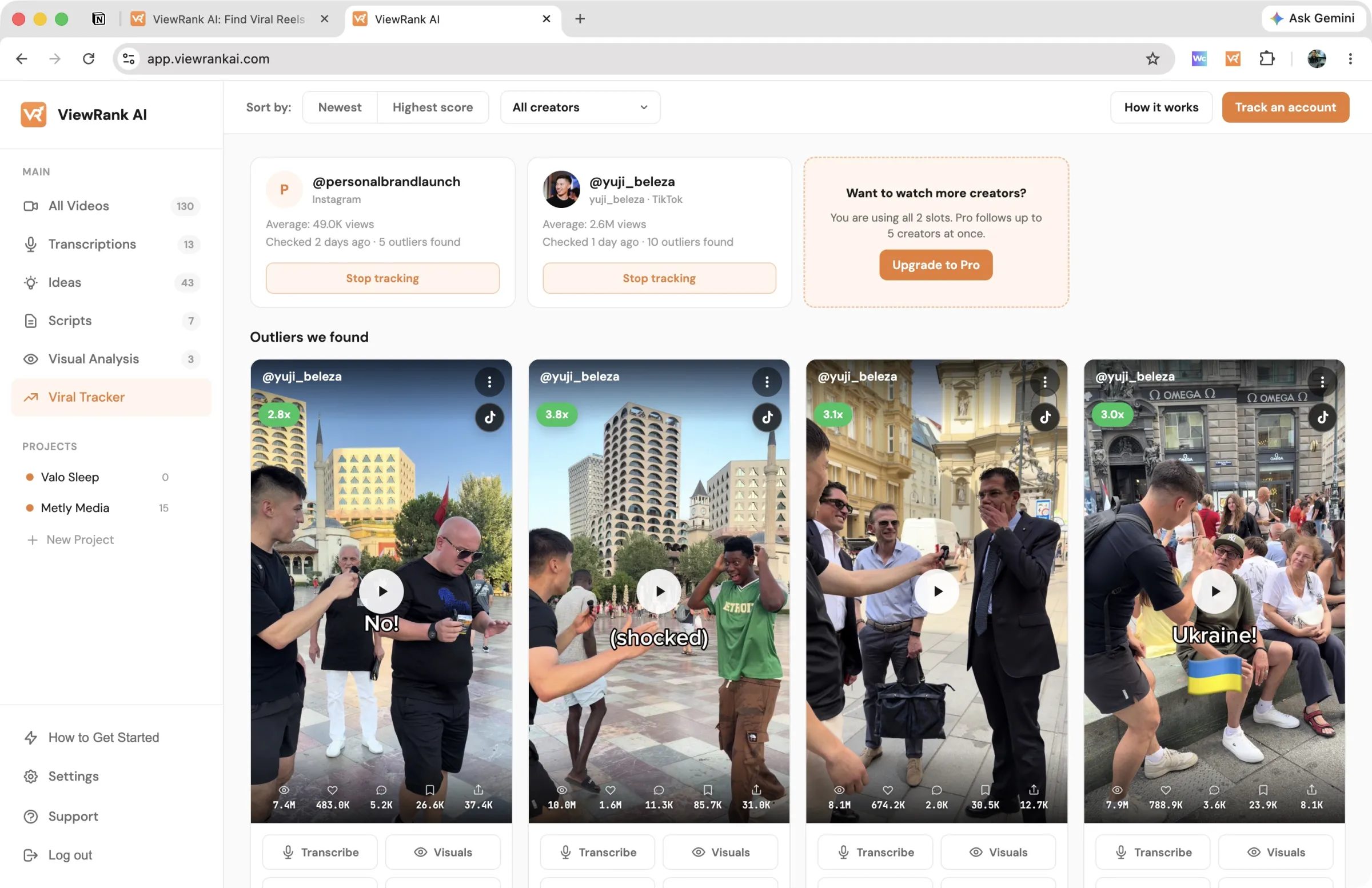
The Viral Tracker takes the manual work out of monitoring as well. Choose the creators worth watching, and ViewRank checks them every few days and collects every video that reaches 2x their average into one feed with its score attached.
Plans start at $12.99 a month with a 7-day free trial you can cancel anytime, and the extension stays free whether or not you upgrade.
Want to know why those videos worked?
ViewRank AI transcribes winning videos, breaks down their visuals scene by scene, and turns the patterns into fresh ideas and scripts for your own niche. Free for 7 days. Cancel anytime.
Start your free trialFAQ
What is the best free Chrome extension for Instagram and TikTok research?
ViewRank, because sorting, outlier scores, account averages, notes, favorites, exports, and downloads are all free with no post cap and no account. Sort Feed's free version stops at the latest 25 posts or one week of content, and ViralSort limits every plan to 10 profile sorts a month.
Are these extensions safe to use with my Instagram or TikTok account?
They read publicly visible numbers from pages you are already viewing and reorganize them inside your browser. None of them asks for your platform password. Check the permissions and privacy policy before installing anything, and prefer tools that process data locally.
Will Instagram or TikTok ban me for using a sorting extension?
These extensions view public profiles the way you already do, only better organized, and we have not seen credible ban reports among users of the major tools. Research in sessions rather than running anything around the clock and you are in the same position as someone browsing carefully.
Why not just use TikTok's Creative Center or Instagram's own tools?
Creative Center shows broad trends but will not rank a specific account's catalog, and Instagram has no per-profile sorting at all since it removed the "most viewed" filter it tested. Native analytics only cover your own account, so extensions are the only way to study anyone else's.