How to Find Outlier Videos on Instagram (Step by Step)
Outlier videos are the Reels that massively outperform an account's normal numbers. Here's how to find them on any Instagram profile in about a minute, for free.
A creator averages 20,000 views. One Reel does 300,000. That video is an outlier, and it is the most valuable thing on their whole profile, because someone already tested an idea at their own expense and published the result.
Instagram will not help you find it. Profiles have no sort by views, and the "most viewed" filter the platform tested was removed, so the best Reels stay buried between hundreds of ordinary ones in date order. There are two ways around that: a slow manual one and a fast automated one.
Use 2x the account's typical views as your threshold. Anything at or above it deserves attention, because the account's size cancels out of the comparison and what remains is the idea, the hook, and the format. Typical means the median of their recent Reels, not the average, and the next two sections explain why that distinction decides whether your numbers are worth anything.
What is an outlier reel?
An outlier reel is a Reel whose view count is a large multiple of the account's own typical view count. The threshold ViewRank uses is 2.0x that account's baseline, so a Reel badged 3.4x got 3.4 times what the creator normally gets.
Measuring against the account rather than the platform does two useful things.
Account size cancels out. A 12x Reel from someone with 900 followers and a 12x Reel from someone with 900,000 carry the same information, because each is compared only against its own author. That's what makes outliers portable. You can study a creator ten times your size and still learn something you can use this week.
Followers stop being the explanation. Instagram pushes Reels to people who don't follow the account, so a large multiple means the recommendation system carried that video well past the creator's usual audience. They didn't earn that reach with their following. The video earned it.
Outlier reel vs viral reel
A viral Reel has a large absolute view count. An outlier Reel has a large view count relative to its own account. They overlap often, and confusing them is the most common mistake in short-form research.
| Outlier reel | Viral reel | |
|---|---|---|
| Measured against | The account's own baseline | The platform at large |
| Typical wording | "3.4x", "12x" | "2 million views" |
| Small accounts can have one | Yes, constantly | Rarely |
| Tells you the idea worked | Yes | Sometimes |
| Tells you the account is big | No | Usually |
A 900,000-view Reel from an account that averages a million went viral by nobody's definition and isn't an outlier either. A 15,000-view Reel from an account that averages 1,200 is not viral, and it's exactly the kind of video that shows you a format before your competitors find it.
Why the average view count gives you the wrong baseline
Use the median of a creator's recent Reels as their baseline, never the average. An average is dragged upward by the exact videos you're trying to detect, so the better a creator's best Reel was, the worse every other Reel scores against it.
Take a creator with 20 recent Reels. Nineteen sit between 8,000 and 14,000 views, clustered around 11,000. One caught something and did 900,000.
Their average is about 55,400. Nothing in that number describes this creator, since not one of their twenty Reels came near it. Score against it and the breakout comes out at 16x, roughly right by luck, while every other Reel lands between 0.14x and 0.25x. A perfectly healthy 14,000-view Reel gets labelled as performing at a quarter of normal.
The median of those same twenty Reels is 11,000, which is what a normal video actually does for them. Score against 11,000 and the breakout is 82x, the honest number. A 24,000-view Reel comes out at 2.2x and gets flagged, correctly, as something that overperformed. That second Reel is the one you'd have missed with the average, and a repeatable 2.2x format is worth more to you than an unrepeatable 82x accident.
If you're building the sheet by hand, =MEDIAN(B2:B51) is the baseline and =AVERAGE(B2:B51)/MEDIAN(B2:B51) tells you how badly the average is lying. Anything above about 1.3 means a breakout is sitting inside your window.
How is the outlier score calculated?
ViewRank divides each Reel's views by a trimmed average of the Reels around it, in three passes:
- Reels are grouped into batches of 50, newest first. Every Reel is compared against Reels from its own era of the account. A creator who went from 4,000 views to 250,000 over two years would otherwise have every recent upload flagged as an outlier and every early one marked a failure, including the early breakout that probably caused the growth.
- Inside each batch, the top 20% and bottom 20% are set aside. The middle 60% becomes the baseline. That's a trimmed mean, and it's why a single 40x monster can't quietly raise the bar for everything around it. In Google Sheets the same calculation is
=TRIMMEAN(B2:B51, 0.4). - Each Reel's score is its views divided by that baseline. 3.4x means 3.4 times normal for that account, at that time.
Pinned Reels are excluded before any of this runs. Creators pin their best-ever video to the top of the profile, so leaving pinned Reels in the baseline would measure a creator against their single luckiest day.
Scoring only runs where views are public, which on Instagram means Reels and videos. Photo posts and carousels don't publish view counts, so there's no honest baseline to score them against, and those rank by likes and comments instead. Full detail in the finding outliers documentation.
Why 2x, and when to ignore it
2.0x is the point where performance stops being explainable by normal variation. Reels from the same creator in the same week routinely differ by 40 or 50 percent for reasons nobody can reconstruct, including posting time, sound choice, and how the algorithm happened to sample the first few hundred viewers. At 2x, the account's own trimmed baseline has been doubled. Something specific caused it.
Treat 2x as a filter rather than a ranking. The Reels worth taking apart properly start closer to 5x, and anything above 10x deserves a transcript and a scene-by-scene read rather than a glance.
The slow manual way to find outlier videos on Instagram
Two versions of this, both free, both painful.
Build a sheet.
- Open the profile's Reels tab.
- Record every video's view count in Google Sheets, along with its link.
- Calculate the account's average views.
- Add a column that divides each video's views by that average.
- Sort by the new column.
Now you have real outlier scores. You also just spent an hour on one profile.
Or scroll and judge by eye. Move down the Reels tab and watch for a video whose view count is obviously larger than its neighbors. This is faster, and much less reliable, because your eye anchors on big absolute numbers instead of big ratios. A 900K Reel on a huge account looks like a discovery even when it sits below that account's average, and a 40K Reel on a small account can be a 15x monster that you scroll past without a second look.
Either version works once. Neither survives contact with real research, which means ten or fifteen profiles refreshed every week. Most people quit within a month, not because the method fails but because it is tedious.
The fast automated way to find outlier videos
Two options here as well, and they solve different problems. The free extension ranks a profile the moment you want an answer. The tracker watches creators continuously so you never have to ask.
Option 1: sort Instagram Reels with the free ViewRank extension
The free ViewRank Chrome extension does the same math as the spreadsheet method, on the profile page, in seconds.
- Install the extension and open any public profile's Reels tab.
- Click the ViewRank icon in your Chrome toolbar.
- Keep the mode on Videos.
- Choose how deep to scan under Recent: 50, 100, 200, 300, 500 reels, or all of them. For an unfamiliar account, 100 to 200 gives the math a fair baseline without a long crawl.
- Press Rank Now.
- Click Outliers in the Rank by row and the grid reorders by outlier score.
What you get after Rank Now. The overlay covers the profile with a clean grid, sorted by Views by default. Along the top sits the Rank by row: Views, Likes, Comments, Outliers, Newest.
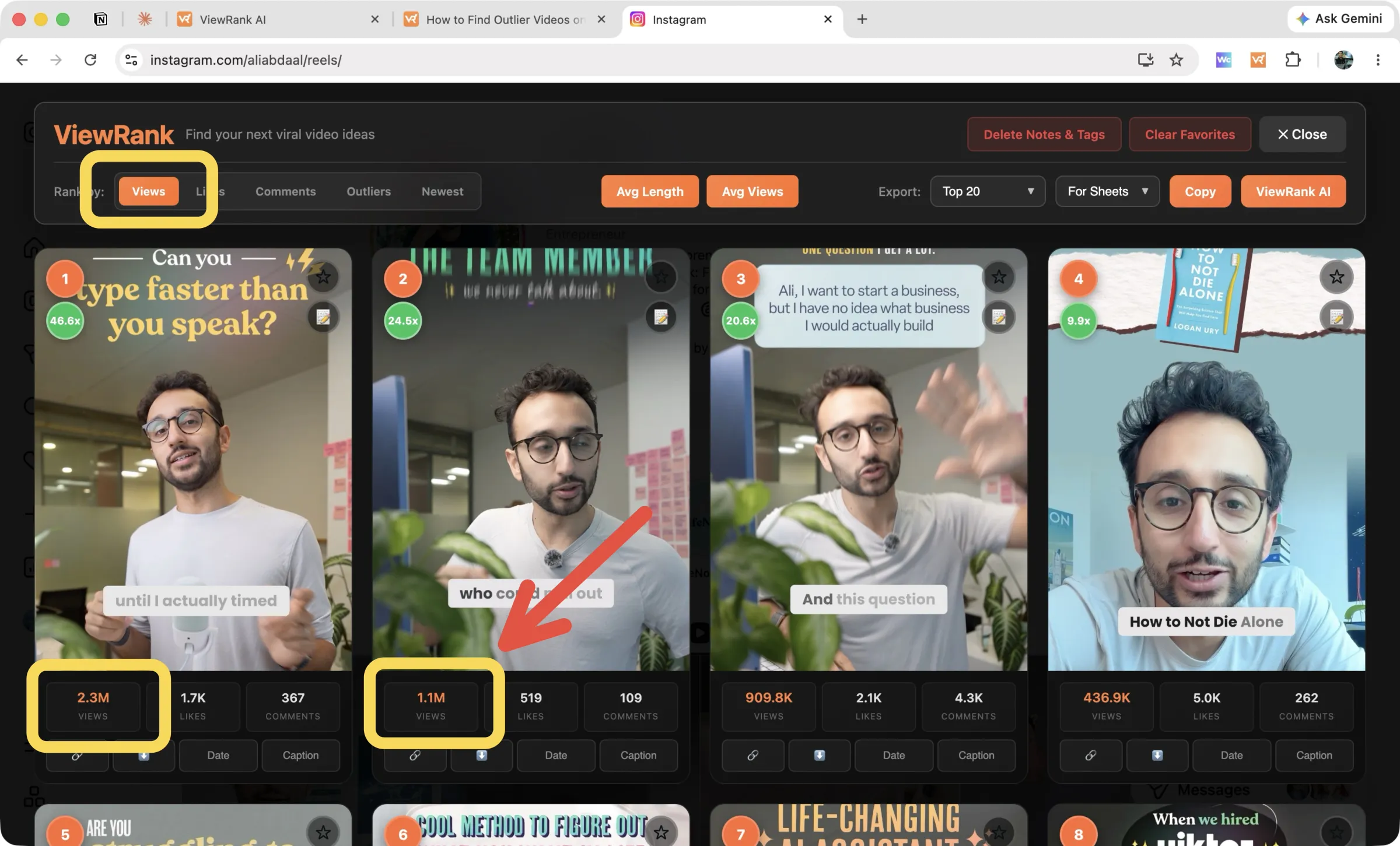
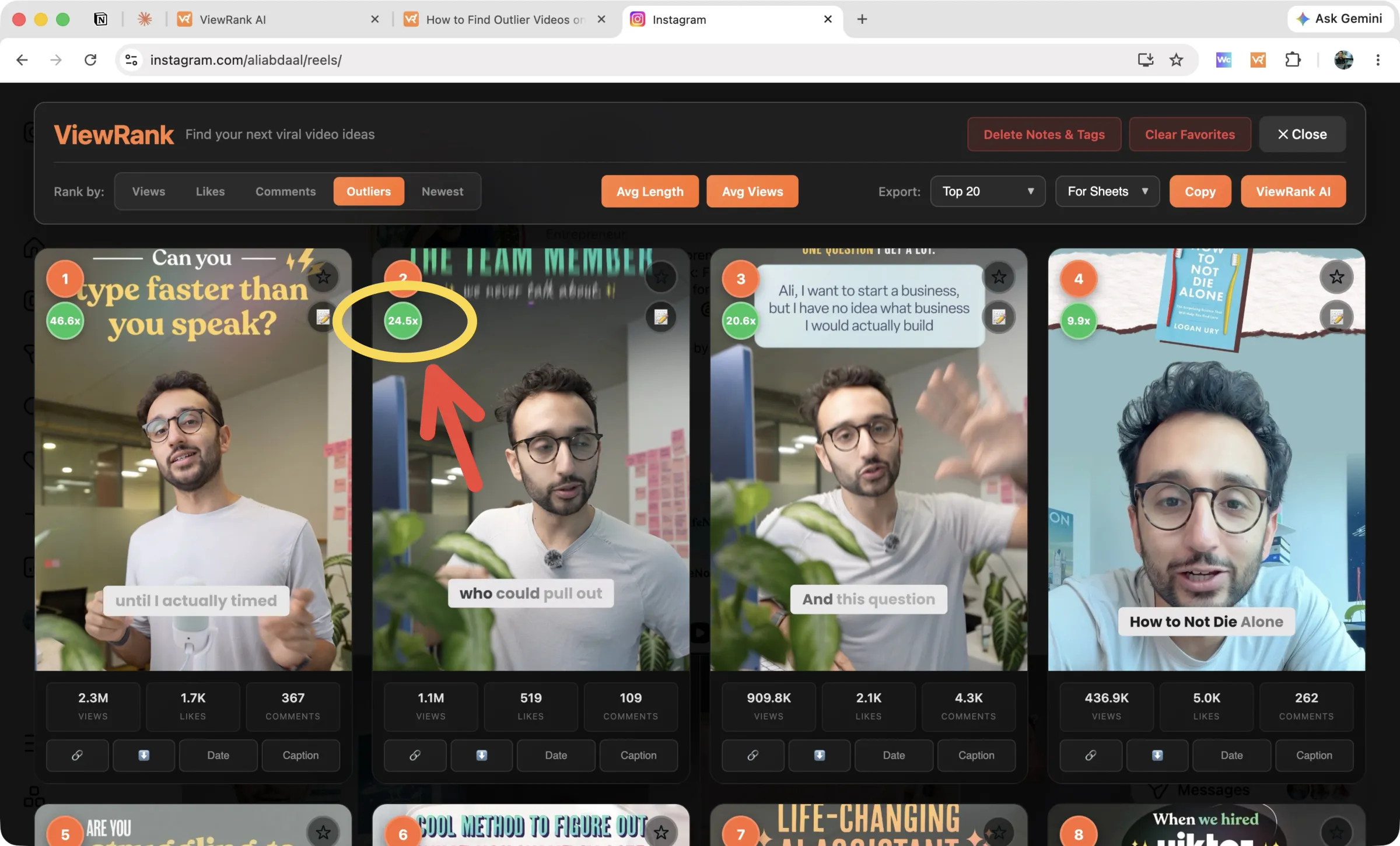
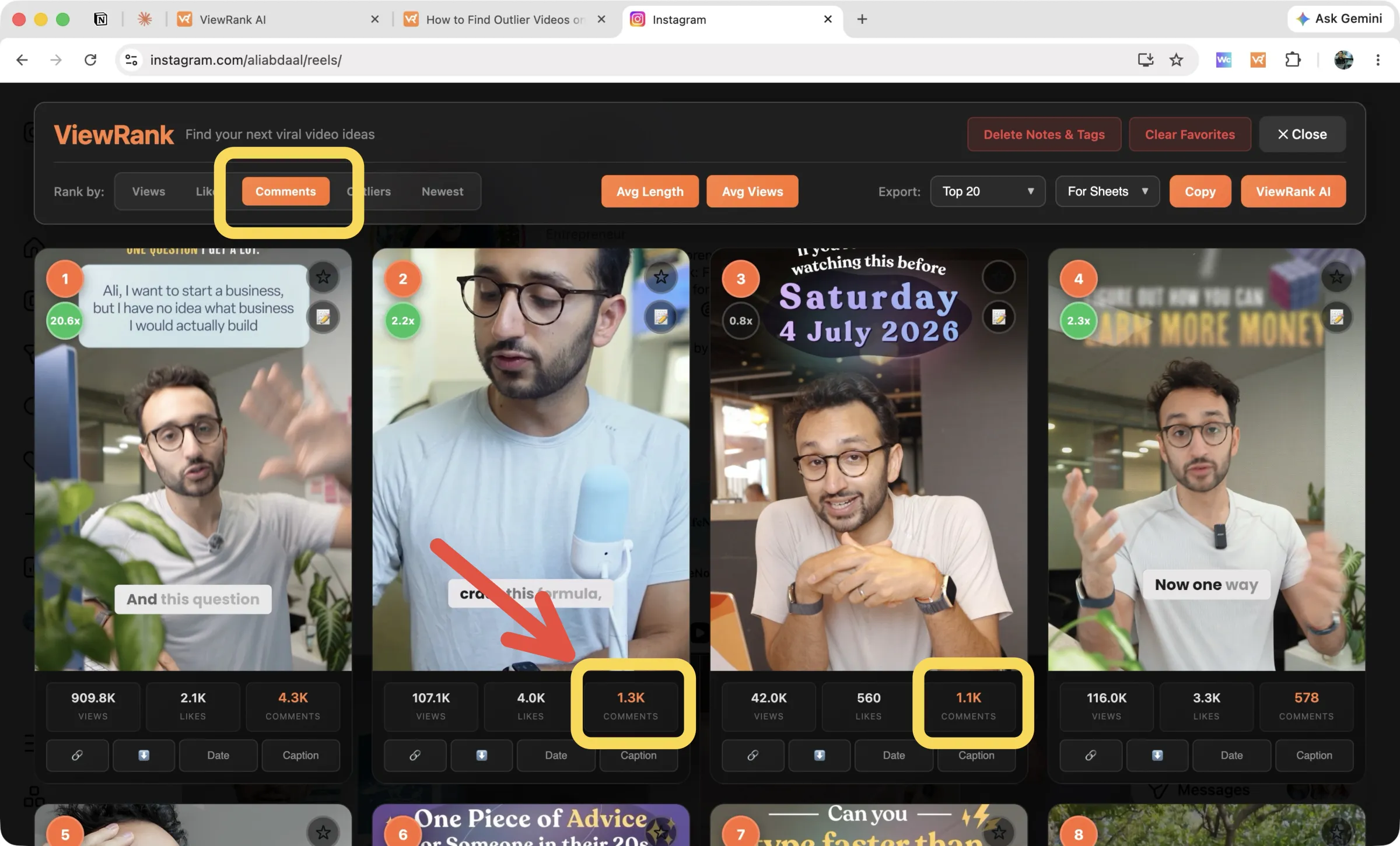
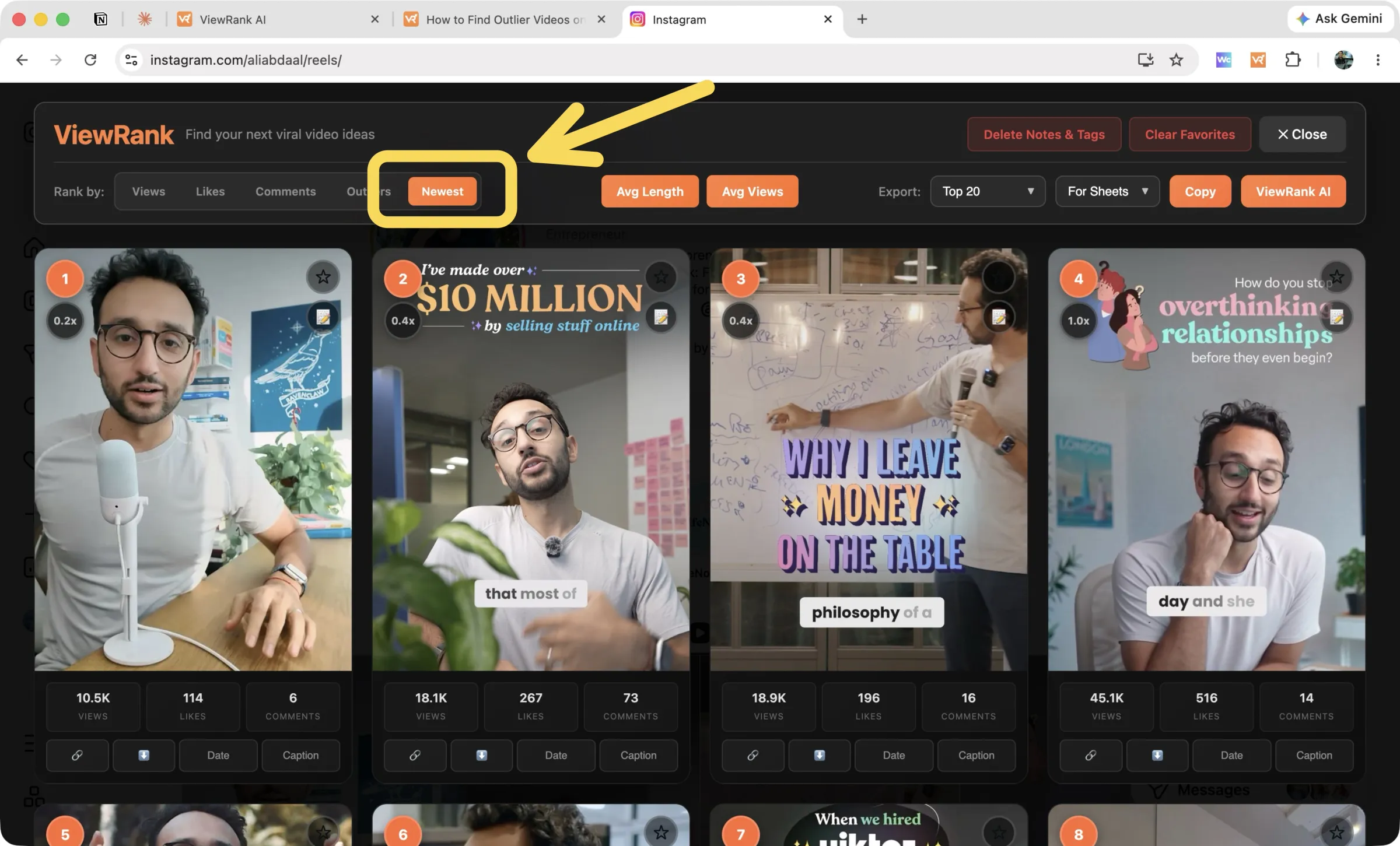
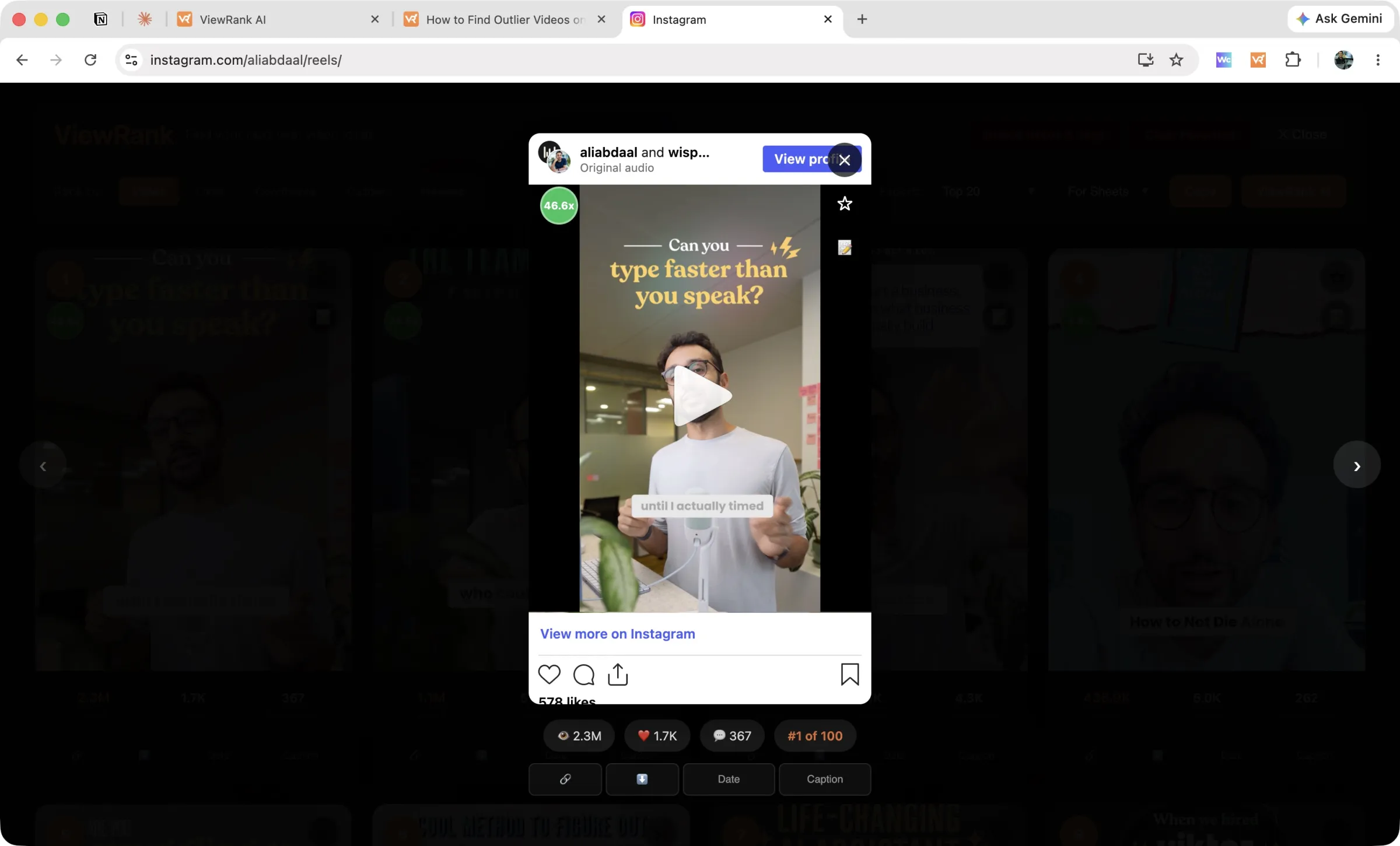
Every card then carries a colored multiplier in its corner, such as 24.5x or 2.7x. Green means the video reached 2x the account's average or better. Below each thumbnail you see views, likes, and comments, plus small buttons for the link, a download, the Date it was posted, and its Caption. Old pinned Reels get a pin badge and stay out of the ranking, so a two-year-old viral video cannot distort the numbers.
Two buttons in the center give you context on demand. Avg Views prints the account's average, median, minimum, and maximum across its recent 30 videos, and Avg Length does the same for the duration of its 10 most viewed videos. Ten seconds there tells you what normal looks like for this creator.
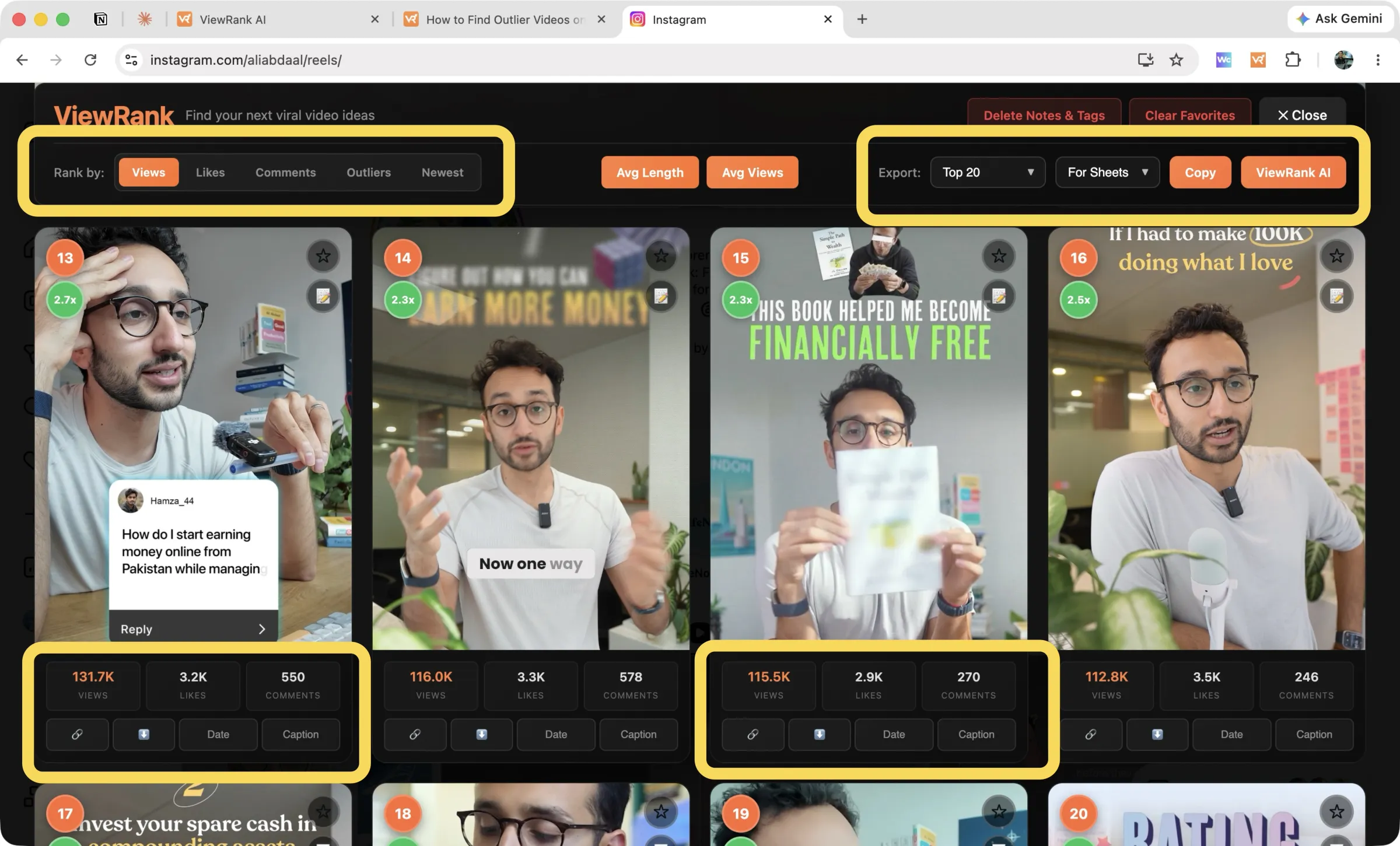
Saving what you found. On the right sits the Export row. The first dropdown chooses the scope: Top 10, Top 20, Top 50, Top 200, your Favorites, or Only Outliers, which keeps every video at 2.0x and above. The second dropdown chooses the shape, either For Sheets or As List. Press Copy, paste into Google Sheets, and you have the table the manual method would have cost you an hour to type.
Next to Copy is a ViewRank AI button, which sends the same selection into the workspace when you want more than a table. More on that below.
Sort any Instagram or TikTok profile in one click
The free ViewRank Chrome extension ranks any profile's videos by views, likes, comments, or outlier score, right on the page.
Add ViewRank to Chrome, it's freeOption 2: track Instagram outliers automatically with ViewRank AI
Ranking a profile is still something you have to remember to do. The Viral Tracker inside ViewRank AI removes that step. The full routine, and why checking by hand fails, is in how to track Instagram and TikTok creators.
Add a creator once, by handle or profile link, and choose Instagram as the platform. ViewRank then measures that account's baseline from its recent videos and re-checks it every few days. When one of their new Reels reaches 2x their average, it appears in your Outliers we found feed with its score attached, a "New" pill, and its views, likes, and comments. Videos younger than 48 hours are held back until they have settled, which prevents a fresh post from being called a hit too early.
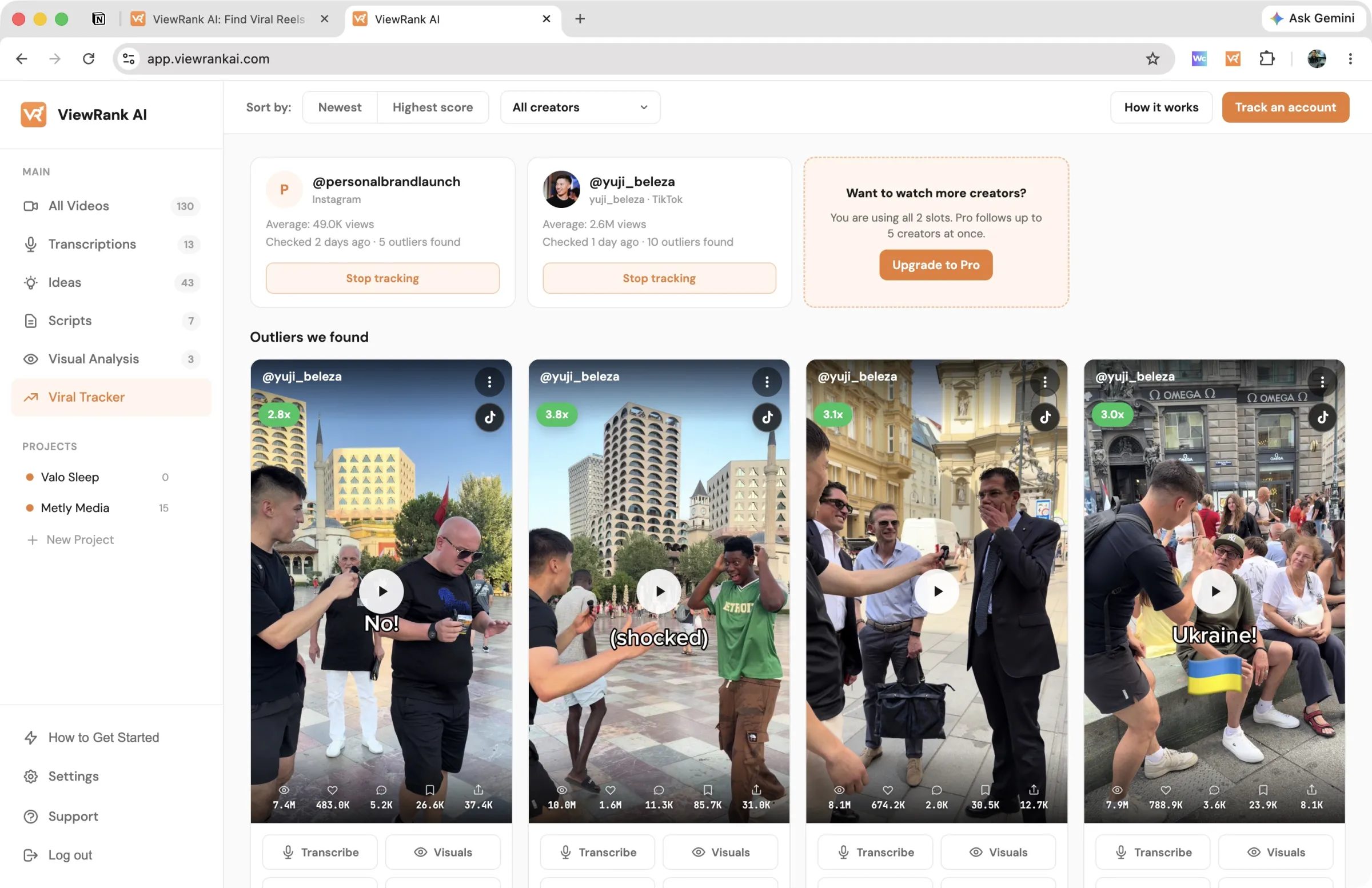
You can sort that feed by Newest or Highest score, filter it by creator, and hide anything irrelevant. Each outlier card carries Transcribe, Visuals, and Scripts buttons, so a video can travel from "the tracker noticed this" to "I have a script" without you opening Instagram at all.
Tracking runs on the paid plans: 2 creators on Starter, 5 on Pro, with a 7-day free trial, and you can cancel anytime. The same setup works for finding outliers on TikTok, and our competitor research guide shows how to run this across a whole list of accounts. Pick your closest competitors, and the research happens whether or not you remember to do it.
What to do with the outlier videos you find
Finding them was the easy half.
Watch the first three seconds of each one repeatedly, until you can quote the opening line and describe what appears on screen while it is spoken. Hooks are where outliers are made, and they are the most portable part of any video. The free Instagram reel transcript tool listens to any public reel and gives you every spoken line as text, so you can study a hook on paper.
Name the format next. Talking-head rant, before and after, silent b-roll with captions, myth versus fact. A format with a name is a format you can rebuild around your own topic, and formats travel across niches far better than topics do.
Then read the comments, which almost nobody does. An outlier's comment section fills with questions, and every question is a video idea your audience has already requested in writing.
If you want the deeper layer without doing it manually, that is what the ViewRank AI workspace handles. Import an outlier and it returns the full transcript, a scene-by-scene breakdown of the visuals, a read on why the video likely worked, and ideas plus scripts that apply the same pattern to your niche.
Want to know why those videos worked?
ViewRank AI transcribes winning videos, breaks down their visuals scene by scene, and turns the patterns into fresh ideas and scripts for your own niche. Free for 7 days. Cancel anytime.
Start your free trialCommon mistakes when hunting Instagram outliers
Scanning ten videos and calling it research. Outlier math needs a baseline. Give it 50 videos minimum before you trust any score.
Studying a single account. One creator with three outliers in one format has a habit. Three creators with outliers in the same format is a pattern in your niche, and only the second is worth building a content plan on. How to find viral Reels in your niche is that multi-account routine.
Treating old outliers as fresh signals. A video that succeeded two months ago still tells you something about how the algorithm behaves now. One from 2023 is history.
Copying rather than adapting. Take the structure, the pacing, and the hook style. Leave the words and the clips. A copy competes with the original and loses; a new video built on the same skeleton belongs to you.
FAQ
What is an outlier video on Instagram?
A Reel that receives far more views than the account's typical video, usually 2x its average or more. It signals that the topic or format reached well beyond that account's existing followers.
Can I sort Instagram Reels by views without a tool?
Not reliably. Instagram tested a "most viewed" sort for Reels and then removed it. The Reels tab is ordered by date, so finding top performers manually means scrolling the entire grid and comparing view counts yourself.
Does outlier detection work on regular Instagram posts too?
No, and the limitation is Instagram's rather than the tool's. View counts are not public on regular posts, so no baseline exists to score against. ViewRank still sorts a profile's posts by likes and comments, while outlier scores stay on Reels and videos, where views are public.
Is the ViewRank extension really free?
Yes. Sorting, outlier scores, the account stats, favorites, notes, and exports are free, with no cap on how many videos you scan. The paid product is ViewRank AI, a separate workspace for the tracker, transcripts, visual breakdowns, ideas, and scripts.
Is an outlier reel the same as a viral reel?
No. Viral describes a large absolute view count. Outlier describes a large view count relative to the account's own average. A small creator can post an outlier at 15,000 views, and a very large account can post a Reel with a million views that isn't an outlier at all.
How is the outlier score calculated?
Reels are grouped into batches of 50 from newest to oldest. Within each batch the top 20% and bottom 20% are removed, and the remaining middle 60% forms the baseline average. Each Reel's score is its views divided by that baseline. Pinned Reels are excluded before any of it runs.
Should I use median or average views as a creator's baseline?
Median. An average is pulled upward by breakout Reels, and those are the videos you're trying to detect, so the average makes every normal Reel look like a failure. A trimmed average, which removes the extremes before averaging, is better again, and it's what ViewRank calculates.
Why is 2x used as the outlier threshold?
Below 2x, differences between a creator's Reels are usually normal week-to-week variation. At 2x the account has doubled its own trimmed baseline, which needs a specific cause. Use 2x as a filter and study the Reels above 5x first.
How many reels do you need before an outlier score is trustworthy?
At least 50. A baseline built from ten Reels moves every time you add one more, and a single strong video in a sample that small drags the average up enough to hide itself. Scanning 100 to 200 Reels on an unfamiliar account gives the batches something real to work with.
Can a brand new reel be an outlier?
Yes, and recent outliers are usually the most useful ones because the format behind them is still working. The caveat is timing. A Reel measured in its first day or two hasn't finished collecting views, so its score will move. The Viral Tracker holds videos younger than 48 hours out of the outlier feed for that reason.