How to Find Outlier Videos on TikTok (The Fast Way)
TikTok view counts are public on every profile, but the winners are still buried in the grid. Here's how to surface a profile's outlier videos in one click, free.
An outlier is a video that beats its own account's average views by a wide margin, and on TikTok it is the cleanest signal you can get. The For You page runs on interest rather than follower count, so when a video reaches 10x its account's normal numbers, the account did not earn that reach. The content did.
Every number you need is already public. Views sit on every thumbnail in every profile grid, unlike Instagram, where only Reels expose them. The data is not hidden, it is simply unsorted, and there are two ways to fix that: a slow manual one and a fast automated one. If you only want a profile's top videos by raw views rather than its outliers, how to find the most viewed videos on any TikTok account covers that plain sort.
Treat 2x the account's typical views as the line. Above it, a video overperformed. At 10x, the algorithm pushed it hard to strangers, and those are the videos worth your afternoon. Typical means the median of their recent videos rather than the average, for reasons the next section gets into, because getting that one choice wrong quietly changes which videos you spend your week studying.
What counts as an outlier video on TikTok?
A TikTok is an outlier when its views are a large multiple of the account's own typical views, measured against videos from the same period. 2.0x is the line where a video gets flagged. In practice the ones worth taking apart start around 5x, and past 10x the recommendation system pushed the video to people who had never seen that creator before.
The multiplier is what makes this work across account sizes. A 9x video from a creator who averages 3,000 views and a 9x video from one who averages 3 million tell you the same thing, because each is compared only against itself.
What the number is not is a measure of quality. A 12x video can be twelve times better, or it can have caught a sound in its first week, or it can have started an argument in the comments. The score gets a video onto your shortlist. Watching it is still your job.
Outlier video vs viral video
A viral video has a large absolute view count. An outlier has a large view count relative to its own account.
| Outlier video | Viral video | |
|---|---|---|
| Measured against | The account's own baseline | The platform at large |
| Typical wording | "3.4x", "12x" | "2 million views" |
| Small accounts can have one | Yes, constantly | Rarely |
| Tells you the idea worked | Yes | Sometimes |
| Tells you the account is big | No | Usually |
Small-account outliers are the most underrated signal on TikTok, because nobody is copying them yet.
Why the average view count gives you the wrong baseline
Use the median of a creator's recent videos, not the average. An average is dragged upward by the exact videos you're trying to find, so the better a creator's best video was, the worse everything else scores against it.
A plain average breaks in two directions on TikTok specifically. One breakout at 8 million inside a set that otherwise sits around 30,000 pulls the average past 200,000. The breakout then scores about 40x, every ordinary video scores 0.15x, and the account reads as one hit and ninety failures. Their real normal was 30,000 the whole time.
The other direction is drift. TikTok accounts change size faster than Instagram accounts, because one video can add 50,000 followers in a week. An average taken across two years describes an account that no longer exists.
Both problems disappear if you compare each video only against videos from around the same time.
How is the outlier multiplier calculated?
ViewRank divides each video's views by a trimmed average of the videos published around it, in three passes:
- Videos are grouped into batches of 50, newest first. Each video is judged against its own era of the account, so an early breakout scores correctly against the early videos and today's uploads are measured against today's normal.
- The top 20% and bottom 20% of each batch are set aside. The middle 60% becomes the baseline. That trimming stops one enormous video from raising the bar for everything around it, and it's the same calculation as
TRIMMEAN(range, 0.4)in Google Sheets. - Each video's score is its views divided by that baseline. 3.4x means 3.4 times normal for that account, at that time.
Fifty is a useful batch size because trimming 20% off each end still leaves 30 videos setting the baseline, and a batch of 50 usually spans a few months rather than a few years. Full description on the finding outliers page.
The slow manual way to find outlier videos on TikTok
Build a sheet.
- Record the views for the last 50 videos on a profile in Google Sheets. TikTok abbreviates on thumbnails, so 1.2M becomes 1200000 and 87.4K becomes 87400 as you type.
- Get the baseline with
=MEDIAN(B2:B51), or better,=TRIMMEAN(B2:B51, 0.4), which drops the top and bottom 20% before averaging. - Add a column dividing each video's views by that baseline.
- Sort by the new column.
Real outlier scores, roughly an hour per profile.
Or scroll and judge by eye. Scroll the grid and watch for a view count that dwarfs the videos near it. Quicker, and much weaker, because raw numbers mislead constantly. 40,000 views on an account that averages 4,000 is a huge outlier. 400,000 views on an account that averages 900,000 is a disappointment wearing an impressive number. Your eye cannot see the ratio, only the total.
Both versions are fine once. Neither is a habit you will keep, and useful research means ten or fifteen profiles refreshed weekly. Running that across a whole niche is covered in how to find trending TikTok videos in your niche.
The fast automated way to find outlier videos
Two options, solving two different problems. The extension answers "what worked on this profile" the second you ask. The tracker answers "did anything work in my niche this week" without you asking at all.
Option 1: sort TikTok videos with the free ViewRank extension
The free ViewRank Chrome extension does the spreadsheet math on the profile page itself.
- Open any public TikTok profile.
- Click the ViewRank icon in your toolbar.
- Choose how many recent videos to include.
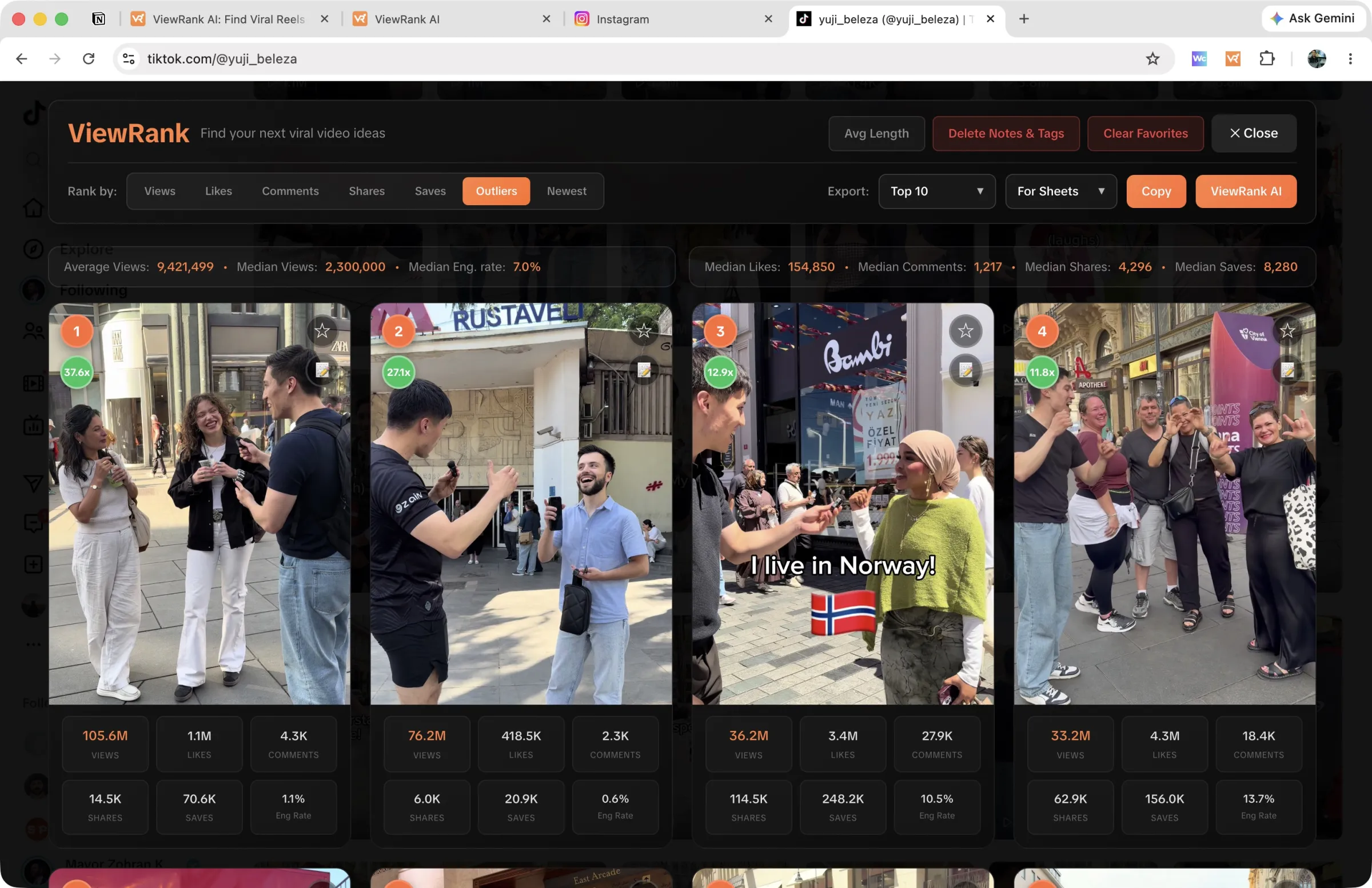
- Press Rank Now. The overlay opens over the profile, sorted by Views by default.
- Click Outliers in the Rank by row. The grid reorders by score, with a green multiplier badge on every video at 2x or better.
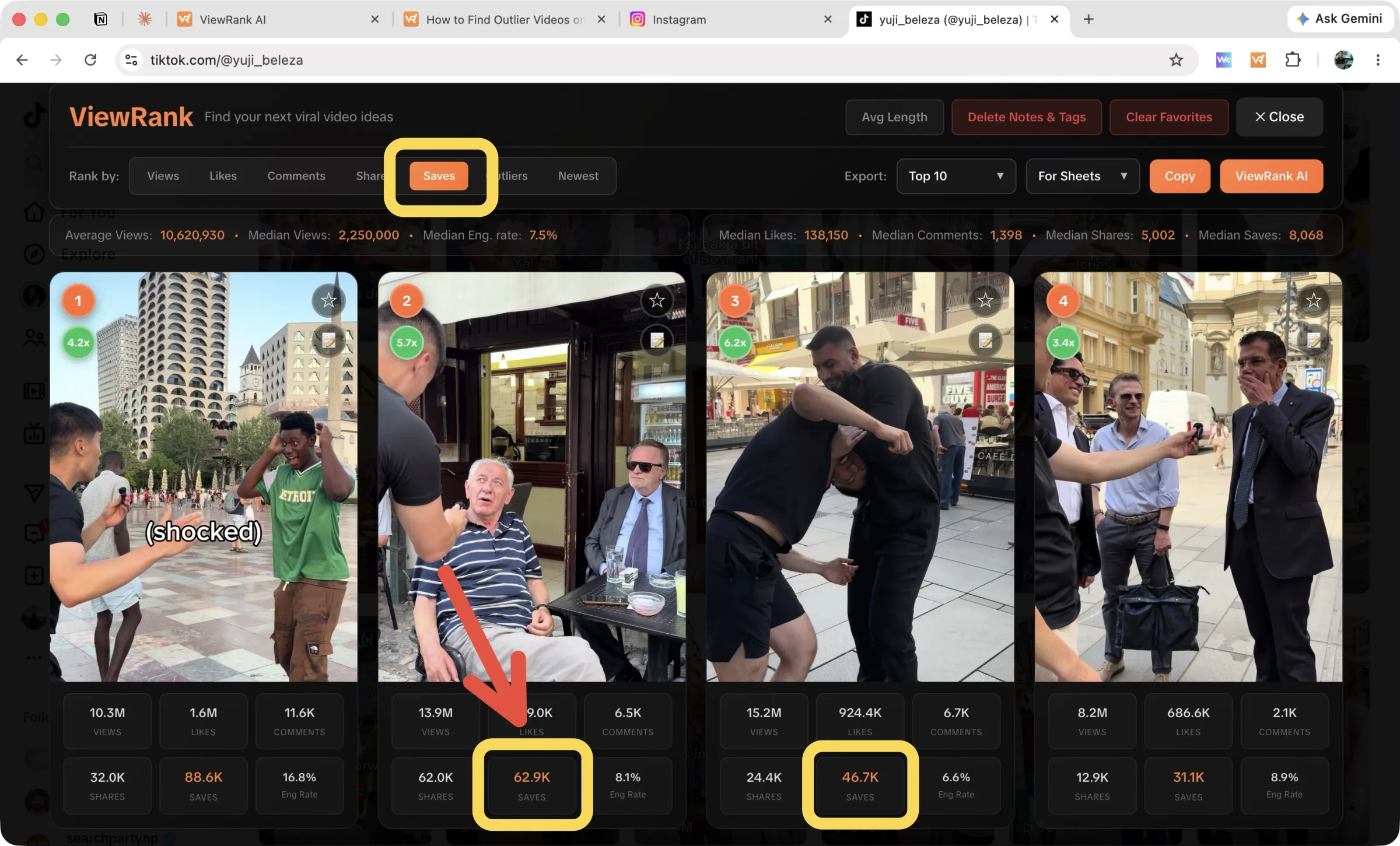
The Rank by row gives you seven choices on TikTok: Views, Likes, Comments, Shares, Saves, Outliers, Newest.
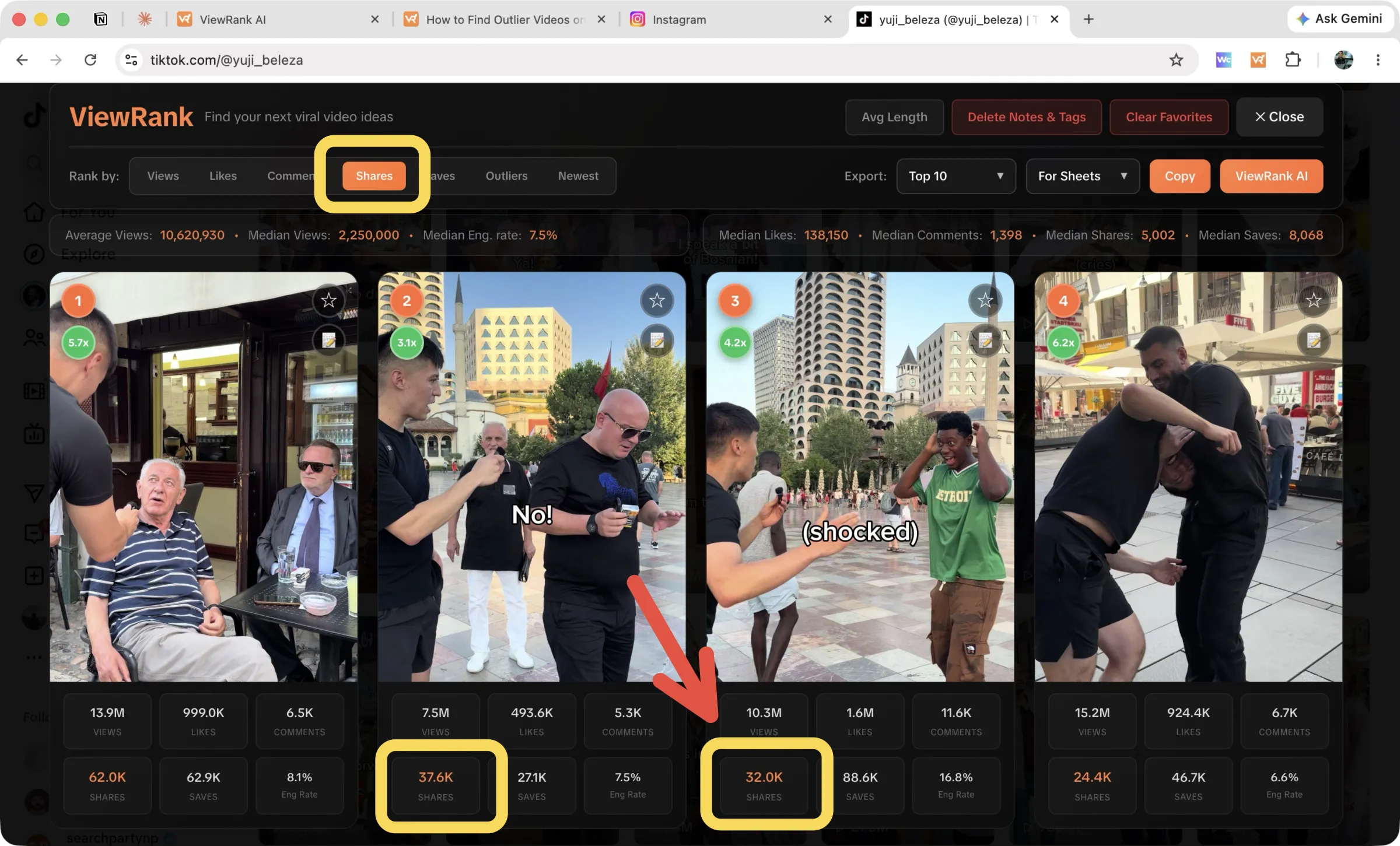
Read the stats strip under the controls before anything else. Average views, median views, median engagement rate, and medians for likes, comments, shares, and saves. That single line tells you what normal looks like for this account, which every other number on the page depends on.
To save your findings, use the Export controls on the right. Pick a scope from the first dropdown (Top 10 through Top 200, Favorites, or Only Outliers), pick For Sheets or As List from the second, then press Copy and paste into your spreadsheet. TikTok exports carry the full set of columns, shares and saves and engagement rate included. The ViewRank AI button beside it sends the same selection into the workspace instead.
Sort any Instagram or TikTok profile in one click
The free ViewRank Chrome extension ranks any profile's videos by views, likes, comments, or outlier score, right on the page.
Add ViewRank to Chrome, it's freeOption 2: track TikTok outliers automatically with ViewRank AI
The extension still requires you to remember to run it. The Viral Tracker inside ViewRank AI does not.
Add a creator by handle or profile link, choose TikTok, and ViewRank measures their baseline and re-checks the account every few days. When a new video reaches 2x their average, it lands in your Outliers we found feed with its score, a "New" pill, and its views, likes, comments, shares, and saves. Videos under 48 hours old are held back until their numbers settle, so nothing gets called a hit prematurely.
Sort that feed by Newest or Highest score, filter by creator, and hide whatever is not relevant. Every card carries Transcribe, Visuals, and Scripts. A video moves from discovery to a finished script without a detour through TikTok. Setup, and what the tracker watches for, is in how to track Instagram and TikTok creators. Tracking runs on the paid plans, with a 7-day free trial, and you can cancel anytime. If Instagram is your other platform, the same process is in how to find outlier videos on Instagram.
TikTok metrics that reveal outliers: shares, saves, and engagement rate
TikTok publishes more than Instagram does, and three of those extra numbers change how you research.
Saves. A save means someone intends to return. Videos with modest views but heavy saves are almost always useful content, the tutorial or checklist kind, and useful content becomes a series.
Shares. A share means someone attached their own reputation to your video in front of their friends. It is the strongest endorsement TikTok exposes publicly.
Engagement rate. Likes, comments, shares, and saves combined, divided by views, shown per video with the account median in the stats strip. It separates videos that were merely watched from videos that moved people.
Photo slideshows have their own tab too, sortable by views, likes, and comments. Slideshows quietly pull excellent reach right now and almost nobody researches them, which is exactly why they are worth a look.
How to turn a TikTok outlier into your own video
An outlier is a lead, not a finished idea. Open one and study three things.
The hook, word for word. TikTok outlier hooks repeat a few shapes: the bold claim, the specific number, the "you are doing this wrong" reversal. Write the opening line exactly as spoken. The free TikTok transcript tool gives you every spoken line as text, so you can copy a hook instead of replaying it.
The structure. How long until the payoff, where the cuts land, whether the ending loops back to the beginning to farm rewatches.
The skeleton, not the skin. Same structure and pacing, your topic, your voice, your examples.
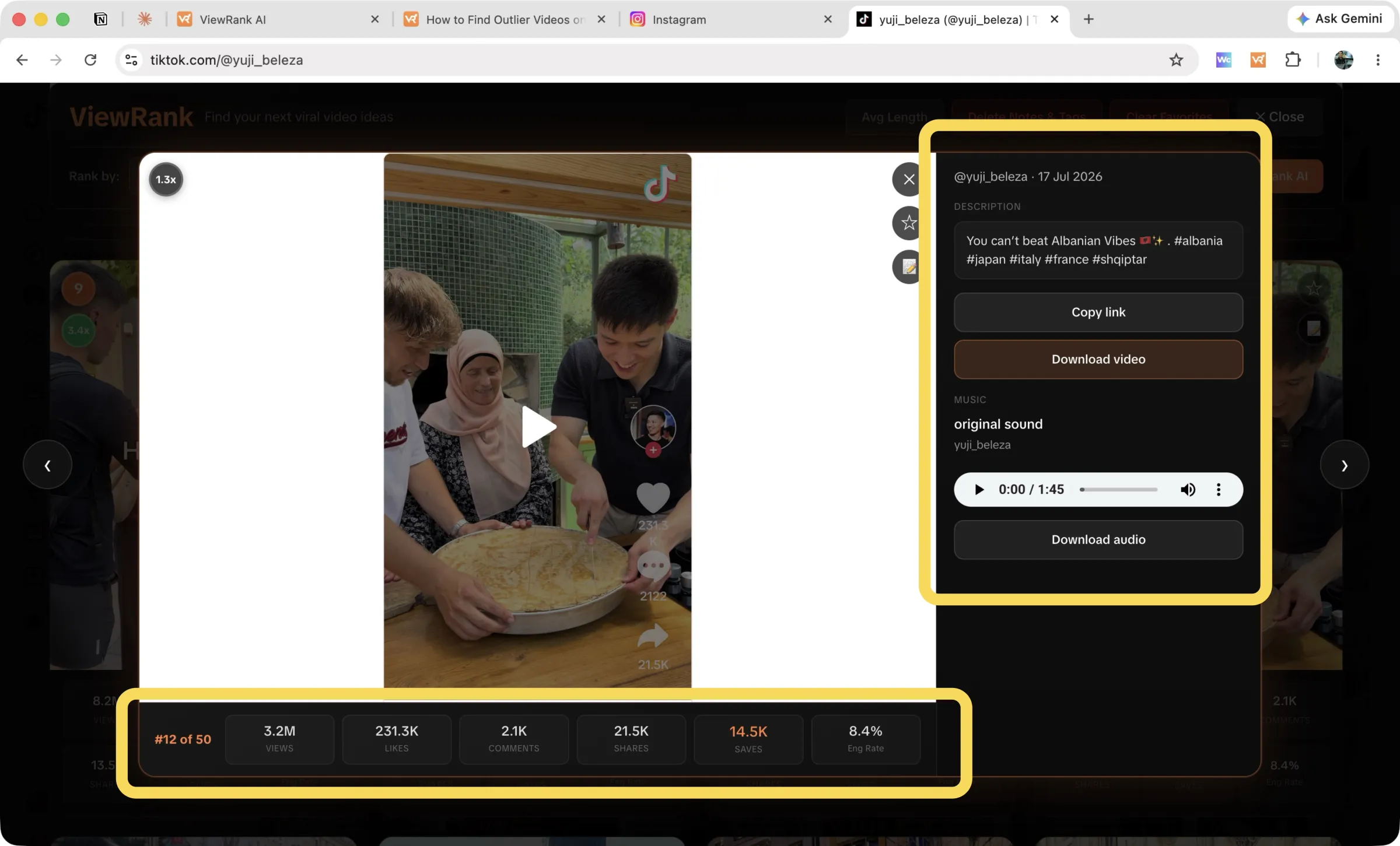
Doing this by hand teaches you a great deal, so don't skip it entirely. When you want it faster, the workspace returns the transcript, a scene-by-scene visual breakdown, a read on why the video worked, and scripts that reuse the pattern for your niche.
Want to know why those videos worked?
ViewRank AI transcribes winning videos, breaks down their visuals scene by scene, and turns the patterns into fresh ideas and scripts for your own niche. Free for 7 days. Cancel anytime.
Start your free trialCommon mistakes when hunting TikTok outliers
Trusting a tiny sample. An average built on 15 videos is noise with a decimal point. Give the math 50 videos minimum.
Chasing outliers you cannot use. A 40x video about a celebrity feud does nothing for a cooking account. Filter for formats you could genuinely adapt this month.
Ignoring recency. TikTok trends decay fast. Last month's outlier is a live signal. Last year's is trivia. After ranking by Outliers, re-sort by Newest to see what is working right now.
Reposting instead of remixing. TikTok's audience punishes copies and rewards remixes. Borrow the hook structure and the format, then rebuild the rest from your own material.
FAQ
What is a good outlier score on TikTok?
Anything at 2x the account's average views deserves a look, and that is where ViewRank adds a green badge. Between 5x and 10x, the algorithm pushed the video hard to non-followers, which makes those the strongest signals on the profile.
Can I see someone else's TikTok analytics?
Not their private dashboard. Views, likes, comments, shares, and saves are public on every video, which is enough to calculate baselines, engagement rates, and outlier scores for any public profile. That is all ViewRank reads: public numbers, organized.
Does this work on TikTok photo slideshows?
Yes. ViewRank has a posts mode for slideshows, sortable by views, likes, comments, and date. Outlier scores stay on videos, where a view baseline exists.
Do I need a TikTok account to research profiles?
You need to browse TikTok profiles on the web in Chrome, and staying logged in makes that more reliable. The extension is free and works on any public profile you open.
Is an outlier video the same as a viral video?
No. Viral describes a large absolute view count. Outlier describes a large view count relative to the account's own average. A creator with 2,000 average views can post an outlier at 20,000, and a very large account can post a video with two million views that isn't an outlier.
How is the outlier multiplier calculated?
Videos are grouped into batches of 50 from newest to oldest. Within each batch the top 20% and bottom 20% are removed, and the middle 60% forms the baseline average. Each video's score is its views divided by that baseline.
Should I use median or average views for a TikTok baseline?
Median, or a trimmed average. A plain average is pulled up by the breakout videos you're trying to detect, which makes every ordinary video look like a failure and hides the moderate overperformers that are usually the more repeatable finds.
How many videos do you need before the score means anything?
At least 50. Below that, one strong video moves the baseline enough to hide itself, and the score you get back is mostly noise.