Sort Feed vs ViewRank, An Honest Comparison (2026)
Both extensions sort Instagram and TikTok profiles to surface outlier videos. One caps free sorting at 25 posts and charges $14 a month. The other is free.
Sort Feed and ViewRank both exist because Instagram and TikTok will not let you sort a profile by performance. Both add that missing feature to your browser, and both flag outliers, the videos that beat an account's normal numbers.
One difference decides it for most people. Sort Feed's free version stops at the latest 25 posts or one week of content, and lifting that limit costs $14 a month, or $9 a month billed yearly, per Sort Feed's own pricing page (checked September 2026). The ViewRank extension has no limit and no price.
Sort Feed vs ViewRank: feature comparison
| Sort Feed | ViewRank | |
|---|---|---|
| Cost for unlimited sorting | $14/mo, or $9/mo billed yearly | Free |
| Free sorting limit | Latest 25 posts or 1 week | None (50 videos to the full profile) |
| Platforms | Instagram, TikTok, YouTube, Facebook Reels | Instagram, TikTok (YouTube and Facebook coming) |
| Outlier scores | Yes | Yes, free, on every card |
| Sort options | Outliers, views, likes, date | Views, likes, comments, outliers, newest; plus shares and saves on TikTok |
| Ranked dashboard over the profile | No, it reorders the feed | Yes, a full overlay with ranked cards |
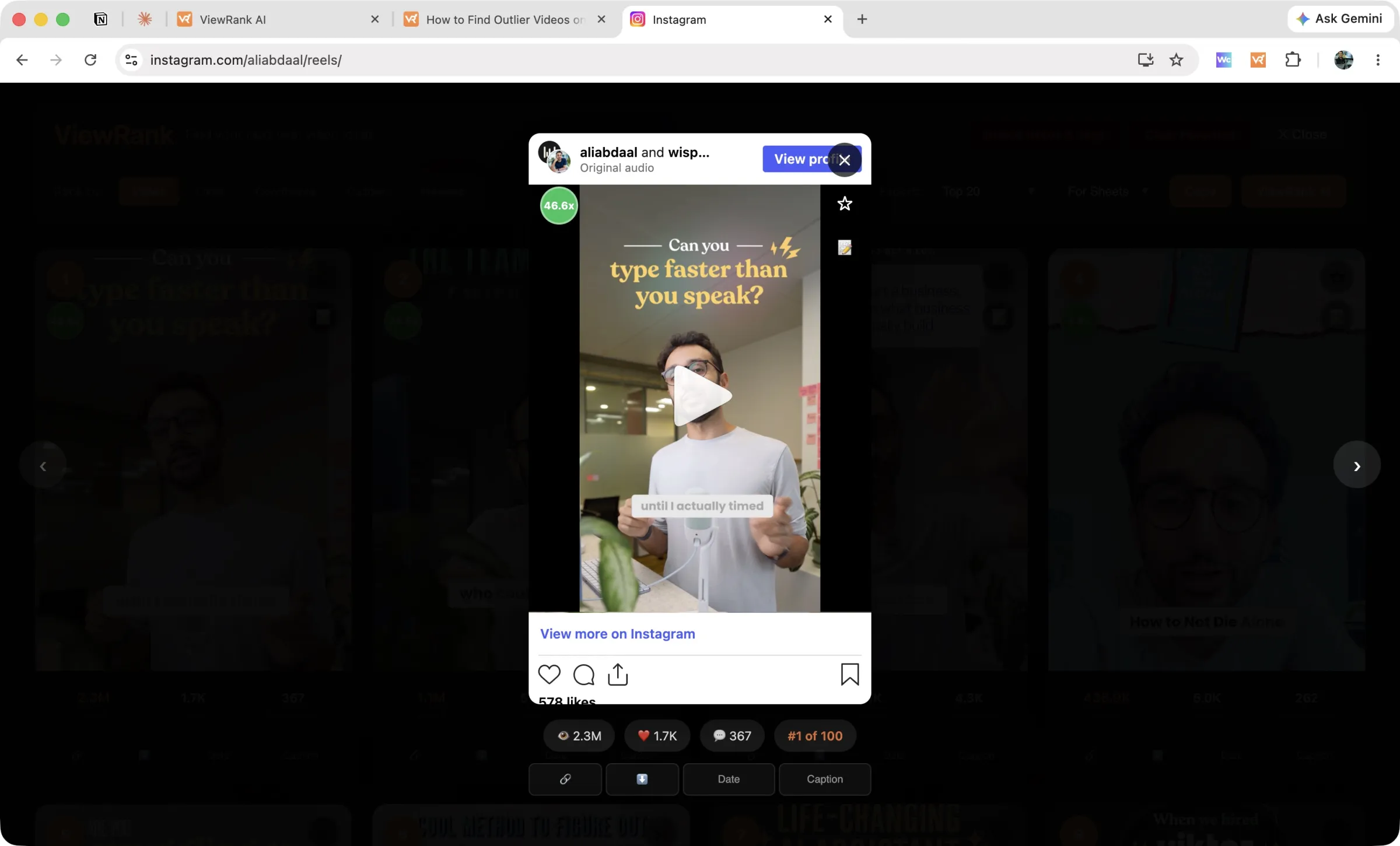
| Built-in video player | No | Yes, with stats and rank position |
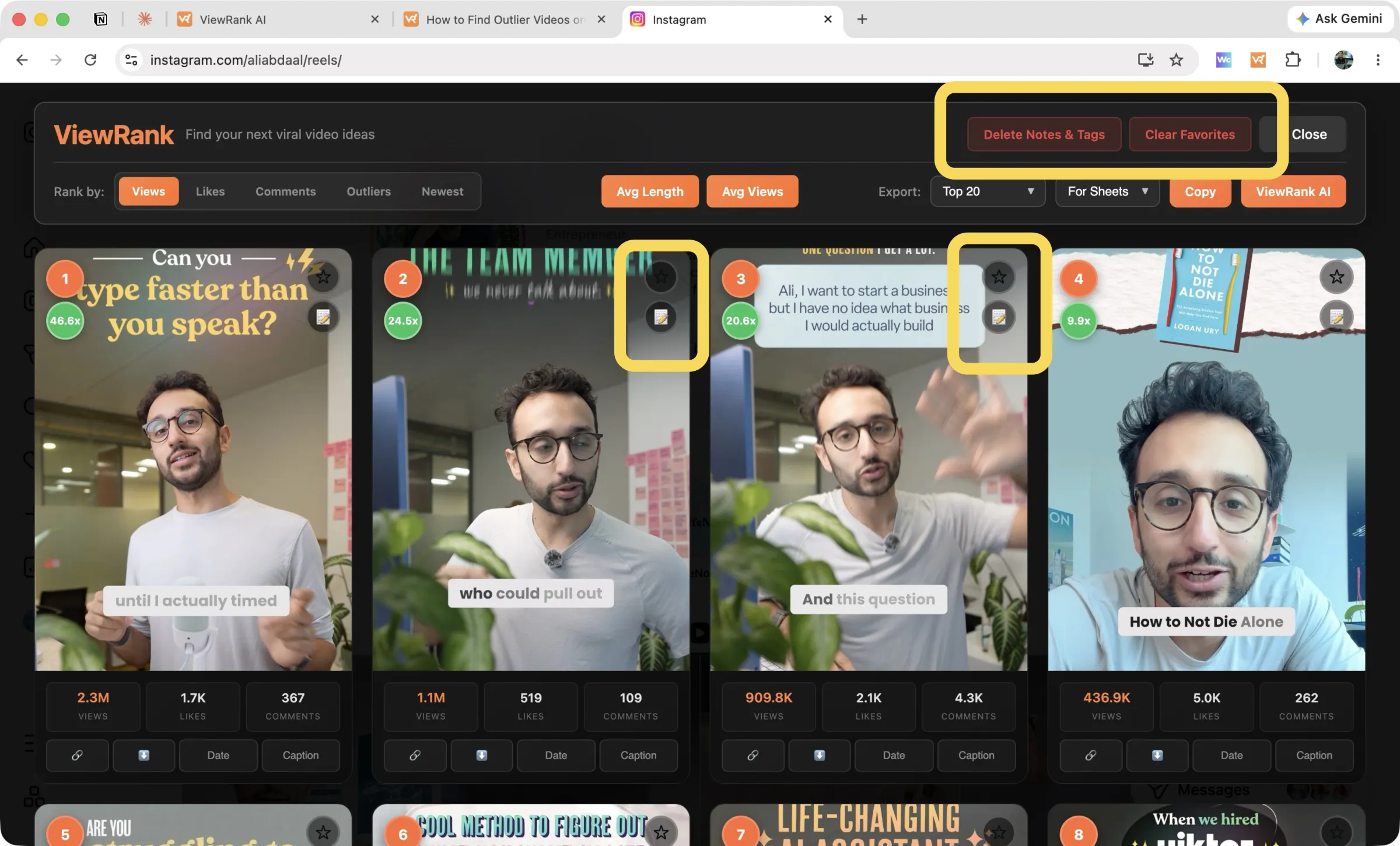
| Per-video notes and tags | No | Yes, exported as columns |
| Favorites saved per creator | No | Yes |
| Remembers your settings | No | Yes |
| Spreadsheet export | Yes | Yes, free, including outliers-only |
| Video download | Yes, free | Yes, free (plus TikTok audio) |
Free plan limits: 25 posts vs unlimited sorting
Sort Feed's free version shows you the last 25 posts, or one week. That is fine for a quick look at what a competitor published recently.
It is not enough to find outliers, and the reason is simple. An outlier is a video that beat its own account's average, so first you need that average. Twenty-five videos is too small a sample to trust. Most accounts worth studying have hundreds of videos, and their biggest hits are usually months or years old, far outside a 25-post window.
The ViewRank extension has no limit. Scan the last 50 videos or the entire profile, and outlier scores, account stats, favorites, notes, exports, and downloads are all included. No account, no API key, no trial countdown.
We can give that away because sorting is not what we sell. Our paid product is a separate workspace, and the extension works fully without it.
Sort any Instagram or TikTok profile in one click
The free ViewRank Chrome extension ranks any profile's videos by views, likes, comments, or outlier score, right on the page.
Add ViewRank to Chrome, it's freeViewRank features Sort Feed does not have
Both tools reorder a profile. What you can do next is where they separate.
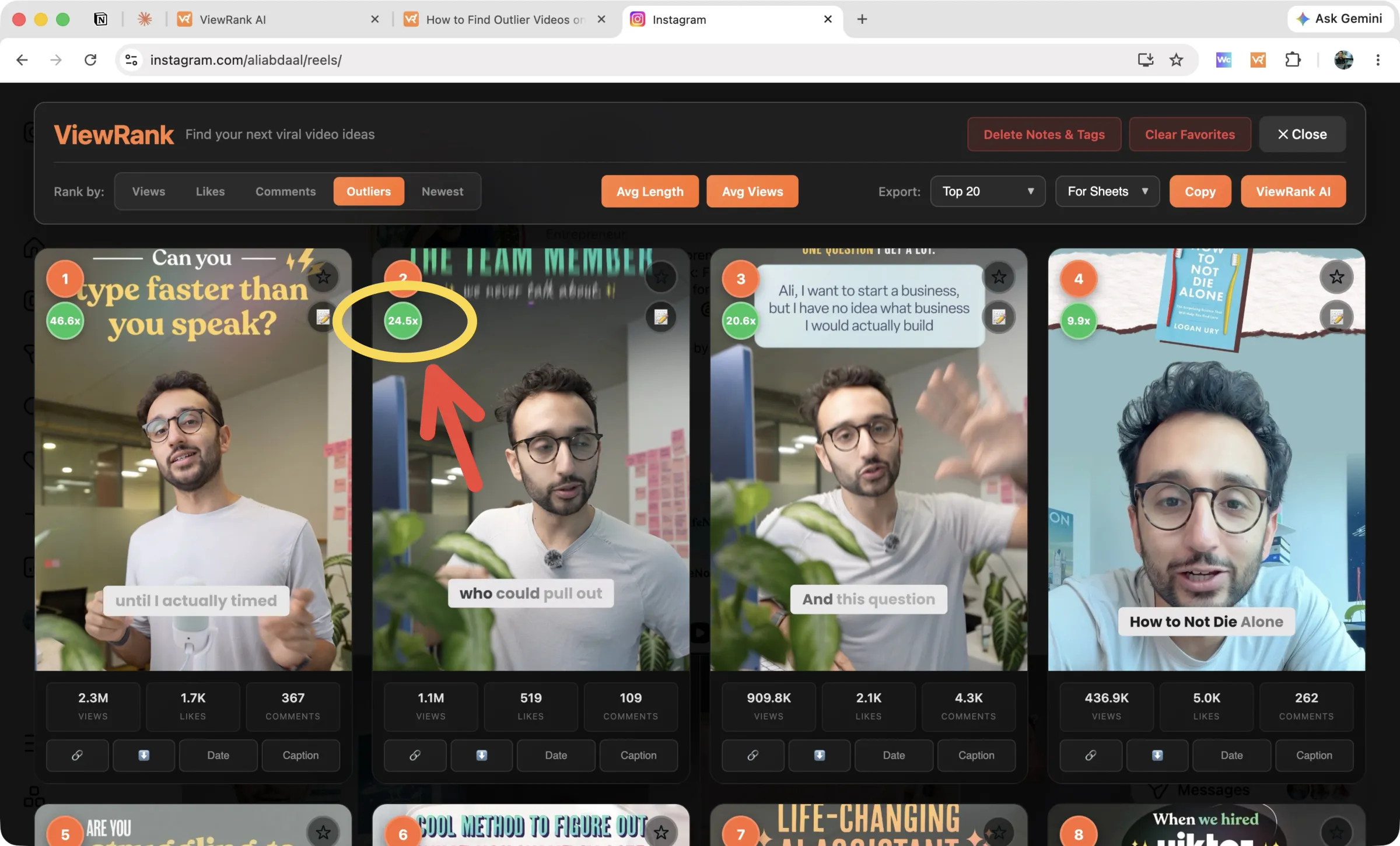
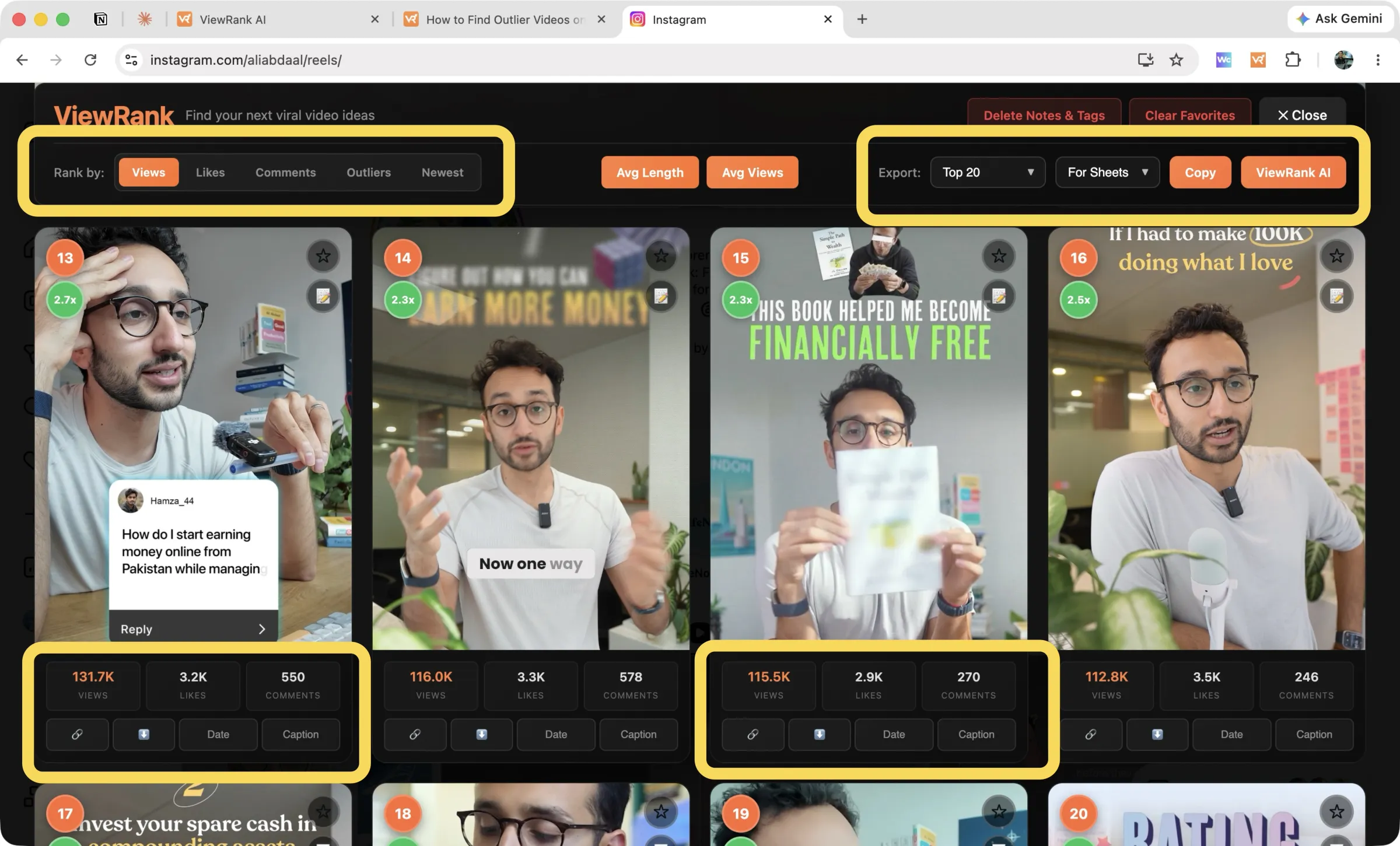
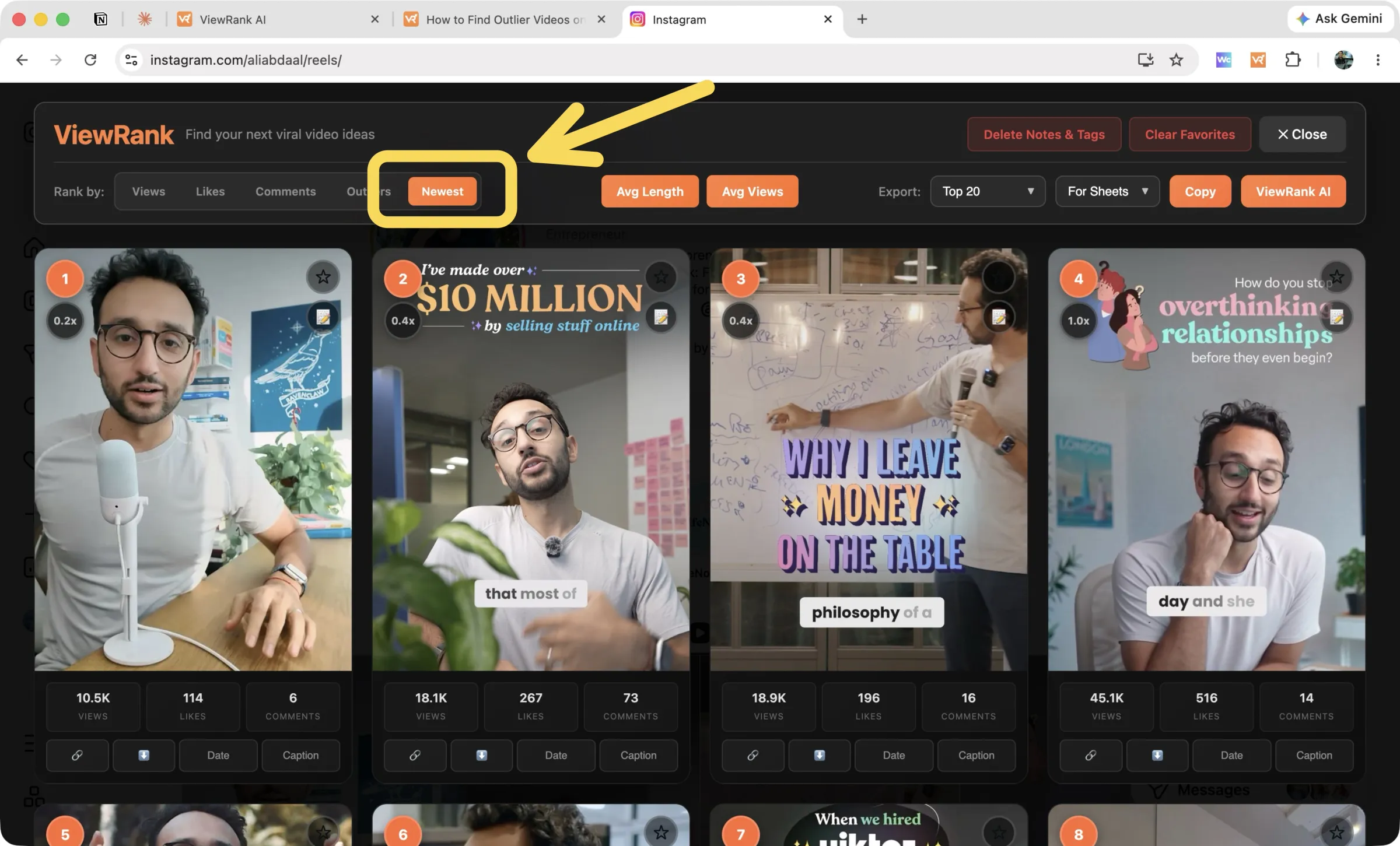
A dashboard, not a reordered feed. ViewRank replaces the profile view with ranked cards. Each one is numbered by position and carries its outlier multiplier plus its views, likes, and comments. You are reading a research surface instead of Instagram in a different order.
A player inside the overlay. Click any card and the video plays right there, with its stats and rank on screen. Arrow keys move through the ranking on Instagram, so you can review a profile's top twenty videos without opening a single tab or losing your place.
Notes, tags, and favorites that stay. Star a video, write down why its hook worked, tag it by format. Come back next month and it is all still there. Export "Favorites" and you get that creator's starred videos only, with your notes and tags as their own spreadsheet columns.
Numbers that give the ranking meaning. Avg Views shows an account's average, median, minimum, and maximum. Avg Length does the same for the duration of its most viewed videos. On TikTok, a permanent strip carries average views, median views, median engagement rate, and medians for likes, comments, shares, and saves. Without those, a ranking tells you the order but never whether the top video was actually exceptional.
Settings that survive the gap. Your scan depth and your Videos or Posts mode are remembered, so a profile you studied in March is one click in April.
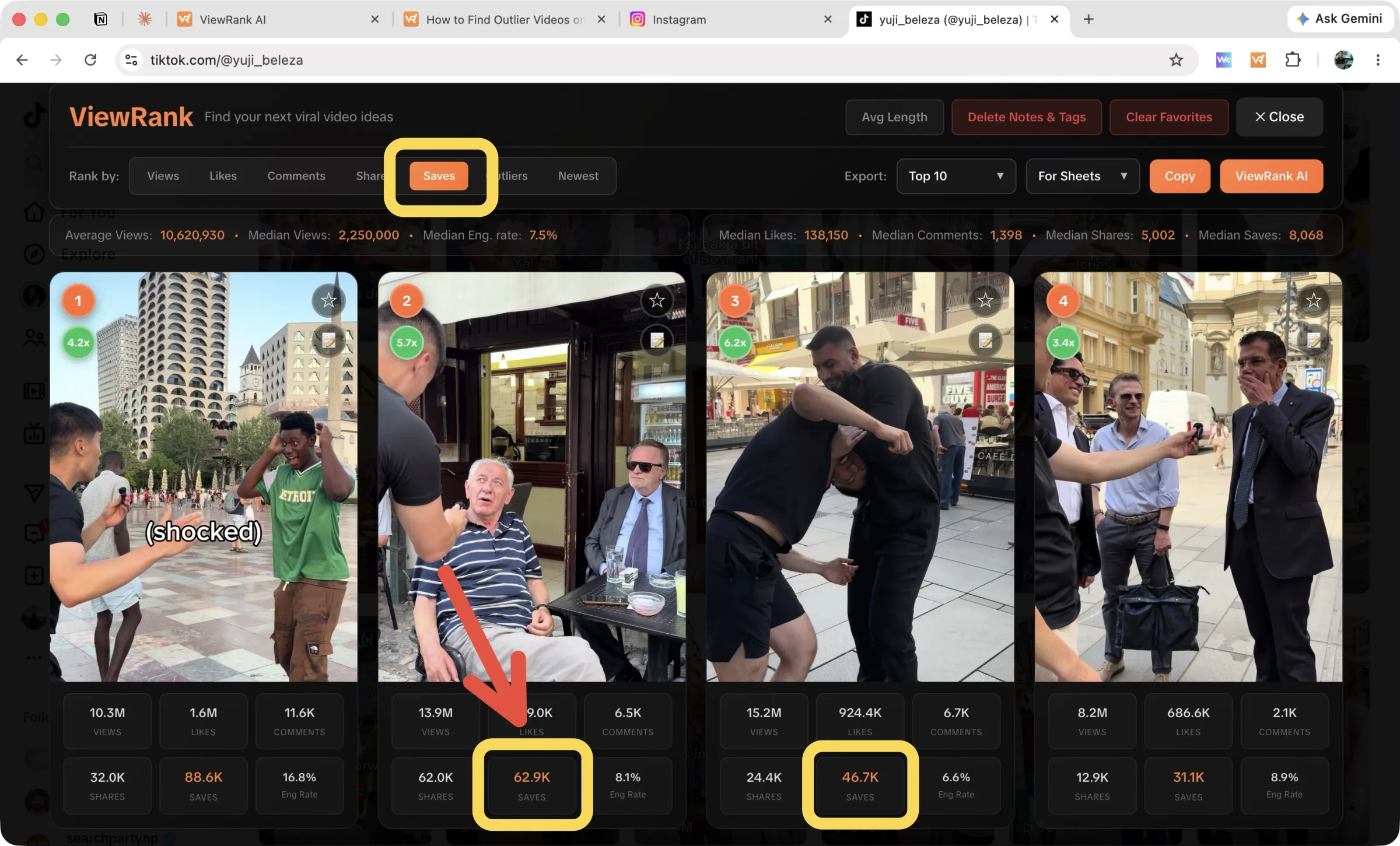
More TikTok signals. Sort by shares and saves, and read a per-video engagement rate beside the account median. A share means someone put their own reputation behind the video, and a save means they plan to return. Both say more than views alone. There is a full walkthrough in how to find outlier videos on TikTok.
Research deeper with ViewRank AI
Sorting a profile tells you which videos won. It never tells you why, and that is the part that shapes your next script.
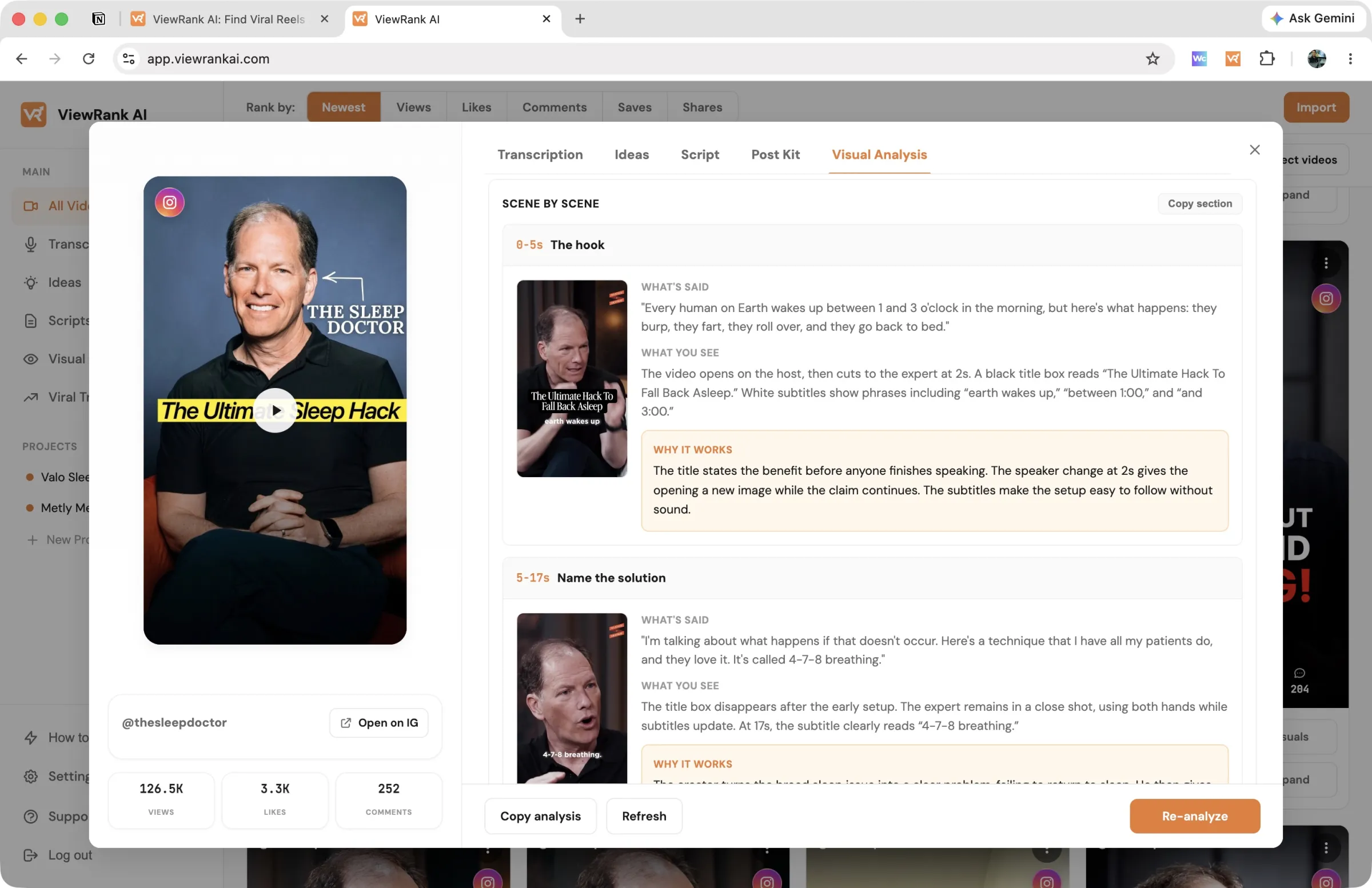
ViewRank AI is the paid upgrade to the free extension, and it exists to close that gap. Send a winning video across from the overlay and it returns a word-for-word transcript, a scene-by-scene visual analysis matching what viewers saw against what they heard, and a read on why the video likely worked. From there it generates fresh video ideas and complete scripts shaped for your own niche.
The Viral Tracker removes the manual step from research entirely. Pick the creators worth watching, and ViewRank checks them every few days and collects every video that reaches 2x their average into one feed with its score attached, so new outliers in your niche arrive without you opening a profile.
Worth being clear about what the money buys on each side. Sort Feed's $14 a month unlocks sorting you cannot use for free beyond 25 posts, plus 500 transcription minutes a month. ViewRank's $12.99 a month buys none of the sorting, because that stays free forever, and instead buys the analysis and writing layer that Sort Feed has no equivalent of. Plans include a 7-day free trial you can cancel anytime.
Want to know why those videos worked?
ViewRank AI transcribes winning videos, breaks down their visuals scene by scene, and turns the patterns into fresh ideas and scripts for your own niche. Free for 7 days. Cancel anytime.
Start your free trialSort Feed or ViewRank: which should you use?
For Instagram and TikTok, ViewRank does the same core job at no cost, then adds the dashboard, the player, notes, favorites, and account averages that turn sorting into research. Sort Feed's advantage is reach: it also covers YouTube and Facebook Reels today, while ViewRank's support for both is on the way.
Both are free to install, so the quickest way to decide is to run each on a profile you already know well and see whose numbers you trust. Twenty minutes tells you more than any comparison table, ours included.
New to this? Start with how to find outlier videos on Instagram, which walks through the whole process step by step.
FAQ
Is ViewRank a free alternative to Sort Feed?
Yes. The ViewRank Chrome extension sorts Instagram and TikTok profiles with no post limit, no account, and no payment, including outlier scores, account averages, notes, favorites, exports, and downloads. Sort Feed's free version stops at the latest 25 posts or one week and costs $14 a month to unlock.
Does ViewRank have a paid plan, and what does it cover?
It does, but not for sorting. ViewRank AI is a separate workspace from $12.99 a month covering transcripts, scene-by-scene visual analysis, idea and script generation, and the Viral Tracker. The extension keeps working with none of it.
Which tool is better for TikTok?
ViewRank shows more TikTok data: sorting by shares and saves, a per-video engagement rate with account medians, and photo slideshow support. Sort Feed sorts TikTok by outliers, views, and likes. If TikTok is your main platform, that difference decides it.
What else is worth considering?
We reviewed the wider field in 3 best Sort Feed alternatives, which covers ViralSort and the OVSZON sorter as well, and in our guide to the 3 best Chrome extensions for Instagram and TikTok research.