Stop patrolling profiles
You already know the routine: every week or so, open each competitor's profile, scroll, squint at view counts, try to remember what their normal looks like. Viral Tracker does that patrol for you. Add the creators you're up against, and when one of them posts a video that clearly beats their own usual numbers, it shows up in your workspace, ready to break down.
Track an account
- Open Viral Tracker in the sidebar and click Track an account.
- Pick the platform: Instagram or TikTok.
- Paste their profile link or type the handle.
- Click Start tracking.
The first check starts immediately and takes a minute or two: ViewRank reads the account's recent videos and works out its average. After that, every tracked account gets re-checked about every 3 days, hands off.
You can track your own account too. It takes a slot like any other, and it answers a question the platforms are weirdly bad at surfacing: which of my videos broke out?
How an outlier is spotted
The bar is the creator's own performance, not some global number:
- ViewRank samples around 50 of the account's recent videos, drops the highest 20% and lowest 20% of view counts, and averages the middle. That's the account's average. Trimming means one ancient mega-viral video can't set an impossible bar, and brand-new videos still gathering views can't drag it down.
- A new video counts as an outlier when it reaches at least 2x that average.
- Videos under 48 hours old aren't judged yet; a video needs a few days to find its audience, so ViewRank waits rather than scoring it too early.
- Pinned videos are ignored entirely, and each account's average is refreshed monthly as it grows.
Once a video qualifies as an outlier, it stays one, even if its multiple later drifts down.
The numbers keep moving
A video that pops is usually still gathering views when ViewRank finds it, so the card does not freeze at that first number. Every check reads the creator's recent videos again, and any outlier still among them gets its views, likes and comments refreshed. The card shows the latest reading, with the number it was flagged at underneath ("Up from 120K when found"), so you can see how far it has climbed. While the last two readings were at least 20% apart, the card also wears a Still climbing badge.
A creator's newer uploads eventually push an older video out of the set ViewRank reads, and that is normally where the readings stop. One exception: if the video was still climbing at that point, ViewRank comes back for one more reading a few days later, so the card catches the number after the climb rather than in the middle of it.
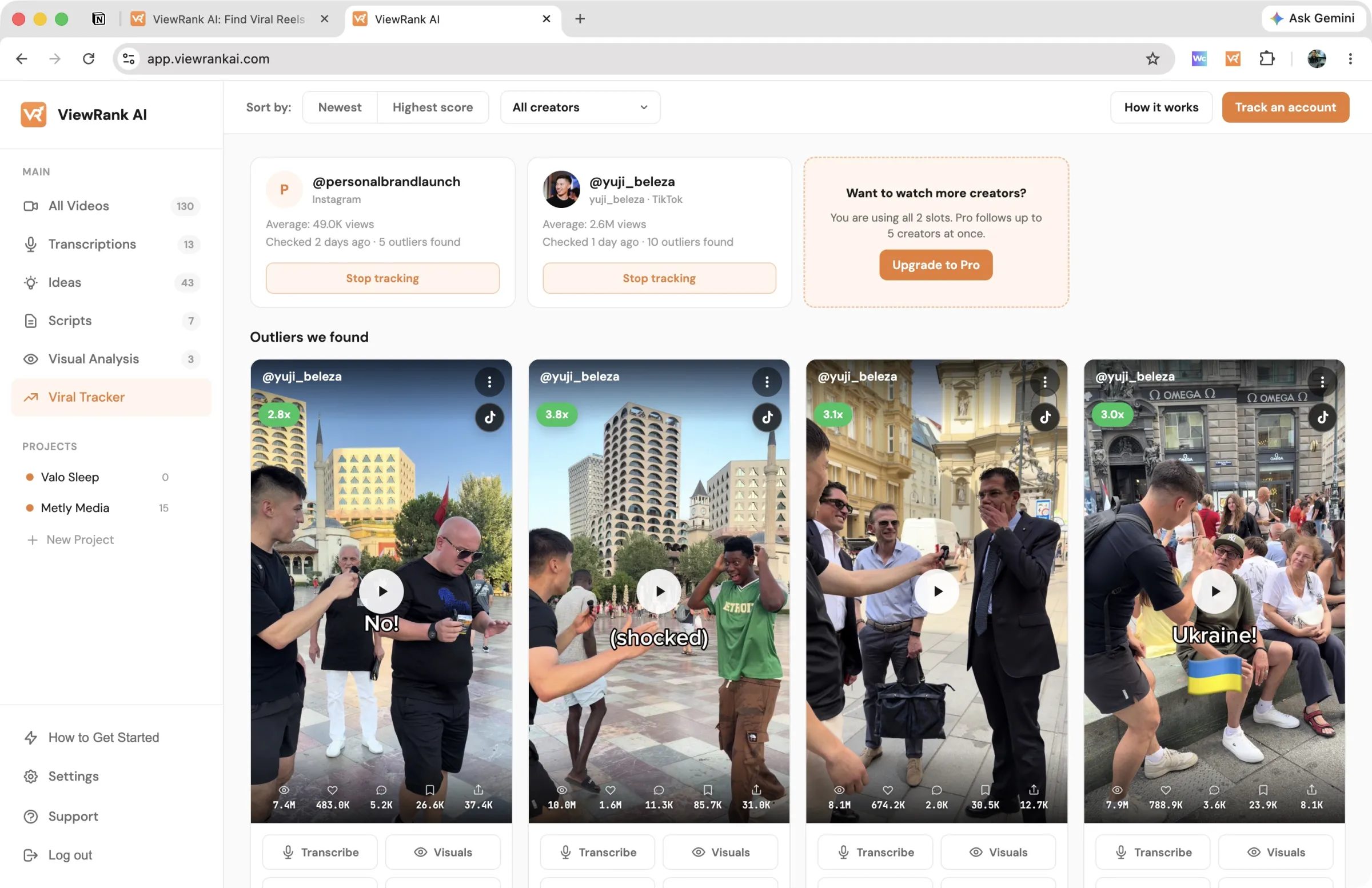
When something pops
The orange badge on Viral Tracker in the sidebar counts outliers you haven't seen. On the page, outliers look like the cards on All Videos: the multiple in the corner (say, 3.4x), the views, likes and comments, and a play button that opens the post on its platform. The bar at the top of the page sorts the feed two ways: Newest leads with whatever the tracker found most recently, so a fresh discovery is the first thing you see, and Highest score leads with the biggest multiple. You can also narrow the feed to a single creator.
The three-dot menu on each card does two things. Add to project files the video under a client or channel, fetching it into your workspace first if you haven't opened it yet. Remove from tracker drops it from the list for good, for the ones that beat the average but aren't worth your time. The tracker only keeps a link and the numbers for each video, so there is nothing else to delete, and removing one never touches a video you already brought into All Videos.
Each outlier card has the same buttons as your own videos: Transcribe, Visuals, Scripts, and Expand. The first time you use one, ViewRank fetches the video into your workspace automatically, which takes a few seconds, then opens straight to the tool you picked. From then on the video also lives in All Videos with a Tracker badge, so you can tell at a glance which of your videos the tracker found for you, and you can transcribe it or run a visual analysis while the trend behind it is still live. Fetching an outlier is free, like any other import. Only the tool you then run on it (a transcription, a visual analysis) spends a credit.
Quiet is normal, by the way. Most checks find everyone running at their usual numbers, and the page says so. The value is that you weren't the one checking.
Slots
Starter tracks up to 2 creators and Pro tracks up to 5. Slots aren't monthly credits: stop tracking an account and the slot frees up instantly.
The outliers you already found stay put. They keep their place in the list, marked Not tracked so you know no more are coming from that creator, and they stay in the creator filter under "No longer tracked". Only the watching stops.
Start tracking the same creator again and you pick up where you left off: the videos you already found are still there, and so is the record of which ones you had seen. One thing gets redone. If they went unwatched for a month or more, their average is worked out again from scratch before anything is scored, because a creator can grow or slow down a lot in a month and the old number would judge them unfairly. That first check after a break also reads further back than usual, so videos posted while you weren't watching still get their shot.
FAQ
Why hasn't a video I know went viral shown up?
Three usual reasons: it's still inside the 48-hour waiting window, it's pinned, or it's big in absolute numbers but under 2x that creator's average. A million views from an account that averages 800k isn't a breakout, and that's the point of measuring against their own numbers.
Will I get an email when something pops?
No, notifications are in-app only right now: the sidebar badge and the outliers feed.
Can I track YouTube channels?
Not yet. Tracking works for Instagram and TikTok accounts.