One remake, three fresh angles
Every run returns four ideas, and they aren't four of the same thing.
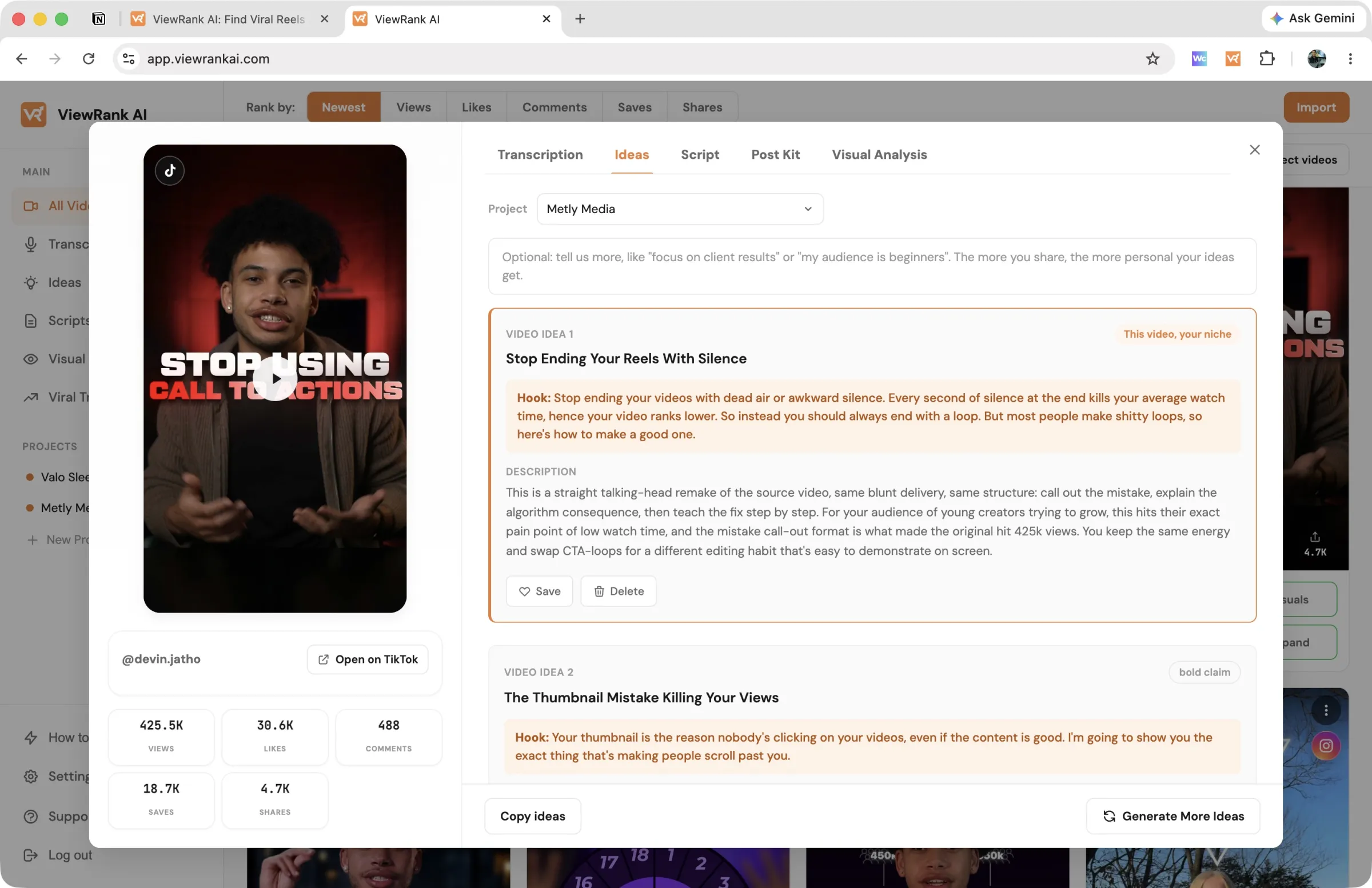
Idea 1 is a remake, marked with an orange border and a This video, your niche tag. Same format, same beat order, same device that made the original land, with a topic from your niche swapped in. If the source was a two-voice skit that listed five things with a gag between each, your remake is a two-voice skit that lists five things from your world with the same gag. Someone who has seen the original should recognise yours as that video, made for your account.
Ideas 2 to 4 are fresh. These take the transferable part, the reason the hook worked, and apply it to clearly different topics with different hook mechanisms. Not the source video reworded; the thing underneath it, reused.
That split is deliberate. The remake is the safe bet, the closest thing to a proven format you can film this week. The other three are where you find something the original creator hasn't done yet.
Why the project picker matters here
The idea writer uses the project you select: its niche, its audience, the formats you film, and everything you wrote in About this account. Ideas for a fitness coach and a bookkeeping firm come out nothing alike, even from the same reference video.
Leave the picker on None and the idea writer has nothing to aim at. It still returns four ideas, but they are written for a general audience, so they read like ideas anyone in your topic could have been given. That is the difference between "5 protein snacks" and "5 protein snacks you can grab at a petrol station between site visits". The second one only exists because the idea writer knew who was watching.
So the one minute you spend creating a project pays back on every idea and every script after it. If you have not made one yet, open Projects in the sidebar and add the account you post from.
Get ideas
- Open a video and select the Ideas tab.
- Pick the project the ideas are for.
- Optionally add a line of direction, like "focus on client results" or "my audience is complete beginners". It's treated as a brief and steers all four ideas.
- Click Get ideas. You get four ideas per run.
Like an idea? Save it. Saved ideas collect under Ideas in the sidebar and become the starting point for scripts.
Run it again on the same video and the new batch is written to be different from what you've already seen, so a second run isn't four rewordings of the first.
Ideas from a topic, with no video
Open Ideas in the sidebar and use the panel at the bottom of the page. It has two things to set:
- Project: the account these ideas are for. Choosing one is what makes the ideas specific to your niche and your audience rather than general. See the section above for why it changes the result so much.
- The box: describe the topic, the angle, or the goal, up to 1000 characters. "Meal prep" gives you general ideas. "3 mistakes beginners make with meal prep, for people who cook for one" gives you ideas you could film this week.
Then click Get ideas. You get four ideas the same way. How it works in the top right corner of the panel repeats this on screen whenever you need it.
There's no source video to remake here, so all four come back fresh. It's the right tool when you already know the topic and just need angles. When you have a video that worked, start from the video instead: ideas anchored to something that already performed beat ideas from a blank page.
Getting better ideas
- Start from outliers, not random videos. A 2x-their-normal video carries a proven pattern; an average video carries an average one.
- Keep project descriptions honest and specific. "Busy parents who want 20-minute dinners" produces sharper ideas than "food lovers."
- Use the direction box when a batch comes back close but not quite right. It's faster than rewriting the project.
- Run it on a few different reference videos and save only the best of each batch. Four ideas per run means you can afford to be picky.
What it costs
One run (four ideas) per credit: Starter includes 100 runs a month, which is 400 ideas; Pro includes 200, which is 800. Ideas from a topic cost the same as ideas from a video. Saving and revisiting ideas is free.
FAQ
Do I need a transcription first?
No, but it helps a lot. The transcript is the idea writer's most important input; with one in place it reverse-engineers the video's real format, hook mechanism, and structure instead of working from less.
Can I get ideas without a reference video?
Yes. The Ideas page in the sidebar takes a topic and writes from that. You lose the remake, since there's nothing to remake, but the four fresh ideas work the same way.
Why is idea 1 so close to the original?
That's the remake, and it's on purpose. It's the one you can film with the least guesswork, because the structure is already proven. Ideas 2 to 4 are the ones that break away.