How to Track Creators on Instagram and TikTok to Catch Their Viral Videos Early
Neither platform tells you when a creator you follow posts something that goes viral. There are two ways to find out, and only one of them is still running in month three.
Neither Instagram nor TikTok will tell you when a creator you're tracking posts a video that massively outperforms their normal. Both platforms have notifications, and both are built to tell you that someone posted, not that something worked.
Knowing a competitor posted is nearly worthless, because most videos from most accounts perform ordinarily. What's worth knowing is that one of their videos did four times their usual numbers, since that video contains a format that's working right now, while it's still working.
Two ways to get that. Open each creator's profile every few days and judge by eye, which is what almost everyone does and which fails for a reason worth understanding. Or have the accounts watched for you against each creator's own numbers. Both are below.
Why post notifications don't tell you a video went viral
Turn on notifications for ten creators and you'll get roughly forty alerts a week, none of which say anything about performance. You'll disable them within a fortnight, and you'll be right to.
Instagram's notification bell on a profile tells you when that account posts. TikTok's follow notifications do the same. Neither carries a view count, and both arrive at the worst possible moment, because a video's numbers mean nothing in the first day or two.
The moment that matters is three to seven days after posting, once the video has found its audience and you can see whether it beat that creator's normal. No platform surfaces that, since neither has a reason to build it.
How to track creators by hand, and why it stops
Every three or four days you open the app, go to the first creator's profile, scroll their recent posts, look at the view counts, and try to work out whether anything looks bigger than what they normally get. Then you do it for the next creator. Then the next.
With a dozen accounts on a three-day cycle, that's about a hundred profile visits a month, and it's the routine almost everyone actually runs, because building a spreadsheet is the thing people intend to do rather than the thing they do.
It has three problems, and the first one is the serious one.
You don't know their baseline. To judge whether 80,000 views is a breakout you need to know what that creator normally gets, and nobody holds that number for fifteen accounts. So you judge by the biggest number on screen, and the biggest number on screen mostly tells you how large the account is. A 45,000-view video from a creator who averages 3,000 is a 15x breakout that looks unremarkable, and a 900,000-view video from someone who averages a million is a disappointment wearing an impressive number. Your eye reads totals. Only the ratio means anything.
You check at the wrong moment. A video seen the day after posting is still gathering views, so its number is meaningless. Seen three weeks later, the format has already been copied. The window where the information is worth having is roughly three to seven days after posting, and hitting it by accident across a dozen accounts is luck.
You stop. Most checks find everyone running at their usual numbers, which is the correct result and feels like a waste of ten minutes, so the cycle stretches to a week, then a fortnight, then it's gone.
Doing it properly by hand means removing the guesswork with arithmetic. Record the view counts of each creator's 50 most recent videos, calculate =TRIMMEAN(range, 0.4), which drops the top and bottom 20% before averaging, and divide every new video by that number. Use the trimmed average or the median, never a plain average, because an average is dragged upward by exactly the breakout videos you're trying to detect. Set the baseline again every month, since a creator on 8,000 views in July can be on 40,000 by October and a stale baseline reports everything as a breakout. That's roughly 40 minutes of setup per account, and it's a real method that a small number of people genuinely sustain.
How to track Instagram and TikTok creators automatically
The Viral Tracker in ViewRank AI runs that routine continuously, including the monthly refresh that manual tracking loses first.
Setting it up
Open Viral Tracker, click Track an account, pick Instagram or TikTok, paste the profile link or type the handle, and click Start tracking.
The first check runs immediately and takes a minute or two while it reads the account's recent videos and works out their baseline. After that, every tracked account is re-checked roughly every three days with nothing for you to do.
Track your own account as well. It answers a question both platforms are strangely bad at surfacing, which is which of your own videos actually broke out.
How it decides something is viral
The bar is the creator's own performance rather than any global number, and it's the same arithmetic as the manual sheet above. It's also the same score the free extension shows on a ranked profile, explained in how to find outlier videos on Instagram and on TikTok.
It samples around 50 of the account's recent videos, drops the highest 20% and lowest 20% of view counts, and averages the middle. That's the account's baseline. A new video counts as an outlier when it reaches at least 2x that number.
Three details do the work that manual tracking gets wrong. Videos under 48 hours old aren't judged at all, because a video needs a few days to find its audience. Pinned videos are ignored entirely. And each account's baseline is refreshed monthly as the creator grows, which is the step a spreadsheet quietly stops doing.
Once a video qualifies it stays qualified, even if its multiple drifts down later.
The numbers keep moving
This is the part a spreadsheet can't do at all. A video that pops is usually still gathering views when it's found, so the card doesn't freeze at the first number it saw.
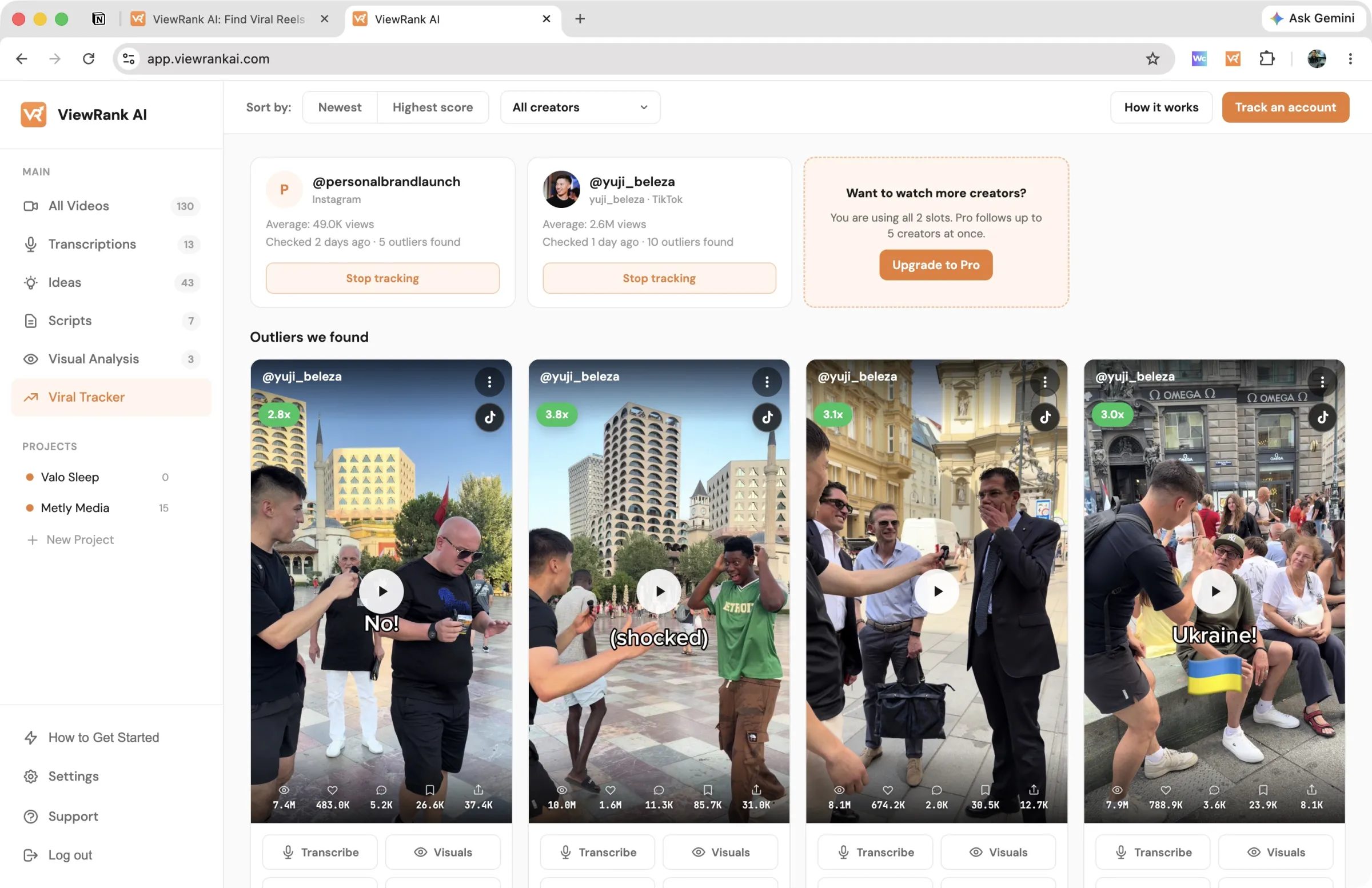
Every check reads the creator's recent videos again and refreshes the views, likes and comments on any breakout still among them. The card shows the current reading with the number it was flagged at underneath, so you can see how far it has climbed. While the last two readings are at least 20% apart, it wears a Still climbing badge.
That badge is more useful than it sounds. A format still accelerating in its niche is one to act on this week rather than next.
When something pops
An orange badge on Viral Tracker in the sidebar counts breakouts you haven't seen.
You don't have to open the app to find out, though. Turn on the Weekly email at the top of the tracker and pick a day. Early that morning, in your time zone, you get the week's breakouts from the creators you track, up to five, biggest first, each with its views and how many times that creator's usual it reached. A week with nothing new sends nothing, which is how a tracker should behave.
The feed sorts by Newest, so a fresh discovery is the first thing you see, or by Highest score to lead with the biggest multiple. You can narrow it to a single creator. Each card carries the multiple in the corner, the views, likes and comments, and a play button that opens the post on its platform.
The three-dot menu files a video under a project, or drops it from the list for the ones that beat the average and still aren't worth your time.
Tracking runs on the paid plans with a limited number of creator slots. Slots aren't monthly credits, so stopping tracking on one creator frees the slot instantly, and the breakouts you already found stay where they are. Instagram and TikTok are supported; YouTube channels aren't. Details on the tracked accounts page.
Which creators to track
Ten to fifteen accounts is the workable range either way. Spread them across four groups rather than filling the list with direct competitors, which is what most people do. Building that list is covered for Instagram in how to find viral Reels in your niche and for TikTok in how to find trending TikTok videos in your niche.
Direct competitors tell you what you're up against, and they're the weakest source of ideas, since they're guessing too.
Adjacent niches, one step sideways, where formats cross easily and the audiences overlap.
Format leaders from unrelated niches, picked because they're unusually good at one structure. This group produces the cross-niche transfers covered in the outlier transfer method.
Small accounts punching above their size, the earliest signal available and the group nobody builds. More in how to find small Instagram accounts getting huge views.
What to do when a tracked creator's video breaks out
A flagged video is a lead, not a finding. Two checks before it changes your content plan.
Check the date, since a format that peaked six weeks ago is history and the useful window is roughly the last 30 days.
Then check whether the same structure appears anywhere else on your list. One creator with a breakout had a good week. Four creators running the same structure inside a month is a pattern, and only the second justifies rebuilding anything.
On TikTok there's a third check worth running, because TikTok publishes shares and saves and enough data for a per-video engagement rate. A big multiple with engagement below that creator's median usually means wide distribution to people who didn't much care. Above their median means the video reached a wide audience and connected. That second one is what you rebuild.
Once something passes, every card in the tracker carries Transcribe, Visuals and Scripts. The first time you use one, the video is fetched into your workspace and opens straight to that tool. Fetching is free; only the tool you run spends anything. Visual Analysis returns the scene-by-scene breakdown described in how to break down a viral Reel, and the transcript feeds writing a script from it.
Quiet weeks stay quiet either way. The difference is that you weren't the one checking.
Want to know why those videos worked?
ViewRank AI transcribes winning videos, breaks down their visuals scene by scene, and turns the patterns into fresh ideas and scripts for your own niche. Free for 7 days. Cancel anytime.
Start your free trialFAQ
Can you get notified when a competitor's video goes viral on Instagram?
Not natively. Instagram's profile notification bell tells you when an account posts, with no performance information attached, and it arrives when the view count is least informative. Knowing a video broke out means comparing its views to that creator's own baseline a few days later, which neither Instagram nor TikTok surfaces. The Viral Tracker in ViewRank AI does that comparison for you and can email you the week's breakouts on the day you choose.
How do you track competitors on Instagram and TikTok manually?
Most people open each creator's profile every three or four days and judge the recent view counts by eye. That fails, because you can't hold fifteen creators' normal numbers in your head, so you end up comparing totals rather than ratios. The version that works is a sheet holding each creator's baseline, calculated as the median or trimmed average of their last 50 videos, with every new video divided by that number and anything at 2x or above shortlisted. Baselines need recalculating monthly as the accounts grow.
How do you catch a competitor's viral video early?
Check three to seven days after they post rather than on the day, and compare against that creator's own median rather than any absolute number. Checking on the day of posting produces false positives, because the view count is still moving.
Why use the median rather than the average for a creator's baseline?
Because an average is dragged upward by the breakout videos you're trying to detect. One old viral hit inside the window makes every ordinary video score below normal and hides the moderate overperformers. Dropping the top and bottom 20% before averaging is better again, and it's what ViewRank's tracker does.
How many creators should you track?
Ten to fifteen. Below eight you won't see enough breakouts to spot repeating formats, and above twenty a manual routine stops happening. Spread them across direct competitors, adjacent niches, format leaders from unrelated niches, and small accounts that overperform their size.
Why hasn't a video I know went viral shown up in the tracker?
Three usual reasons. It's still inside the 48-hour waiting window, it's pinned, or it's large in absolute numbers but under 2x that creator's own average. A million views from an account that averages 800,000 isn't a breakout, and measuring against their own numbers is the point.
Does creator tracking work for YouTube?
Not in ViewRank AI, which tracks Instagram and TikTok accounts. The manual routine in this article works on any platform that publishes view counts publicly, YouTube included.