How to Find the Most Viewed Videos on Any TikTok Account
TikTok's Popular sort shows a creator's big hits, but not by how much or why. Here is how to find any public creator's most viewed videos, and sort them by views, shares, saves or outlier score.
TikTok shows a view count on every video in every public profile grid, and it now has a Popular sort that pulls a creator's biggest hits to the top. That's a good first look. It stops there, though. It won't tell you which videos beat the creator's normal, it can't sort by shares or saves, and it gives you nothing to export.
The data situation on TikTok is better than on Instagram in every way that matters for research. Views are public on every post, including slideshows. Share counts and save counts are public too, which Instagram never gives you. What's missing is a way to compare those numbers against the creator's own normal.
Can you sort a TikTok profile by views in the app?
Partly. Creator profiles have three orders: Latest, Popular and Oldest. Latest is the default, newest first, with up to three pinned videos held at the top regardless of how they performed. Popular puts the creator's most successful videos first.
TikTok hasn't said what Popular measures. It could be views, likes or a mix, so you can't tell why a video sits where it does, and there is only one order. You can't switch it to shares or saves, and you can't see how far each video beat the creator's usual numbers.
TikTok's own analytics exist under Creator Tools, and they cover your own account only. They're genuinely good for your own content and useless for studying anybody else, which is what most research is.
Search doesn't help either. Searching a creator's name returns their videos ranked by TikTok's relevance model, not by performance, and it mixes in other accounts' videos using the same keyword. Comparing videos across different accounts is the mistake that outlier scoring exists to prevent, since a 200,000-view video means completely different things depending on whose account it sits on.
Method 1: sort by Popular on TikTok
Free and instant, and the right place to start.
- Open the creator's profile and stay on the Videos tab.
- Switch the order from Latest to Popular. On the desktop site the three options sit above the video grid. In the app, look for the sort option above the videos.
- Scroll the first two or three rows. Those are the videos TikTok rates as the creator's biggest.
Use it for a quick read of what an account is known for. Its weakness is the same one raw views have. On a growing account, Popular fills up with whatever the creator posted after they got big, and the early video that started the growth sits far below. The methods below fix that by comparing every video to the creator's own normal.
If Popular doesn't appear for you, Method 2 and Method 3 work on any public profile.
Method 2: find the most viewed videos by hand
Free, reliable, slow.
- Open
tiktok.com/@handlewith the Videos tab showing. - Record each video's view count and link in a spreadsheet, newest first.
- Collect at least 50 videos. TikTok abbreviates large numbers on thumbnails, so 1.2M becomes 1200000 and 87.4K becomes 87400 as you type.
- Sort by views for the best-performing list.
- Add a column dividing each video by the median of the set,
=B2/MEDIAN($B$2:$B$51), then sort by that column instead.
Step 5 is what turns a list of big numbers into research. Sorted by raw views, a growing account puts everything it posted after it got popular at the top. Sorted by the ratio, you see which videos beat their own moment, including the early one that probably caused the growth in the first place. Use the median, not the average. Averages get pulled up by the breakouts you're hunting. The reasoning is in how to find outlier videos on TikTok.
Typing 50 numbers off thumbnails takes 30 to 45 minutes for one creator. It's fine once. It doesn't survive a competitor list you refresh weekly.
Method 3: sort TikTok videos by views, shares and saves with the free ViewRank extension
The ViewRank Chrome extension collects the same numbers and sorts them on the page, in any order you pick, with the creator's average and median above the cards.
- Open the creator's profile with the Videos tab visible at
tiktok.com/@handle. - Click the ViewRank icon and keep Videos selected. The popup warns you if it can't confirm which tab you're on.
- Pick a recent count and press Rank Now. The page reloads and collects while it scrolls itself.
The overlay opens with every collected video as a card. Sorting is instant from there, and the tabs cover views, likes, comments, shares, saves, outliers and newest. Re-sorting costs nothing because the collection already happened.
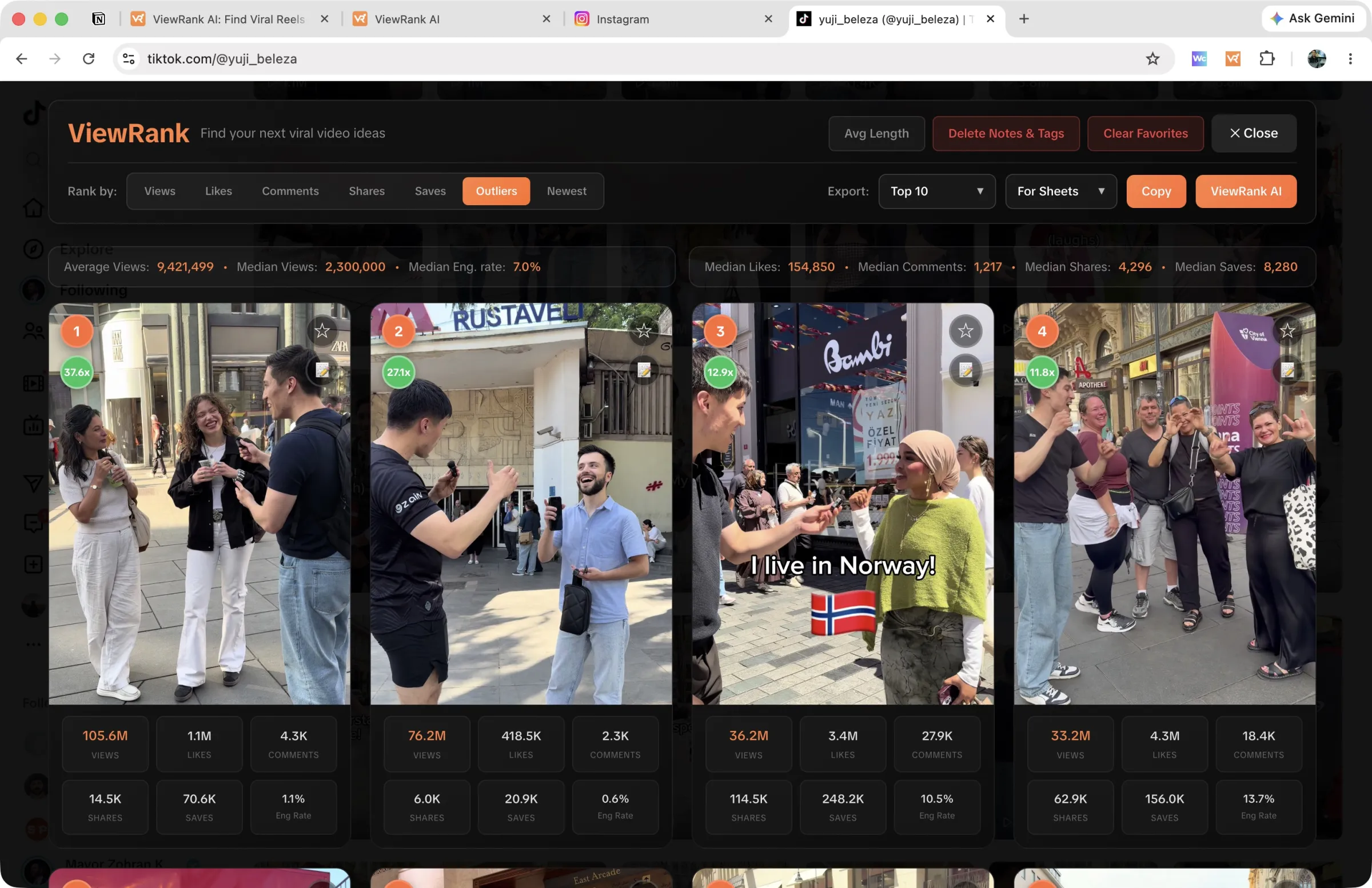
Ranking works on creator profiles, not on search results or the For You feed, and that restriction is deliberate rather than a gap. Videos in a search result come from many accounts, and comparing them against each other produces a leaderboard of account sizes.
Sort any Instagram or TikTok profile in one click
The free ViewRank Chrome extension ranks any profile's videos by views, likes, comments, or outlier score, right on the page.
Add ViewRank to Chrome, it's freeThe four sorts, and what each one answers
Best-performing means different things depending on what you're about to make. TikTok publishes enough per video that you can ask the question four ways.
Views answers which videos reached the most people. Useful for a first look at an account, and the least informative of the four, because it mostly tells you when the creator got big.
Outliers answers which videos beat this creator's own normal. The score is calculated by grouping videos into batches of 50 newest first, trimming the top and bottom 20% of each batch, and dividing each video by the average of the middle 60%. Anything at 2.0x or above gets a green badge. This is the sort to use if you're picking one, and the full method is on the finding outliers page.
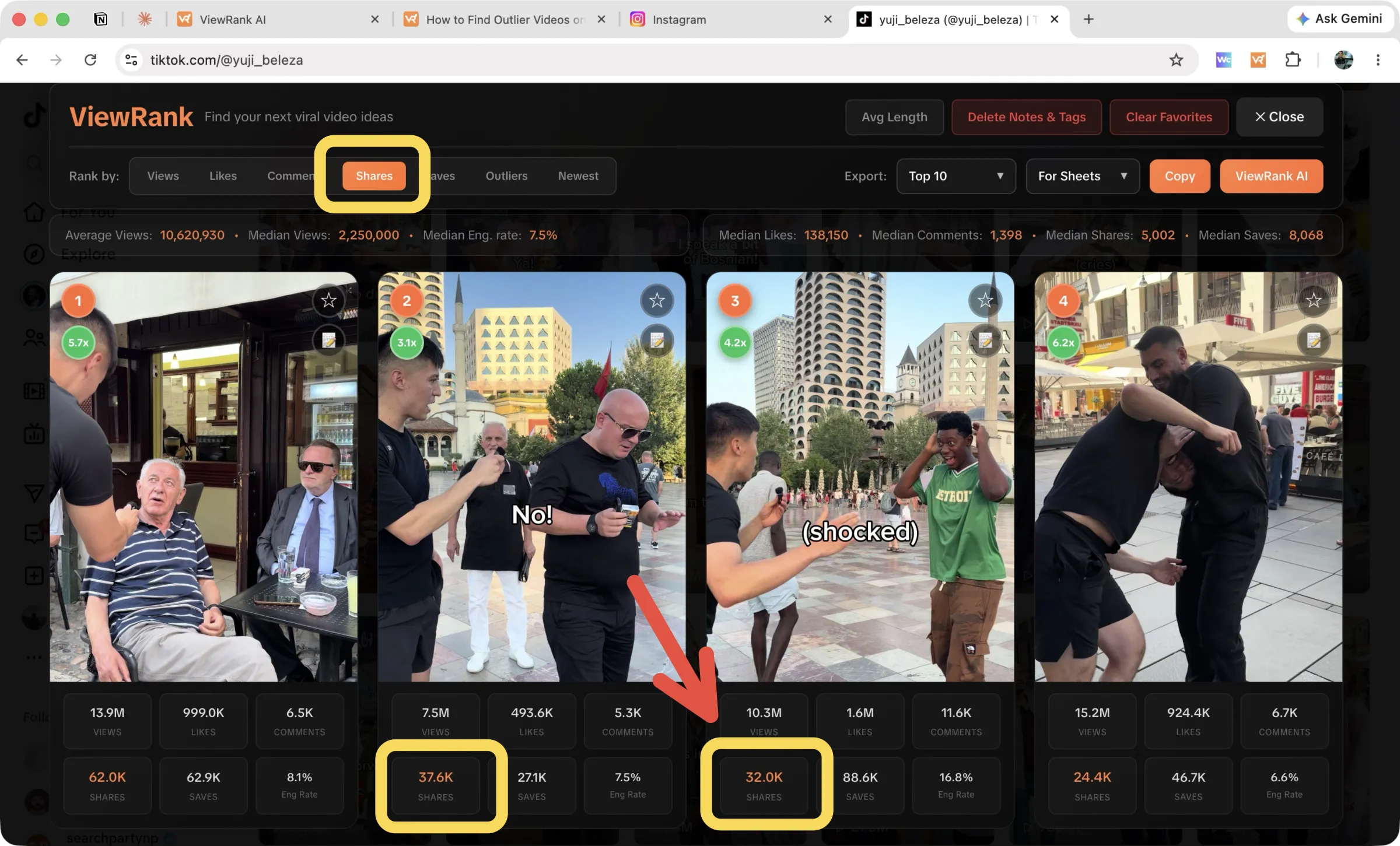
Shares answers what people sent to someone else. A share is the closest thing on TikTok to a real recommendation, because it costs the sharer something, namely their friend's attention. Videos that overperform on shares are usually funny, surprising, or useful enough to be worth a message.
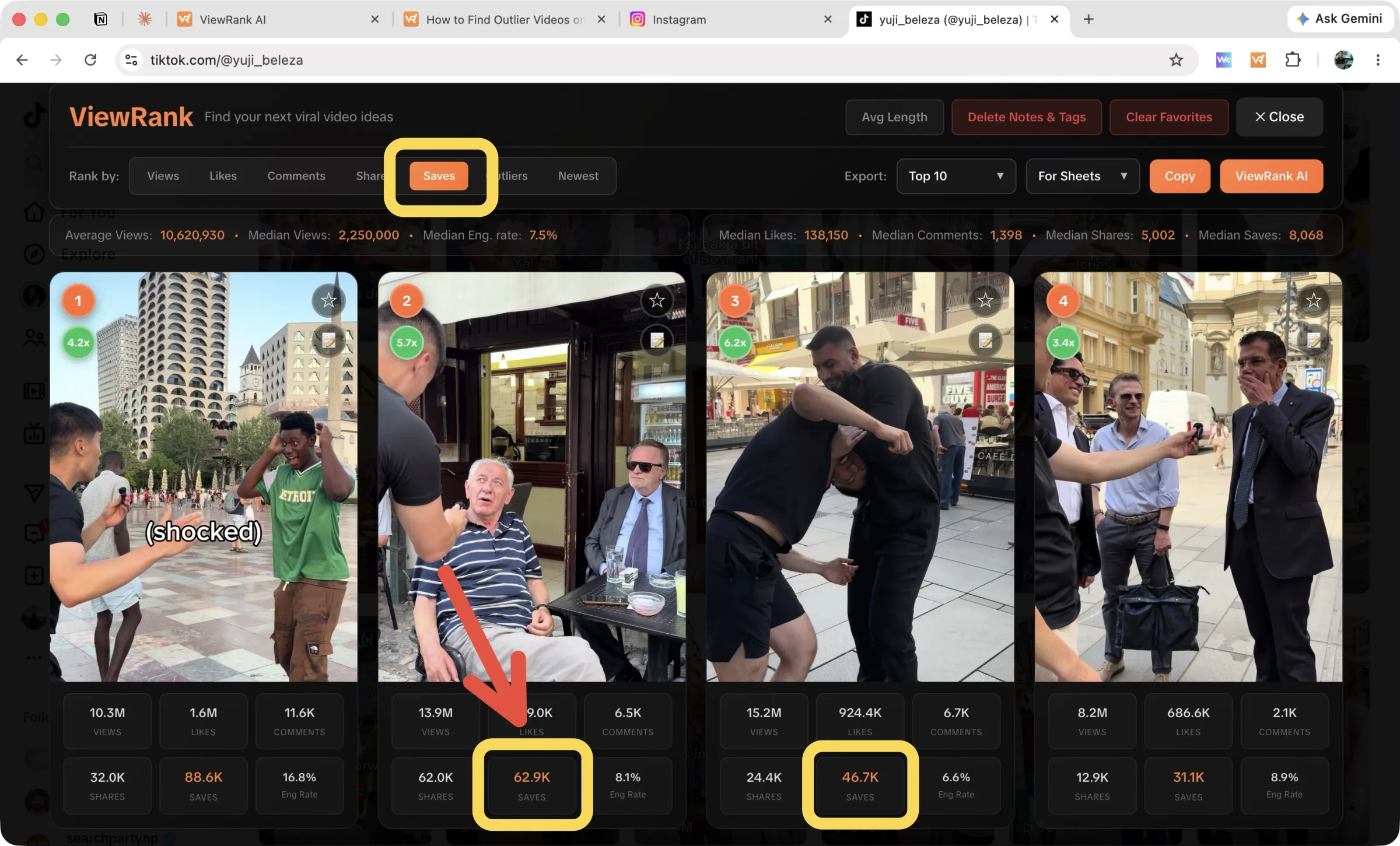
Saves answers what people wanted to keep. Saves cluster on tutorials, lists, recipes and anything with steps in it. A video with ordinary views and unusual saves is a strong signal that the topic has demand, even when the delivery didn't travel.
Reading engagement rate against the creator's median
The stats strip on a ranked TikTok profile shows the account's average views, median views and Median ER, its typical engagement rate. Each card carries its own engagement rate, and the comparison between the two is the fastest quality check available on the platform.
Big views with engagement below the creator's median usually means the video got distributed widely to people who didn't care much. Sounds and visual gimmicks do this, and it rarely repeats on purpose.
Big views with engagement above the median means the video reached a wide audience and connected with it. Those are the ones worth rebuilding.
This check has no equivalent on Instagram, because Instagram doesn't publish shares or saves and gives you less to calculate with. If you research both platforms, it's a reason to do the pattern-finding work on TikTok and then carry what you learn across.
Method 4: track the creator instead of checking on them
Ranking a profile still requires remembering to rank it. The Viral Tracker in ViewRank AI watches accounts continuously.
Add a creator by handle or link, choose TikTok as the platform, and ViewRank measures their baseline and re-checks every few days. New videos that cross 2x their average appear in the Videos that went viral feed with the multiplier attached. Anything under 48 hours old is held back until the numbers settle. Turn on the weekly email and the week's breakouts arrive in your inbox on the day you choose.
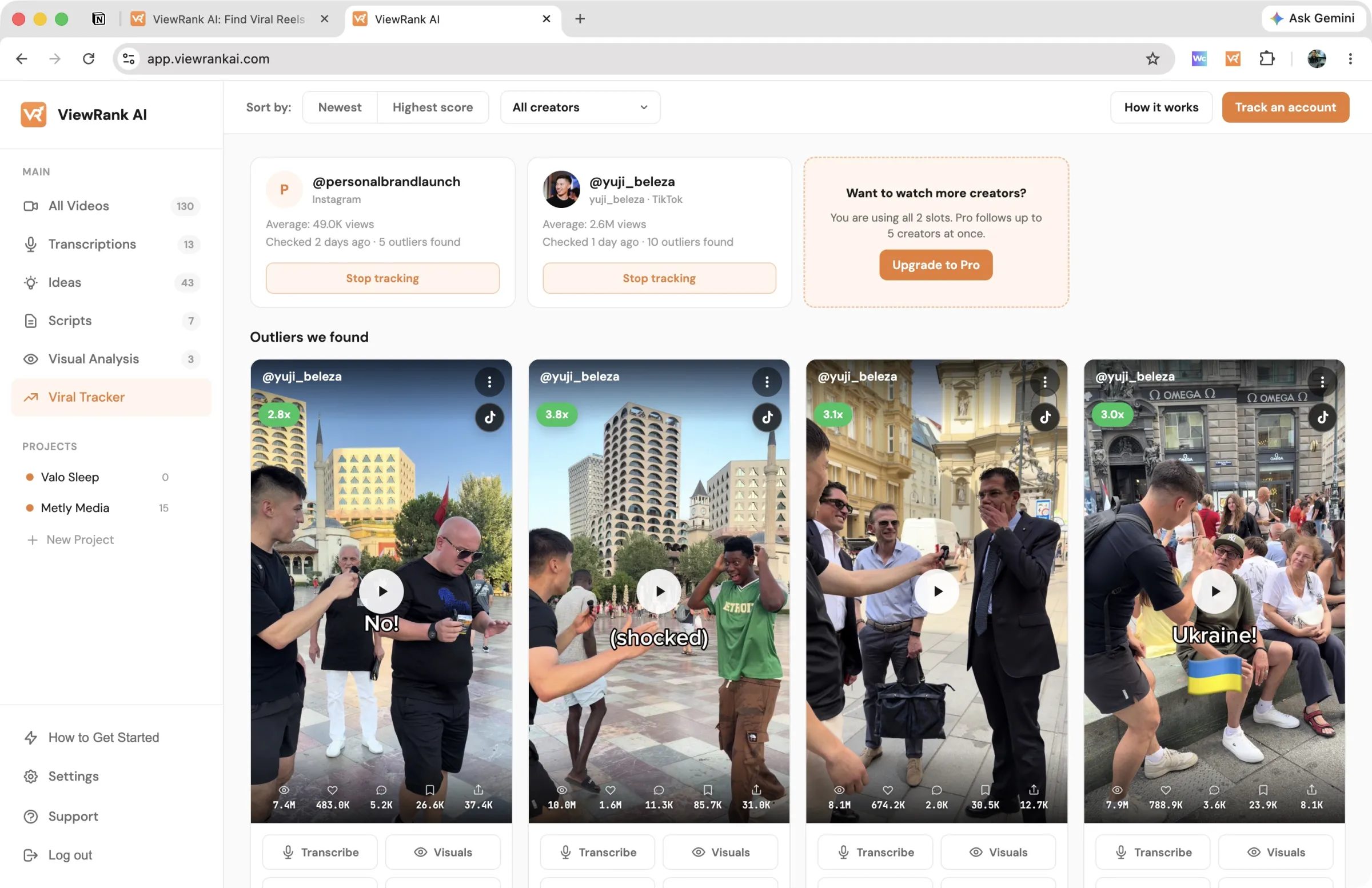
Each outlier in that feed carries Transcribe, Visuals and Scripts buttons, so a video can travel from detection to a draft script without opening TikTok. Tracking runs on the paid plans, with a 7-day free trial. Details on the tracked accounts page, and the full routine is in how to track Instagram and TikTok creators.
What to do with a creator's top videos
Watch the first two seconds of the top ten in a row, back to back, and you'll usually see the pattern before you've finished. Creators repeat their own openings far more than they realize, and the repeated opening on their best videos is the thing you're actually trying to learn. The long version of that read is how to break down a viral video scene by scene.
Pull transcripts next. The free TikTok transcript generator returns the spoken lines from any public video without an account, and a hook read as text is much easier to judge than a hook delivered well. How to transcribe a TikTok for free covers the details, including videos with no captions.
Then export the list and do it again on three or four more accounts in the same niche. A format that appears on one creator's best videos is that creator's habit. The same format on several accounts is a pattern in the niche, and that's the thing worth building a content calendar around. Instagram and TikTok competitor analysis covers running this across a list of accounts, how to find trending TikTok videos in your niche is the niche-wide version, and the Instagram version of this post covers the same job on Reels.
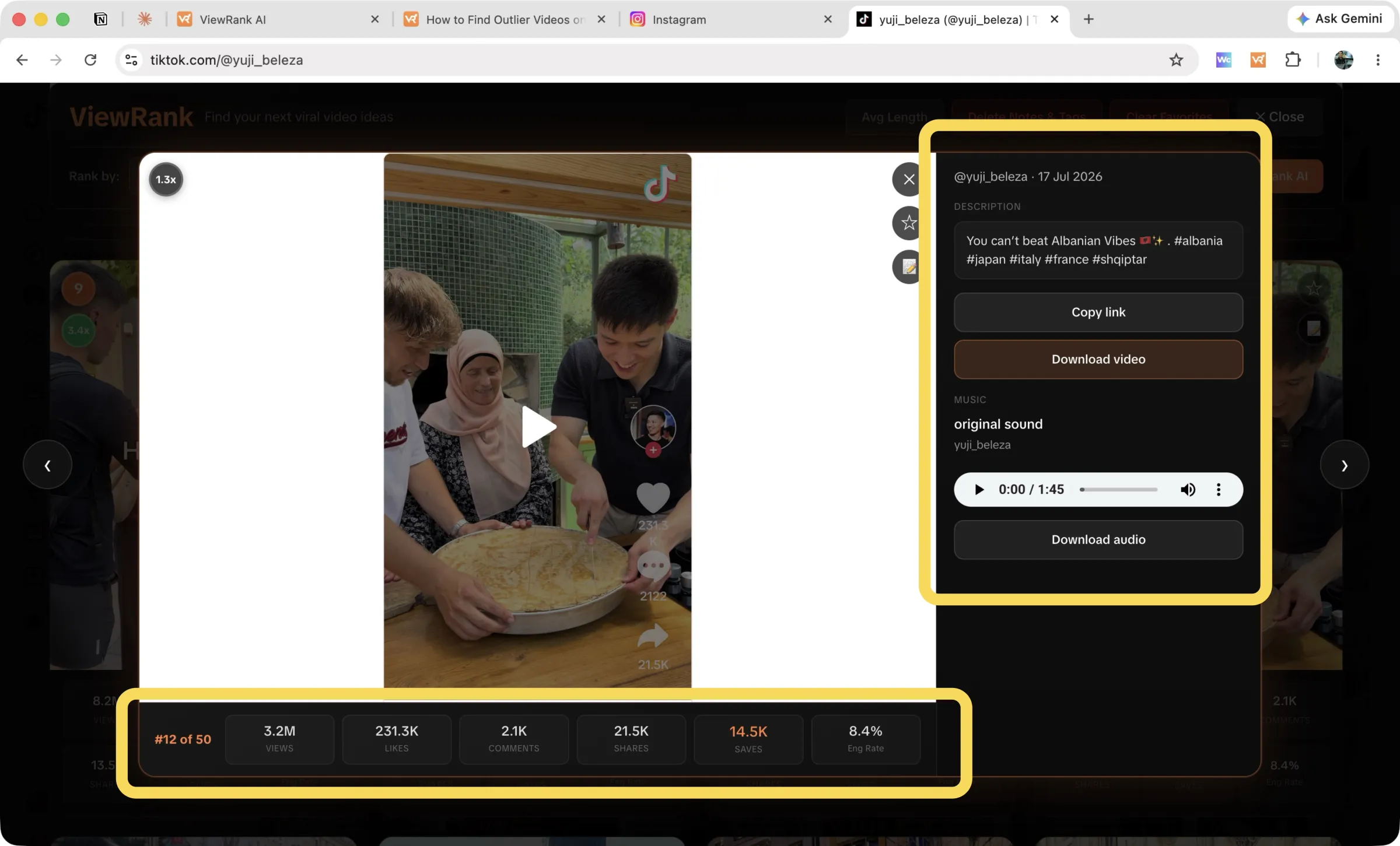
Downloads are available on any video in the overlay if you want the file itself, with Download video for the MP4 and Download audio for the sound alone, which is the faster way to check whether a trending sound is doing the work.
Want to know why those videos worked?
ViewRank AI transcribes winning videos, breaks down their visuals scene by scene, and turns the patterns into fresh ideas and scripts for your own niche. Free for 7 days. Cancel anytime.
Start your free trialFAQ
Can you sort TikTok videos by views?
Partly. TikTok profiles have a Popular order next to Latest and Oldest, which puts a creator's most successful videos first, but TikTok doesn't say whether it ranks by views, likes or both. To sort strictly by views, or by shares, saves or outlier score, use a browser extension that reads the counts on the profile and reorders them.
What does TikTok's Popular sort rank by?
TikTok hasn't published it. Some creators describe it as most viewed and others as most liked. Treat it as a quick list of a creator's hits, and check the actual numbers before you read anything into the order.
How do you find a TikTok creator's most viewed videos?
Switch their profile to Popular for a quick look, then either record the view counts into a spreadsheet and sort, or use a Chrome extension that collects and ranks the profile automatically. Both work on public accounts, since the view counts are already published on the thumbnails.
Does TikTok show shares and saves publicly?
Yes. TikTok publishes views, likes, comments, shares and saves on public videos, which is more than Instagram exposes. Shares indicate what people sent to someone else, and saves indicate what people wanted to keep for later.
Can you sort TikTok search results by views?
No, and it wouldn't tell you much if you could. Search returns videos from many different accounts, so ranking them together produces a list of large accounts rather than a list of good ideas. Performance comparisons only mean something within a single creator's profile.
What is the best sort for finding content ideas?
Outliers. Sorting by raw views mostly surfaces whatever a creator posted after they got popular, while outlier score surfaces the videos that beat that creator's own normal at the time they were published, including early videos from before the account grew.
Do TikTok analytics show other people's accounts?
No. TikTok's Creator Tools analytics cover your own account only. Any research on another creator has to work from the numbers published on their public profile.