How to See Someone Else's Instagram Analytics (What You Can and Can't See)
You can't open someone else's Instagram Insights, but most of it is public. Here's what you can and can't see, and how to analyze any account in a minute.
You can't see someone else's Instagram Insights. Reach, saves, watch time, profile visits and audience details are shown only to the account's owner, and no tool can open them for you. What you can see is every public number on the profile: followers, the views on each Reel, and the likes and comments on each post. Ranked and compared, those numbers answer most of what people want from "analytics," such as how well an account performs, what normal looks like for them, and which videos broke out.
Below is exactly what's public and what isn't, how to read the public numbers, and how to get all of it for any account in about a minute with the free ViewRank extension.
Can you see someone's Instagram Insights?
No. Insights belong to the account that owns them. Instagram shows them only to the owner and to apps the owner chooses to connect, and connecting your own account to a tool doesn't give you anyone else's.
That's worth knowing before you search for an "Instagram analytics viewer." For accounts they don't manage, outside tools get only the same public numbers you can see on the profile. So when a website claims to show another account's reach, impressions or audience breakdown, it's estimating those figures, not reading them.
What Instagram analytics are public?
More than most people expect. Here's the split.
| You can see on any public account | Only the owner can see |
|---|---|
| Follower and following counts | Reach and impressions |
| Number of posts | Saves |
| Views on Reels, unless the creator hid them | Watch time and average watch time |
| Likes on posts, unless the creator hid them | Profile visits and link taps |
| Comment counts and the comments themselves | Follower age, gender and location |
| The date each post went up | Follower growth over time |
| Captions, hashtags and the audio used | Where viewers came from |
Many Reels also show how often they've been shared, under the paper-plane icon. Creators can hide like and view counts on any post, and viewers can switch off like and share counts for themselves, so a missing number doesn't always mean zero.
Private accounts show far less. Without following them you see only the follower, following and post counts.
How do you turn public numbers into real analytics?
Compare each post with the account's own normal. A single view count tells you almost nothing, since 50,000 views is a great result for one account and a weak one for another. Four measures do most of the work.
Typical views. Take the median views across their last 30 to 50 Reels. Use the median, not the average, because a single viral Reel can double an average and make every other video look like a flop.
Views compared with followers. Divide typical views by the follower count. Small accounts tend to reach a bigger share of their followers than large ones. Socialinsider's 2025 Instagram benchmarks, built from brand accounts, put the Reels "view rate" at about 20% of followers for accounts under 5,000 followers, falling to about 4% for the largest accounts, over 100,000 followers (Socialinsider, data from 2023 and 2024). An account well above those numbers is getting its Reels in front of people who don't follow it yet.
Outliers. Divide each Reel's views by the typical views. Anything at 2x or more beat the account's normal by a wide margin. These are the videos to study, because each one is a topic or format that reached far beyond the account's own followers. More in how to find outlier videos on Instagram.
Posting rhythm. Count how many Reels went up in the last 30 days and on which days. Comparing that with the outliers tells you whether the account wins by volume or by a few strong ideas.
You can do all four by hand: note the views of 50 Reels in a spreadsheet, add a median, divide. It takes about an hour per account, which is why few people keep it up.
How do you see any Instagram account's analytics in a minute?
The free ViewRank Chrome extension does that hour of work on the page.
- Install the extension and open any public profile's Reels tab at
instagram.com/username/reels. - Click the ViewRank icon, keep Videos selected, pick how many recent Reels to collect, and click Rank Now.
- Click Avg Views at the top of the overlay. It shows the average, median, lowest and highest views across the account's 30 most recent Reels, which is the quickest answer to "what's normal for them?" Avg Length does the same for video length, based on their 10 most viewed Reels.
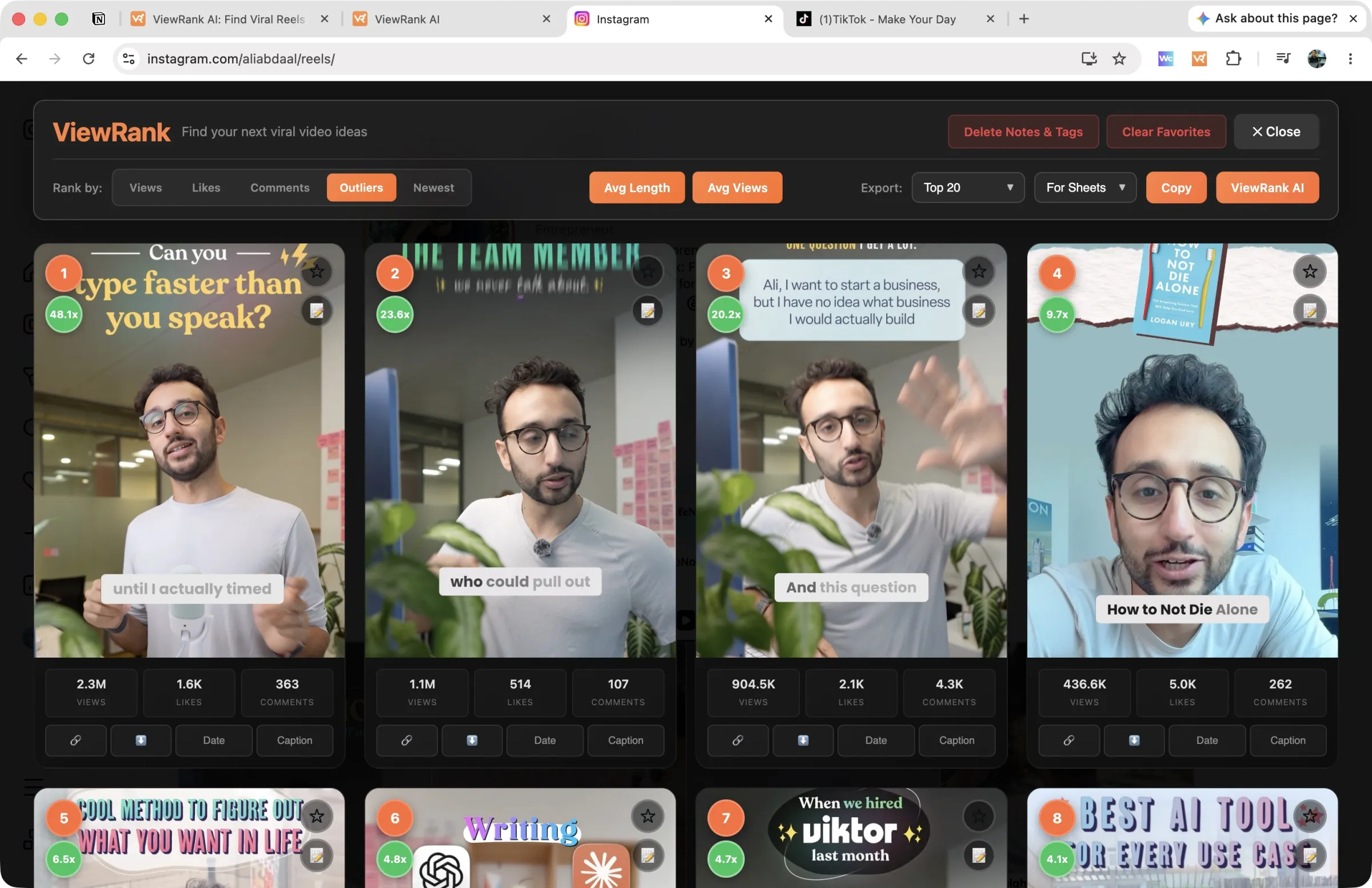
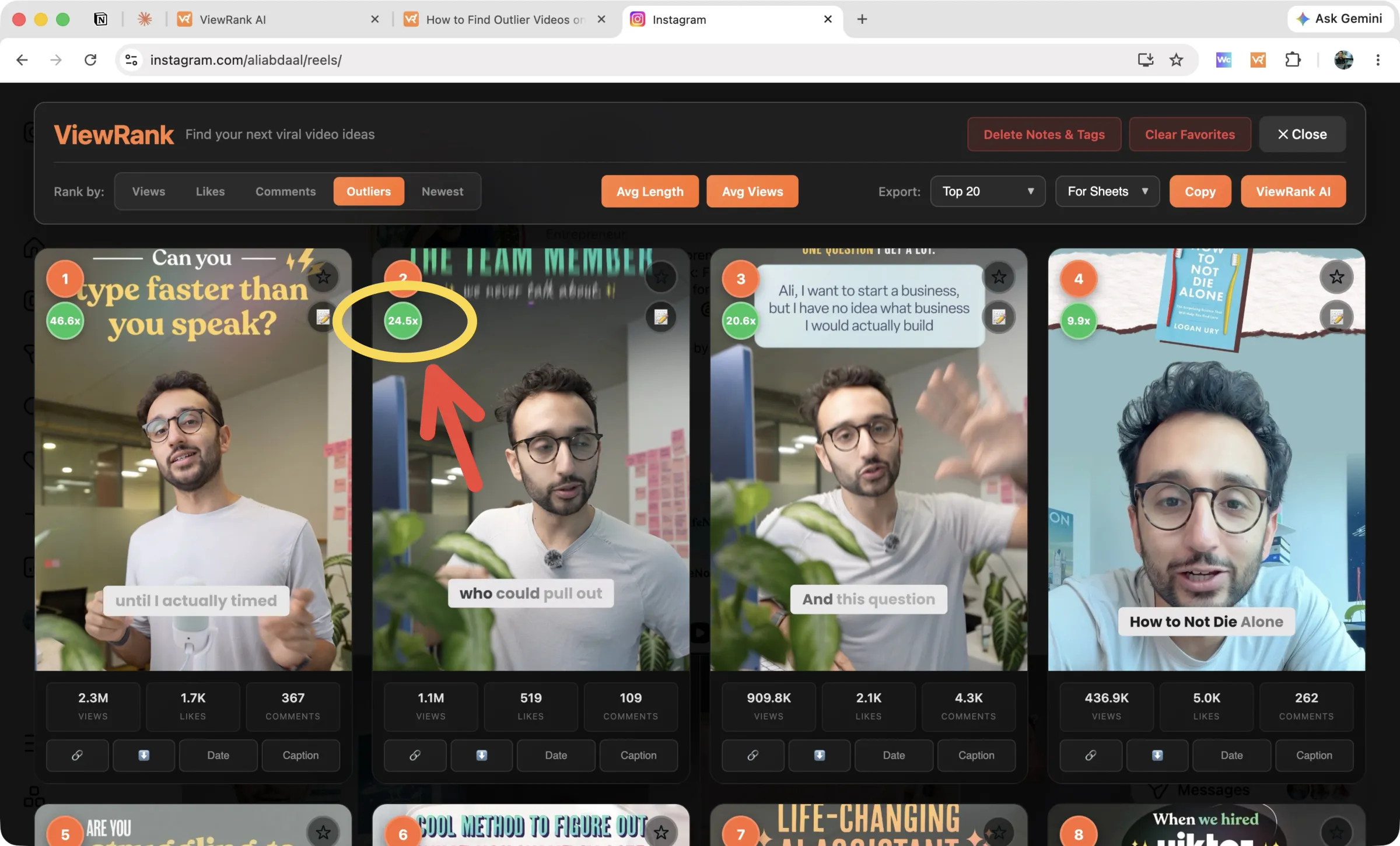
From there, every Reel is a card with its views, likes and comments. Switch the Rank by row between Views, Likes, Comments, Outliers and Newest. Outliers scores every Reel against the account's normal and puts a green badge on anything at 2x or more, so the breakout videos are at the top.
Photos and carousels have their own Posts mode on the main grid, ranked by likes or comments, since Instagram doesn't show views on them. How to see the most liked posts on any Instagram account covers it step by step.
To keep the numbers, use Export and choose For Sheets. Paste into Google Sheets and you have each Reel's link, views, likes, comments and outlier score in columns, ready for any calculation you want, such as engagement rate.
Sort any Instagram or TikTok profile in one click
The free ViewRank Chrome extension ranks any profile's videos by views, likes, comments, or outlier score, right on the page.
Add ViewRank to Chrome, it's freeHow do you calculate someone's Instagram engagement rate?
For Reels, add the likes and comments and divide by the views. For photos and carousels, which have no view count, divide likes plus comments by the follower count instead.
In a sheet built from the ViewRank export, the Reels version is =(D2+E2)/C2 with views in column C, likes in D and comments in E. Compare each Reel with the account's median rate rather than with an outside benchmark. A Reel with big views and low engagement was shown widely to people who didn't care much. Big views with engagement above the account's median is the combination worth learning from.
How do you follow an account's numbers over time?
Instagram shows only today's follower count, with no history, and ranking a profile once tells you how it's doing today. To follow an account over weeks, you can rank it again every week and keep the exports, or let the work be done for you.
The Viral Tracker in ViewRank AI watches the Instagram and TikTok accounts you choose. It works out each account's normal from its recent videos, checks again every few days, and flags any new video that reaches 2x that normal, with its views, likes and comments kept up to date as it climbs. Turn on the weekly email and the week's breakouts arrive on the day you pick.
That's the part of analytics that matters for your own content: not what an account did last year, but which of its videos is working right now. Each flagged video carries buttons to transcribe it, see it broken down scene by scene, and get video ideas for your niche built on the same format. How to track Instagram and TikTok creators covers the full routine, and Instagram competitor analysis shows how to run this across a list of accounts.
Want to know why those videos worked?
ViewRank AI transcribes winning videos, breaks down their visuals scene by scene, and turns the patterns into fresh ideas and scripts for your own niche. Free for 7 days. Cancel anytime.
Start your free trialFAQ
Can you see someone's Instagram insights?
No. Insights such as reach, saves, watch time and audience details are visible only to the account owner and the apps they connect. You can see the public numbers on their profile, including followers, each Reel's views and each post's likes and comments, and analyze those.
Can you see how many saves a post has on someone else's account?
No. Saves are private on Instagram and appear only in the owner's Insights. Comments and, on many Reels, shares are public, and both are reasonable signs of how much a post meant to people.
Is there a free tool to see another account's Instagram analytics?
Yes. The ViewRank Chrome extension is free and needs no account. It ranks any public profile's Reels by views, likes, comments or outlier score, works out the account's average and median views in one click, and exports the numbers for Google Sheets.
Can you see someone's follower growth on Instagram?
Not on Instagram itself, which shows only the current follower count. You can note it yourself each week, or use sites that record public follower counts over time.
Will someone know if you look at their Instagram analytics?
No. Viewing a profile, its posts and its Reels doesn't notify anyone, and neither does ranking it with an extension. Stories are the exception: the creator can see who viewed a Story.
Does this work on private Instagram accounts?
No. A private account hides its posts from everyone it hasn't accepted as a follower, and the ViewRank extension ranks public profiles only. Without access, all you can see is the follower, following and post counts.