How to See the Most Liked Posts on Any Instagram Account (4 Ways)
Instagram won't sort a profile by likes. Here are 4 ways to find any account's most liked photos, carousels and Reels, including a free one-click ranking.
Instagram has no way to sort someone's profile by likes. The grid stays in date order, and your own Insights only cover your own posts. To see the most liked posts on any public account, you have to collect the like counts yourself and sort them, either by hand or with a browser extension that reads the numbers already on the page.
There are four ways to do it below. The fastest is the free ViewRank Chrome extension, which ranks a profile's photos and carousels by likes or comments in a few seconds, with no account and no cap.
Can you sort someone's Instagram posts by likes?
Not inside Instagram. A profile shows its posts newest first, with pinned posts at the top, and there's no button to reorder them. That's true in the app and on the website.
The numbers are public, though. Every post on a public account shows its like count (unless the creator hid it) and its comment count. Instagram simply won't put them in order for you, so every method below is a different way of doing that sorting.
One thing to settle before you start: "post" means two different things on Instagram. Photos and carousels live in the main grid and are judged by likes and comments. Reels live in their own tab and also carry a view count. If you want the most liked content on an account, check both, because the answer is often a Reel.
Method 1: open the posts and count by hand
Free, needs nothing installed, and fine for a quick look.
- Open the profile at
instagram.com/username. - Open the first post, note its likes, and move to the next one with the arrow.
- Keep going for 30 to 50 posts, writing down the link and the like count each time.
It works, and it's slow, about 20 minutes for 50 posts. It also has a blind spot. Your eye goes to the biggest numbers, and on a growing account the biggest numbers are simply the most recent posts. A post from two years ago with 900 likes might have been a much bigger hit for that account at the time than a post from last week with 3,000.
Method 2: rank the posts in Google Sheets
A spreadsheet fixes that blind spot, because it lets you compare every post with the account's normal instead of with the biggest number on screen.
- Put each post's link in column A and its like count in column B.
- Sort by column B for the most liked list.
- Add a column that divides each post's likes by the median of the set,
=B2/MEDIAN($B$2:$B$51), and sort by that instead.
The third step is the useful one. A post at 3x the account's median likes beat that account's normal by a wide margin, whatever its raw number says. Use the median rather than the average, because the very posts you're trying to find raise the average. It's the same idea as the outlier score on Reels, explained in how to find outlier videos on Instagram.
The problem is time. An hour per profile is fine once, and nobody keeps it up across ten competitors.
Method 3: sort Instagram posts by likes with the free ViewRank extension
The free ViewRank Chrome extension does the counting and the sorting on the page itself. Its Posts mode collects a profile's photos and carousels and ranks them by likes in seconds, with no account needed.
- Install the extension and open the profile's main grid at
instagram.com/username. Not the Reels tab this time. - Click the ViewRank icon in your toolbar and switch the toggle to Posts.
- Pick how many recent posts to collect and click Rank Now.
An overlay opens over the profile with every collected post as a card, ranked by likes. Each card shows its rank badge, likes, comments, and a small stacked-slides icon with the slide count when the post is a carousel. Switch the sort to Comments or Newest and the order changes instantly, because nothing has to be collected again.
Click any card to open it full size. You can step through every slide of a carousel with the arrows or your keyboard, and the side panel shows the post type, the date, the stats and the full caption with a copy button. Copy Link and Open Post are there too, and the outer arrows move to the next ranked post without closing the view.
To keep the list, use the export menu. For Sheets copies the ranking with the post link, type, likes, comments, slide count, date and caption in their own columns, plus any notes and tags you added. Paste it into Google Sheets and add a column dividing each post's likes by the median, =F2/MEDIAN($F$2:$F$51), if you want each post measured against the account's normal. In this export, likes land in column F.
Star the posts worth keeping and they're saved as favorites for that creator, so the list is still there next time you open the profile.
Sort any Instagram or TikTok profile in one click
The free ViewRank Chrome extension ranks any profile's videos by views, likes, comments, or outlier score, right on the page.
Add ViewRank to Chrome, it's freeHow do you see someone's most liked Reels?
Use the same extension in Videos mode on the Reels tab.
- Open
instagram.com/username/reels. - Click the ViewRank icon, keep Videos selected, and click Rank Now.
- In the overlay, set Rank by to Likes.
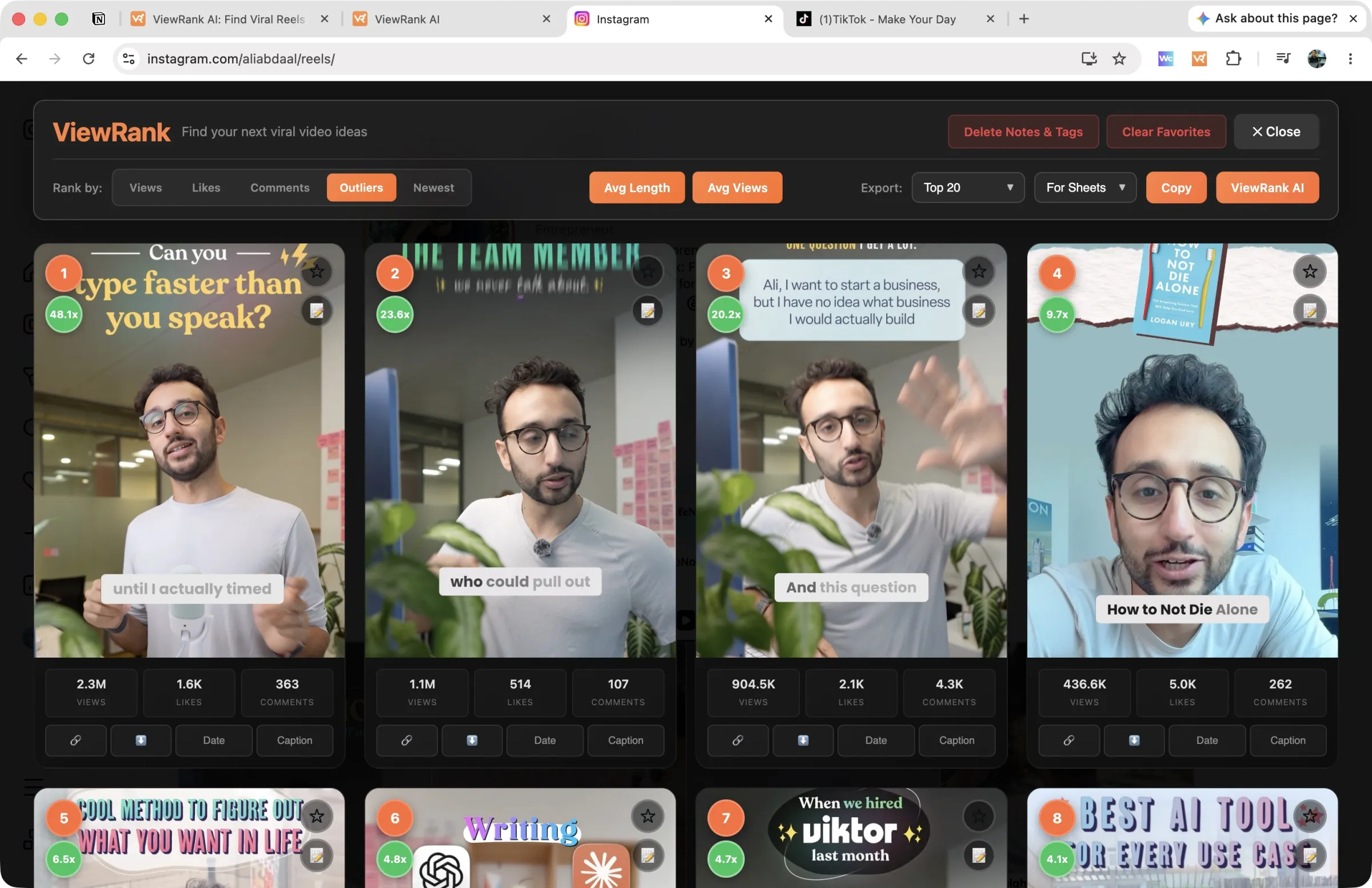
Reels also carry view counts, so this is where you get more than likes. Switch to Outliers and every Reel is scored against the account's own normal, with a green badge on anything at 2x or more. Likes tell you what people approved of. Outlier score tells you which ideas reached far beyond the account's usual audience, which is usually the better list for planning your own videos. The full walkthrough is in how to find the most viewed Reels on any Instagram account.
How do you see your own most liked posts?
Use Insights, if you have a professional account (creator or business, both free to switch to). In Insights, open Content you shared, then filter your posts by type, interactions and time period. Interactions count likes, comments, shares and saves together, and opening any post shows its own like count.
Insights only cover your own account. They won't show anything about a competitor, which is why the methods above exist.
Why do some posts show no like count?
Creators can hide the like count on any of their posts, using Instagram's Hide like and view counts on this post setting. When they do, you'll see "Liked by" a name "and others" instead of a number. Instagram shows a hidden count only to the creator, so a post with hidden likes may sit lower in any ranking than it deserves. Comments stay visible on those posts and are a fair stand-in.
If you can't see like counts on anybody's posts, check your own settings. Under Like and share counts, Instagram lets you hide the counts on other people's posts for yourself, and that setting affects every post you see.
Which method should you use?
| Method | Time per profile | Covers carousels | Compares posts with the account's normal |
|---|---|---|---|
| Open the posts and count | About 20 minutes for 50 posts | Yes | No |
| Google Sheets by hand | About an hour | Yes | Yes, with the median column |
| ViewRank extension, Posts mode | Under a minute | Yes, with slide counts | Yes, after export |
| ViewRank extension, Videos mode | Under a minute | Reels only | Yes, outlier score built in |
For one account you're curious about, count by hand. For competitors you'll check again next month, use the extension, because the hour per profile is what makes people give up.
Most liked or most commented: which list should you use?
Both, because they answer different questions.
Likes are cheap. People tap them while scrolling, so the most liked posts show you what a broad audience was happy to see: a striking photo, a relatable line, a big announcement.
Comments cost more effort. A post with an unusual number of comments for its likes asked something, started an argument, or gave people a reason to tag a friend. Carousels that end on a question often rank this way. If your goal is conversation, or you want ideas that pull people into the comments, the comments list is the more useful one.
Sort by likes first, then by comments, and look at the posts that appear near the top of both. Those are the ones that worked in every way.
What to do with the most liked posts you find
A ranked list is research material, not a plan. Three steps turn it into one.
First, look for the format behind the winners. Is it carousels with a bold first slide, single photos with a long story in the caption, or a series the account repeats? One post at the top is luck. The same format in four of the top ten is a pattern.
Second, check the dates. A format that won two years ago may not win now. Give most of your weight to posts from the last few months.
Third, check other accounts in your niche for the same pattern. When several accounts have the same kind of post near the top of their list, you've found something your shared audience reliably responds to. Instagram competitor analysis covers running this across a whole list of accounts, with a free template.
Then turn the pattern into video ideas. In ViewRank AI, the Ideas page takes a topic and writes four video ideas for your niche and audience, and if one of the winners is a Reel, you can import it, transcribe it, and get ideas built on the exact format that worked. That's the step that turns "this account's best posts" into "what you film this week."
Want to know why those videos worked?
ViewRank AI transcribes winning videos, breaks down their visuals scene by scene, and turns the patterns into fresh ideas and scripts for your own niche. Free for 7 days. Cancel anytime.
Start your free trialFAQ
Can you see the most liked posts on someone else's Instagram?
Yes, if the account is public. Like counts are shown on each post, so the information is already there. Instagram just doesn't sort a profile by likes, so you either note the counts yourself or use a browser extension like ViewRank that reads and ranks them.
How do you see someone's most popular post on Instagram?
"Most popular" usually means most liked, so rank their main grid by likes with ViewRank's Posts mode. Then check their Reels tab too, ranked by views or outlier score, because an account's most popular content is often a Reel rather than a photo or carousel.
Is there a free way to sort Instagram posts by likes?
Yes. The ViewRank Chrome extension is free and needs no account. Its Posts mode ranks a profile's photos and carousels by likes, comments or newest, and its Videos mode ranks Reels by views, likes, comments or outlier score.
Can you sort Instagram posts by likes on your phone?
Not for other people's accounts. The app has no sort option on profiles. For your own posts, Insights on a professional account can sort your content by likes. For anyone else, the ViewRank extension runs in Chrome on a computer.
Why can't I see likes on some Instagram posts?
The creator hid them. Instagram lets creators hide like counts on individual posts, and lets viewers hide like and share counts on everyone else's posts. If counts are missing on every account you visit, the viewer setting on your own account is the likely cause.
How do you find the most liked carousel on an Instagram account?
Rank the profile's main grid in ViewRank's Posts mode. Carousels show a stacked-slides icon with their slide count, so you can see at a glance which of the top posts are carousels, and open any of them to step through the slides.
Does Instagram show view counts on photo posts?
No. View counts appear on Reels and videos. Photos and carousels show likes and comments, which is why posts are ranked by those two numbers.