How to See When an Instagram Reel Was Posted (Exact Date and Time)
Instagram shows "3 days ago" instead of a date. Here's how to see the exact date and time any Reel was posted, and check a whole profile at once.
To see exactly when an Instagram Reel was posted, open it on a computer and hold your mouse over the time next to the creator's name. Instagram shows the full date in a small label. The exact time is in the page too, one right-click away. We checked the date and time steps below on a public Reel in October 2026.
Instagram makes this harder than it should be. Recent Reels show a relative time such as "23h" or "3 days ago," older ones show only the date, and nowhere does Instagram print the time of day. If you're checking whether a viral Reel is fresh, or when a competitor posts, that's not enough.
How do you see the date an Instagram Reel was posted?
On a computer, it takes a few seconds.
- Open the Reel at
instagram.com/reel/...in your browser. Any public Reel works. - Find the time next to the creator's name above the caption. It reads something like "23h" or "5d."
- Hold your mouse over it. A label appears with the full date, for example "Oct 13, 2026."
The same time appears a second time under the like count, as "23 hours ago" or a date, and holding your mouse over that one shows the same label.
On your phone, Instagram shows the same relative time with the caption. For a date older than a few days you'll usually see the day and month. For anything more precise, send yourself the link and open it on a computer.
How do you see the exact time a Reel was posted?
Instagram never prints the time of day, but the website stores it in the page. Here's how to read it in Chrome, Edge or Firefox.
- Open the Reel in your browser on a computer.
- Right-click the time next to the creator's name and choose Inspect.
- A panel opens with the page code, and the line that's highlighted contains a value called
datetime. It looks like2026-10-13T15:59:43.000Z.
That value is the exact moment the Reel was posted, down to the second. The date comes first, the time follows the T, and the Z at the end means it's in UTC, the world's standard time. Convert it to your own time zone to read it. In the example above, 15:59 UTC was 11:59 in the morning in New York and 9:59 in the evening in Dhaka.
Close the panel when you're done. Looking at the page code changes nothing on the page or on the account.
How do you check the dates of many Reels at once?
Opening Reels one by one is fine for one video. It's slow when you're studying a whole profile, which is usually why the date matters in the first place: you've found a creator's best Reels and you want to know which of them are recent enough to act on.
The free ViewRank Chrome extension can show the posted date of every Reel on a ranked profile.
- Install the extension and open a public profile's Reels tab at
instagram.com/username/reels. - Click the ViewRank icon, keep Videos selected, and click Rank Now.
- On any Reel card, click the Date button under the numbers. The button changes to the date the Reel was posted, for example "Oct 12," or "Dec 12, 2023" for older Reels.
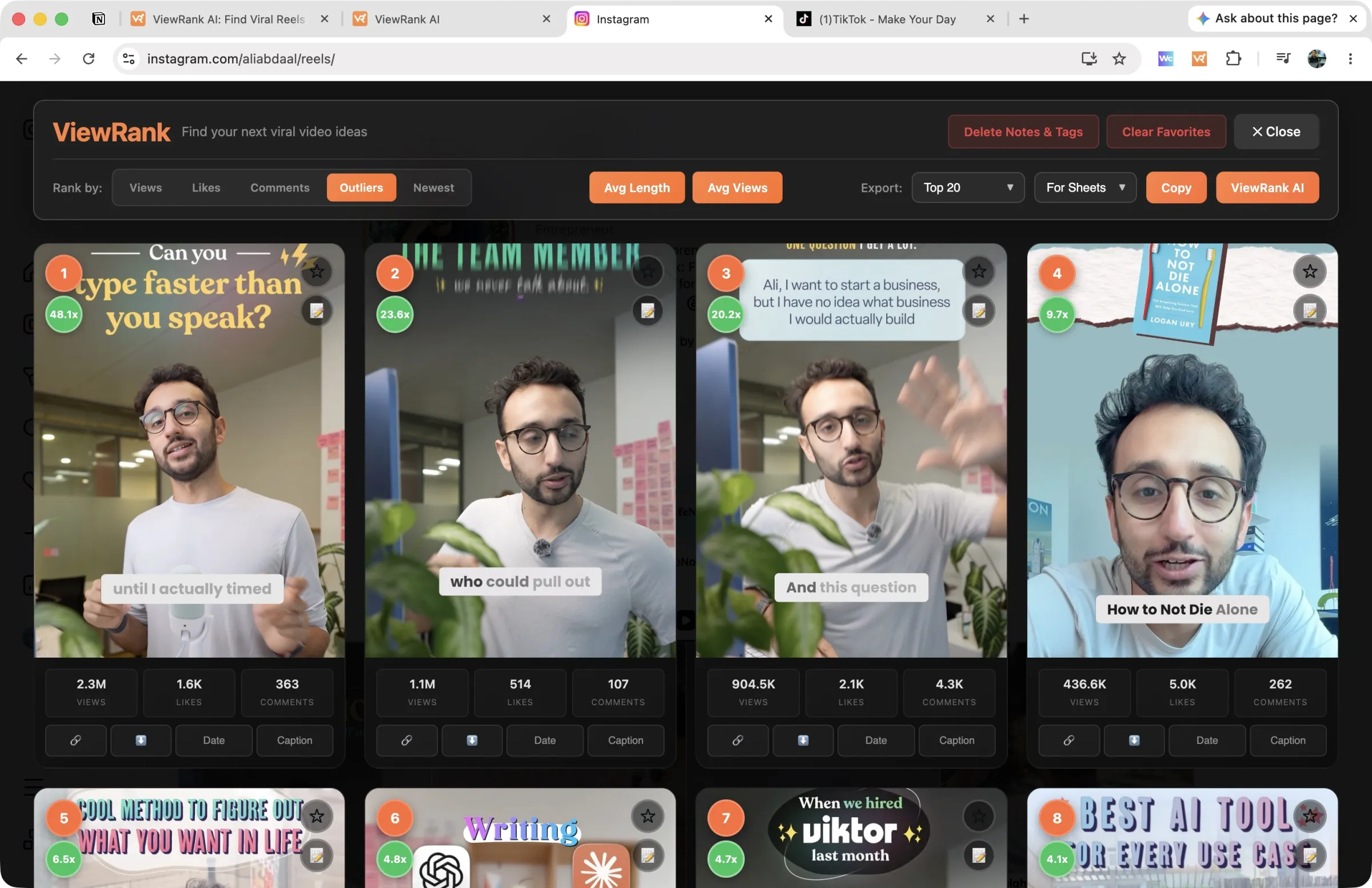
You can also sort the whole profile by Newest to see the most recent Reels first, or by Outliers to see which Reels beat the creator's normal and then check the date on the top few. That second order is the useful one for research, because it tells you whether a breakout format is still working this month or peaked a year ago.
On photos and carousels, the extension's Posts mode shows each post's date in its detail view and includes a date column in the spreadsheet export. On TikTok, the export has a Date posted column for every ranked video. More on ranking photos and carousels is in how to see the most liked posts on any Instagram account.
Sort any Instagram or TikTok profile in one click
The free ViewRank Chrome extension ranks any profile's videos by views, likes, comments, or outlier score, right on the page.
Add ViewRank to Chrome, it's freeWhy does the posted date matter so much?
Because a viral Reel is only useful to you while its format is still working.
Formats on Instagram wear out. A structure that pulled ten times a creator's usual views in the spring can be everywhere by summer and ignored by autumn. Before you rebuild a Reel you found, check two things: when it was posted, and whether other creators in your niche have had a hit with the same format since. A breakout from the last 30 days, repeated on two or three other accounts, is worth making this week. A breakout from last year with nothing since is history.
The date also tells you how to read the views. A Reel with 80,000 views after two days is moving fast. The same 80,000 after a year is a slow burner. How to find viral Reels in your niche covers how to weigh the two.
Can you see what time a competitor usually posts?
Yes, with a little patience. Read the exact time on their last 10 to 15 Reels using the method above, convert them to your time zone, and look for a pattern. Many creators post within the same two or three hour window, often on the same days each week.
Don't copy it blindly, though. Their audience may live in another time zone, and posting time matters far less than the idea and the first two seconds of the video. Use it to understand their routine, not to set yours.
How do you know when a competitor's Reel goes viral?
You can check their profile every few days, or you can have it done for you.
The Viral Tracker in ViewRank AI watches the Instagram and TikTok creators you choose, works out each one's normal views, and flags any new video that reaches at least twice that number. It waits until a video is two days old before judging it, so the numbers have time to settle, and each find shows how far its views have climbed since it was spotted. Turn on the weekly email and the week's breakouts arrive in your inbox, early in the morning in your time zone, on the day you pick.
Each breakout carries Transcribe, Visuals and Scripts buttons, so you can transcribe it, see it broken down scene by scene, and get video ideas for your own niche built on the same format, while the format is still fresh. The full routine is in how to track Instagram and TikTok creators.
Want to know why those videos worked?
ViewRank AI transcribes winning videos, breaks down their visuals scene by scene, and turns the patterns into fresh ideas and scripts for your own niche. Free for 7 days. Cancel anytime.
Start your free trialFAQ
Can you see the exact time an Instagram post was made?
Yes, on a computer. Open the post, right-click the time next to the creator's name, choose Inspect, and read the datetime value in the highlighted line. It shows the date and the time to the second, in UTC.
How do you see when an Instagram photo or carousel was posted?
The same way as a Reel. Open the post on a computer, hold your mouse over the time next to the creator's name for the full date, or right-click it and choose Inspect for the exact time. The steps work on every type of post.
Why does Instagram show "3 days ago" instead of a date?
Instagram uses relative times for recent posts and switches to a date for older ones. Holding your mouse over the time on the website shows the full date for any post, recent or not.
Can you see when a Reel was posted on your phone?
You can see the relative time or the date with the caption, but not the time of day. Open the Reel's link on a computer to see the full date and the exact time.
Does the date change if a Reel is edited?
No. Editing a caption doesn't change the posted date. The date you see is when the Reel was first published.
How do you see when a TikTok was posted?
The date appears next to the creator's name on the video page. To get the dates of a whole profile at once, rank it with the ViewRank extension and export it: the spreadsheet includes a Date posted column for every video.
Can you sort an Instagram profile by date?
The profile is already in date order, newest first, with pinned posts at the top. To see the oldest posts first or to combine dates with view counts, rank the profile with the ViewRank extension and sort by Newest, Views or Outliers.